
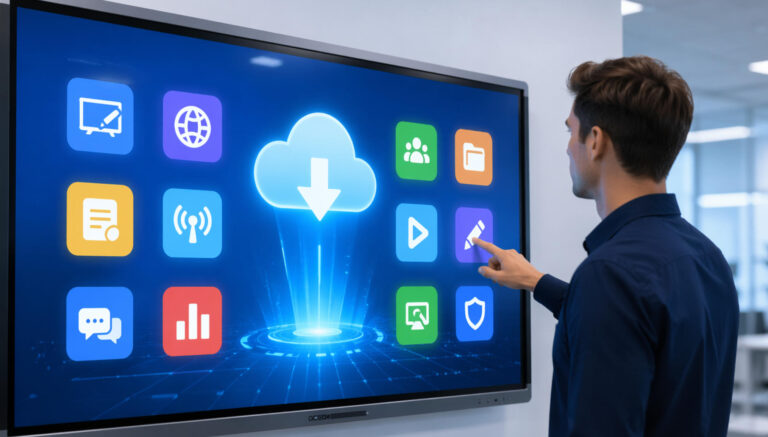
Banyak pengguna pertama kali tampilan interaktif sering merasa bingung saat mencoba mengunduh aplikasi penting seperti alat pendidikan, perangkat lunak papan tulis digital, atau aplikasi kolaborasiFaktanya, kami telah menerima banyak pertanyaan serupa dari klien yang tidak yakin di mana menemukan perangkat lunak yang andal dan kompatibel untuk perangkat mereka.
Tantangannya bukan hanya menemukan aplikasi, tetapi memilih platform yang tepat yang memastikan keamanan, stabilitas, dan kompatibilitas sentuh penuhDalam artikel ini, kami akan membagikan beberapa tempat terpercaya untuk mengunduh perangkat lunak tampilan interaktif, beserta kiat praktis untuk membantu Anda menghindari kesalahan umum dan mendapatkan kinerja terbaik dari perangkat Anda.
Platform Resmi Produsen (Direkomendasikan Pertama)
Tempat paling terpercaya untuk mengunduh perangkat lunak tampilan interaktif adalah dari platform resmi produsen. Banyak merek tampilan interaktif menyediakan sendiri pusat unduhan aplikasi, di mana pengguna dapat mengakses perangkat lunak yang dikembangkan khusus untuk perangkat mereka. Misalnya, Ikinor menawarkan pusat unduhan aplikasi khusus, memungkinkan pengguna untuk dengan mudah menemukan alat yang kompatibel untuk tampilan interaktif mereka.
Platform-platform ini biasanya mencakup berbagai aplikasi penting, seperti: Perangkat lunak papan tulis bawaan, alat berbagi layar, aplikasi kolaborasi, dan pembaruan firmware.Karena aplikasi-aplikasi ini dirancang dan diuji oleh pabrikan, maka aplikasi tersebut dioptimalkan untuk perangkat keras, sehingga memastikan respons sentuhan yang lancar dan stabilitas sistem.
Salah satu keuntungan terbesar menggunakan sumber resmi adalah kesesuaianBerbeda dengan aplikasi pihak ketiga, perangkat lunak yang disediakan oleh produsen dirancang untuk bekerja secara mulus dengan sistem operasi perangkat (Android atau Windows) dan fungsi sentuh. Hal ini mengurangi risiko masalah seperti lag, respons sentuh yang tidak akurat, atau kerusakan sistem.
Selain itu, platform resmi menyediakan Pembaruan berkala dan dukungan jangka panjangArtinya, pengguna dapat memperoleh manfaat dari peningkatan kinerja, fitur baru, dan peningkatan keamanan seiring waktu.
Secara keseluruhan, mengunduh perangkat lunak langsung dari produsen adalah cara teraman dan paling efisien untuk memastikan layar interaktif Anda beroperasi dengan potensi penuhnya.
Toko Aplikasi & Ekosistem OS (Windows / Android)
Cara andal lainnya untuk mengunduh perangkat lunak tampilan interaktif adalah melalui toko aplikasi resmi dan ekosistem sistem operasi, seperti Microsoft Store, Google Play Store, dan Apple App StorePlatform-platform ini menyediakan beragam aplikasi yang dapat meningkatkan fungsionalitas tampilan interaktif.
Alat-alat umum yang tersedia di platform ini meliputi: aplikasi papan tulis digital, perangkat lunak berbagi layar, alat anotasi, dan aplikasi kolaborasi.Opsi populer seperti Microsoft Whiteboard, Zoom, dan berbagai aplikasi casting dapat dengan mudah diinstal dan digunakan untuk keperluan bisnis maupun pendidikan. Aplikasi-aplikasi ini umumnya dioptimalkan untuk interaksi sentuh, sehingga cocok untuk lingkungan tampilan interaktif.
Metode ini sangat cocok untuk perangkat yang ditenagai oleh Komputer OPS (sistem Windows), Android box, atau pengaturan hibridaKarena sistem ini beroperasi mirip dengan komputer atau tablet standar, mengakses toko aplikasi sangat mudah dan ramah pengguna.
Meskipun beberapa aplikasi di platform ini mungkin memerlukan langganan berbayar atau pembelian sekali bayar, mereka menawarkan keunggulan utama: keamanan dan keandalanAplikasi yang terdaftar di toko resmi melalui proses peninjauan yang ketat, mengurangi risiko malware, masalah kompatibilitas, atau kinerja yang tidak stabil.
Secara keseluruhan, menggunakan toko aplikasi resmi adalah salah satu cara teraman untuk memperluas kemampuan layar interaktif Anda sekaligus memastikan pengalaman pengguna yang lancar dan aman.
Platform Perangkat Lunak Kolaborasi Profesional
Kategori penting lainnya adalah platform perangkat lunak kolaborasi profesional, yang sangat penting untuk memaksimalkan nilai tampilan interaktif baik di lingkungan bisnis maupun pendidikan. Alat-alat populer seperti Zoom, Microsoft Teams, Google Meet, dan Miro banyak digunakan di seluruh dunia dan sepenuhnya kompatibel dengan sebagian besar sistem tampilan interaktif.
Platform-platform ini dirancang untuk mendukung kolaborasi waktu nyata, memungkinkan banyak pengguna untuk berinteraksi secara bersamaan. Misalnya, selama rapat atau kelas daring, peserta dapat berbagi layar, memberi anotasi pada konten, dan berkomunikasi dengan lancar. Alat seperti Zoom memungkinkan konferensi video yang lancar dikombinasikan dengan berbagi layar, sementara Papan Miro menyediakan papan tulis digital yang andal untuk bertukar pikiran, mengajar, dan kolaborasi visual.
Dalam penggunaan praktis, alat-alat ini hampir menjadi Penting untuk rapat dan ruang kelas modern.Sebagai contoh, Zoom umumnya digunakan untuk pengajaran jarak jauh dan rapat perusahaan, sementara Miro banyak diadopsi untuk lokakarya interaktif, diskusi kelompok, dan sesi kreatif. Ketika dikombinasikan dengan layar interaktif, pengguna dapat menulis langsung di layar, menyoroti poin-poin penting, dan terlibat lebih aktif.
Keunggulan utama lainnya adalah mereka kemampuan integrasi cloudyang memungkinkan pengguna untuk mengakses file, menyimpan sesi, dan berkolaborasi dari mana saja. Hal ini menjadikannya ideal untuk lingkungan kerja dan pembelajaran hibrida.
Secara keseluruhan, perangkat lunak kolaborasi profesional secara signifikan meningkatkan interaktivitas, membuat tampilan interaktif menjadi lebih canggih dan serbaguna.
Situs Web Perangkat Lunak Sumber Terbuka & Pihak Ketiga
Sumber berharga lainnya untuk perangkat lunak tampilan interaktif adalah platform sumber terbuka dan pihak ketiga, seperti GitHub, SourceForge, dan repositori perangkat lunak tepercaya lainnya. Platform-platform ini menampung berbagai macam aplikasi, mulai dari alat papan tulis sederhana hingga sistem kolaborasi yang sangat disesuaikan, menawarkan pengguna kebebasan yang lebih besar dibandingkan dengan solusi resmi atau solusi dari toko aplikasi.
Salah satu keunggulan utama perangkat lunak sumber terbuka adalah sifatnya yang... fleksibilitas dan kustomisasiPengembang dan pengguna tingkat lanjut dapat memodifikasi kode sumber agar lebih sesuai dengan kebutuhan spesifik, seperti mengintegrasikan dengan sistem internal, menambahkan fitur unik, atau mengoptimalkan kinerja untuk pengaturan perangkat keras tertentu. Hal ini membuatnya sangat berguna bagi organisasi dengan persyaratan proyek khusus atau alur kerja yang unik.
Selain itu, banyak alat pihak ketiga menyediakan fungsionalitas khusus yang mungkin tidak tersedia di aplikasi utama. Misalnya, beberapa perangkat lunak berfokus pada anotasi tingkat lanjut, sinkronisasi multi-layar, atau alat pendidikan khusus yang dirancang untuk tampilan interaktif.
Namun, pendekatan ini secara umum lebih cocok untuk pengguna tingkat lanjut atau tim TIBerbeda dengan platform resmi, perangkat lunak sumber terbuka mungkin memerlukan instalasi, konfigurasi, dan pemeliharaan berkelanjutan secara manual. Pengujian kompatibilitas juga penting untuk memastikan kinerja sentuh yang lancar dan stabilitas sistem.
Secara keseluruhan, platform sumber terbuka dan pihak ketiga menawarkan opsi yang ampuh dan fleksibel, menjadikannya pilihan yang sangat baik bagi pengguna yang membutuhkan solusi khusus yang melampaui aplikasi standar.
Tampilan Interaktif Tips Mengunduh Perangkat Lunak
Saat mengunduh perangkat lunak untuk layar interaktif, mengikuti praktik terbaik sangat penting untuk memastikan keberhasilannya. keamanan, stabilitas, dan kinerja jangka panjang.
Pertama, selalu unduh perangkat lunak dari sumber resmi atau tepercayaHal ini membantu Anda menghindari malware, iklan tersembunyi, atau versi yang tidak stabil yang dapat membahayakan sistem Anda atau membahayakan data. Unduhan yang tidak terverifikasi dapat menyebabkan risiko keamanan yang serius, terutama di lingkungan bisnis atau pendidikan.
Kedua, pastikan untuk periksa kompatibilitas sistemLayar interaktif dapat berjalan di berbagai platform seperti Windows (OPS PC), Android, atau sistem hibridaOleh karena itu, penting untuk memastikan bahwa perangkat lunak tersebut mendukung pengaturan spesifik Anda. Menginstal perangkat lunak yang tidak kompatibel dapat mengakibatkan kerusakan atau fungsionalitas terbatas.
Poin penting lainnya adalah verifikasi dukungan sentuh dan optimasiTidak semua aplikasi dirancang untuk perangkat layar sentuh besar. Bahkan jika perangkat lunak berjalan dengan baik, mungkin tidak merespons dengan baik terhadap gerakan sentuh, yang dapat memengaruhi kegunaan dan pengalaman pengguna.
Anda juga harus memperhatikan pembaruan, perizinan, dan dukungan jangka panjangPembaruan berkala memastikan kinerja yang lebih baik, fitur baru, dan peningkatan keamanan. Selain itu, memahami apakah perangkat lunak tersebut gratis, berbasis langganan, atau memerlukan lisensi membantu menghindari biaya tak terduga.
Akhirnya, selalu uji kinerja perangkat lunak sebelum penerapan skala besarHal ini memungkinkan Anda untuk mengidentifikasi potensi masalah sejak dini dan memastikan solusi tersebut memenuhi harapan Anda sebelum menerapkannya di berbagai perangkat.




 Indonesian
  English
  Spanish
  Arabic
  French
  German
  Portuguese
  Russian
  Vietnamese
  Thai
Thai  Italian