
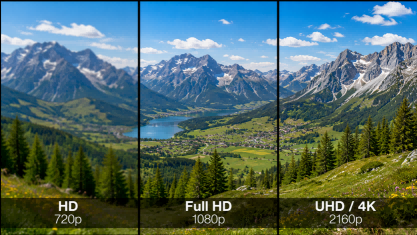
Many buyers compare HD vs UHD only by pixel numbers, but commercial display projects are not that simple. A 4K screen may look sharper for an interactive display, meeting room screen or close-range digital signage, while a 1080P display may still be practical for a large advertising screen viewed from a distance. The real question is not “Which resolution is better?” but “Which resolution fits the screen size, viewing distance, content type and business purpose?” This guide explains the difference between HD, Full HD, UHD and 4K, then shows how to choose the right resolution for commercial displays, advertising screens and interactive display projects.
What Do HD, Full HD, UHD and 4K Mean?
Before comparing HD vs UHD, it is important to understand what these resolution terms actually mean. In display technology, resolution refers to the number of pixels a screen can show. Pixels are the tiny dots that form images, text, videos and interface elements on a display. For example, a resolution of 1920 × 1080 means the screen has 1,920 pixels across the width and 1,080 pixels down the height.
HD, or High Definition, is often used as a general term, but technically it usually refers to 1280 × 720 pixels, also called 720P. It offers better clarity than older standard-definition screens, but it is not the same as Full HD.
Full HD, also known as 1080P, has a resolution of 1920 × 1080 pixels. This is still widely used in commercial displays, digital signage and advertising screens because it provides clear visuals for many standard applications, especially when the screen is viewed from a reasonable distance.
UHD, or Ultra High Definition, usually refers to 3840 × 2160 pixels in commercial and consumer display markets. This is commonly called 4K UHD. Compared with Full HD, UHD has four times the total pixel count, which allows it to show finer details, sharper text and smoother image edges.
The terms 4K and UHD are often used together, but they are not always technically identical. In most commercial display product descriptions, however, 4K UHD usually means 3840 × 2160 resolution. For buyers comparing 4K vs 1080P, this means comparing a UHD display with a Full HD display.
| Term | Common Resolution | Common Name | Basic Meaning |
|---|---|---|---|
| HD | 1280 × 720 | 720P | Entry-level high-definition resolution |
| Full HD | 1920 × 1080 | 1080P | Common resolution for many displays |
| UHD | 3840 × 2160 | 4K UHD | Higher-resolution display with more detail |
| 4K | Usually 3840 × 2160 in commercial displays | 4K UHD | Often used interchangeably with UHD |
For commercial display buyers, the key point is simple: HD, Full HD, UHD and 4K are not the same thing. They represent different pixel levels, and those pixel levels affect how clearly a screen can show text, images and video content. However, resolution alone does not decide whether a display is the right choice. The next step is to compare how HD and UHD perform in real commercial display projects.
HD vs UHD: Key Differences Buyers Should Understand
After understanding the basic terms, the next step is to compare HD vs UHD from a buyer’s point of view. The difference is not only about resolution numbers. It also affects image clarity, content preparation, hardware cost and where the display should be used.
In most commercial display projects, the practical comparison is often UHD vs Full HD, or 4K vs 1080P. UHD usually refers to 3840 × 2160, while Full HD refers to 1920 × 1080. This means UHD has far more pixels than Full HD, allowing the screen to show finer image details, smoother edges and clearer text.
For close-viewing applications, this difference can be important. A meeting room display, interactive whiteboard, wayfinding kiosk or menu board may show small text, tables, maps, icons, handwriting or detailed product images. In these cases, UHD can make the content look cleaner and more professional.
However, UHD is not always the better choice for every project. Full HD is still useful for many commercial display applications, especially when the screen is viewed from a distance, the content is simple, or the project needs to control cost. For example, a large advertising screen mounted high on a wall may not always need UHD if viewers are far away and the content mainly uses large images, short messages and bold text.
| Comparison Factor | HD / Full HD | UHD / 4K UHD |
|---|---|---|
| Resolution | Commonly 1280 × 720 or 1920 × 1080 | Commonly 3840 × 2160 |
| Pixel Count | Lower pixel count, suitable for basic display needs | Higher pixel count, better for detailed visuals |
| Visual Detail | Works for simple images, videos and large text | Better for sharp text, maps, product images and interface details |
| Best For | Basic signage, distant-viewing advertising screens, budget-sensitive projects | Interactive displays, meeting screens, premium retail, menus and close-viewing screens |
| Content Requirement | Standard HD or Full HD content is usually enough | Works best with high-quality images, 4K video or detailed UI design |
| Cost Consideration | Usually more budget-friendly | Usually higher cost and may require better playback support |
The key point is that UHD gives buyers more visual detail, but that detail only matters when viewers can actually see it and when the content is good enough to use it. If a screen only plays low-resolution videos or simple slides, UHD may not show its full advantage.
So, UHD is not automatically better than Full HD in every situation. A better rule is: choose UHD when detail, close viewing and premium presentation matter; choose Full HD when distance, simple content and budget efficiency matter more.
Why Viewing Distance Changes the Value of UHD Resolution
A higher resolution does not always create a visible difference. In commercial display projects, the value of UHD depends on whether viewers are close enough to notice finer visual details. If people stand near the screen, small text, icons, image edges and interface elements become easier to compare. If they view the display from far away, the extra detail may be much less noticeable.
This happens because viewing distance changes how much detail the human eye can perceive. At close range, viewers may notice whether text edges look smooth, whether maps are easy to read, or whether presentation content feels sharp. At longer distances, the same level of detail becomes harder to distinguish, especially when the content uses large images, bold titles or simple messages.
Screen size also affects this perception. When the same number of pixels is spread across a larger display, each pixel occupies more physical space. This lowers pixel density, often described as PPI, or pixels per inch. A screen that looks sharp at one size may look softer when stretched to a much larger size, especially if viewers stand close to it.
| Viewing Situation | Typical Example | What Viewers Notice | Practical Direction |
|---|---|---|---|
| Close-range viewing | Interactive screen, wayfinding kiosk, meeting room display | Text, icons, maps, handwriting and detailed UI elements | UHD is often more valuable |
| Mid-range viewing | Menu board, retail display, lobby screen | Readability, layout clarity and product visuals | Full HD or UHD may both work |
| Long-distance viewing | High-mounted advertising screen, large public display | Large images, short messages and overall visibility | Full HD may be enough |
For buyers, the key question is simple: will viewers be close enough to see the difference? If the display is used for interaction, reading, navigation or detailed presentation, UHD can add real value. If the screen is mainly used for distant advertising with large visuals and short messages, the extra detail may not strongly affect the viewer’s experience.
In short, viewing distance changes how valuable UHD really is. The closer the viewer is to the screen, the more important fine detail becomes. The farther the viewer is, the more practical it becomes to focus on clear layout, readable content and appropriate screen placement.
Best Resolution by Application: Commercial Displays, Advertising Screens and Interactive Displays
Different commercial display projects do not need the same resolution. A screen used for short advertising messages in a large public space has very different visual requirements from a screen used for maps, classroom writing or meeting presentations. That is why digital signage resolution should be matched with the application, not selected only by the highest specification.
The table below gives a quick reference for common commercial display scenarios.
| Application | Typical Viewing Situation | Content Type | Recommended Resolution | Reason |
|---|---|---|---|---|
| Large advertising screens | Viewed from a longer distance | Large images, short slogans, simple promotional videos | Full HD may be enough | Viewers usually focus on the overall message rather than small details. |
| Outdoor advertising screens | Viewed from streets, entrances or open public areas | Brand ads, event notices, store promotions | Full HD or UHD, depending on distance and size | Resolution matters, but layout visibility and readable content are also important. |
| Retail digital signage | Viewed from short to mid-range distance | Product images, promotional videos, campaign graphics | Full HD or UHD | UHD can improve product detail, while Full HD may work for simpler campaigns. |
| Menu boards | Viewed from mid-range distance | Menu names, prices, product photos, combo information | UHD often better | Text, prices and food images need to remain clear and easy to read. |
| Wayfinding kiosks | Viewed and operated up close | Maps, routes, floor directories, icons, search results | UHD recommended | Users need to read detailed navigation information and interact with the screen. |
| Interactive whiteboards | Used at close range in classrooms or training rooms | Writing, diagrams, documents, teaching materials | UHD recommended | Handwriting, small text, charts and visual materials benefit from sharper detail. |
| Meeting room displays | Viewed from short to mid-range distance | Presentations, spreadsheets, video meetings, reports | UHD recommended | Business content often includes text, tables and detailed visuals. |
| Smart classroom displays | Viewed by teachers and students at different distances | Lessons, whiteboard writing, multimedia content | UHD recommended | Teaching screens need to support both close interaction and clear classroom viewing. |
For basic advertising screens, Full HD can still be a practical option when the message is simple and viewers are not standing close to the display. For example, a screen showing large promotional text, brand visuals or short video loops may not always need UHD to communicate clearly.
For retail digital signage and menu boards, the choice depends more on how much detail the content contains. If the display mainly shows bold promotions and large product images, Full HD may be acceptable. If it shows product details, pricing, menu items or premium visuals, UHD can create a cleaner and more professional result.
For interactive displays, meeting screens and smart classroom displays, UHD is usually the stronger choice. These screens are often used for reading, writing, presenting and interacting. Users may look closely at documents, charts, whiteboard notes, maps or interface elements, so clearer detail can directly improve the experience.
For buyers comparing advertising screen resolution, digital signage resolution and interactive display resolution, the practical rule is simple: match the resolution to the application. Full HD can work well for distant and simple display tasks, while UHD is more suitable for close-viewing, interactive and detail-heavy use cases.
If the project involves an interactive display, smart classroom or meeting room screen, it is helpful to share the application scenario and screen size with the supplier before requesting a quotation. This makes it easier to recommend a suitable display configuration without over-specifying the project. For advertising screen and commercial display projects, working with reliable Digital Advertising Display Factories can also help buyers evaluate display options, production capability, customization support, and long-term supply reliability.
Buyer Checklist: When Is UHD Worth the Extra Cost?
Choosing UHD is not only about getting a higher specification. For buyers, the real question is whether the extra resolution will create enough value for the project. If the screen environment, content quality and system setup cannot support UHD properly, the higher specification may not translate into a better viewing experience.
Use the checklist below to judge whether UHD is worth the extra cost.
| Checklist Question | Why It Matters |
|---|---|
| Will viewers need to read small text or fine visual details? | UHD is more useful when the content contains information that must stay sharp and easy to read. |
| Is the screen large enough for resolution to affect perceived clarity? | Larger screens can make resolution differences easier to notice, especially when users are not far from the display. |
| Will the display be used for interaction, writing, searching or detailed operation? | Interactive use usually makes users pay closer attention to text, icons and interface elements. |
| Do you have 4K-ready images, videos or UI assets? | UHD needs suitable content quality; low-resolution content may limit the benefit. |
| Can the playback device and content system handle UHD smoothly? | A UHD screen still needs proper playback support to perform well. |
| Does the project require a premium visual impression? | For brand showrooms, executive spaces or high-end environments, sharper display quality may support a stronger professional image. |
| Is the project expected to run for several years? | UHD may be more useful when the display needs to support future content upgrades. |
If most answers are yes, UHD is likely worth the extra cost. It means the project can actually use the additional detail, and the higher resolution may improve readability, interaction and visual presentation.
If most answers are no, Full HD may be a more balanced choice. This is especially true when the content is simple, the visual details are not critical, or the project mainly needs stable information display rather than premium image quality.
The 4K vs 1080P decision should therefore be treated as a value decision, not just a specification comparison. UHD is more reasonable when the screen, content and system can work together to support the higher resolution. Otherwise, the buyer may pay for a specification that does not strongly improve the final user experience.
Before requesting a quotation, buyers can prepare a simple project brief: screen size, usage purpose, content type, viewing situation and system requirements. This helps the supplier recommend a configuration that fits the real project instead of simply quoting the highest-resolution option.
Beyond Resolution: What Else Buyers Should Check Before Choosing a Commercial Display
A higher resolution alone does not guarantee a better commercial display. Buyers may choose the right resolution but still get poor results if the screen is not bright enough, the panel is not designed for long operating hours, or the content system cannot run smoothly. For commercial projects, resolution is only one part of display performance.
The first factor is brightness. A screen used in a bright retail store, lobby or semi-outdoor area needs enough brightness to keep content visible. If brightness is too low, even a UHD screen can look dull or difficult to read. For outdoor or window-facing displays, visibility under strong ambient light should be checked carefully.
Contrast and color performance also affect how professional the content looks. Good contrast helps text, images and video elements stand out more clearly. Stable color performance is especially important for product images, brand visuals and promotional content, where inaccurate colors can reduce the quality of the presentation.
For interactive displays, buyers should also check touch technology and touch accuracy. A screen may look sharp, but if writing feels delayed, touch points are inaccurate, or multi-touch performance is weak, the user experience will suffer. For classrooms, meeting rooms and self-service interfaces, touch response can be just as important as image detail.
| Factor to Check | Why It Matters |
|---|---|
| Brightness | Affects visibility in bright indoor, window-facing or outdoor environments. |
| Contrast | Helps text, images and interface elements stand out clearly. |
| Color performance | Keeps product visuals, brand graphics and media content more accurate. |
| Anti-glare surface | Reduces reflections and improves readability in strong light. |
| Touch technology | Affects writing, clicking, dragging and interactive operation. |
| Commercial-grade panel | Supports longer and more stable business use than consumer screens. |
| Media player | Determines whether content can run smoothly without lag or playback issues. |
| CMS compatibility | Helps manage, schedule and update content more efficiently. |
| Heat management | Supports stable performance during long operating hours. |
| Installation environment | Affects screen placement, visibility, safety and long-term reliability. |
Commercial displays are also different from regular consumer TVs. A consumer TV may be suitable for home entertainment, but business environments often require longer operating hours, stronger hardware stability, easier content management and better installation flexibility. For digital signage, advertising screens and interactive display projects, these factors can directly affect daily operation.
A common mistake is choosing a high-resolution screen while ignoring the actual deployment environment. For example, an outdoor-facing display may have a premium resolution, but if brightness and anti-glare performance are weak, the content can still be hard to see. Similarly, an interactive screen may support UHD, but poor touch response or weak system compatibility can reduce its practical value.
Before choosing a commercial display, buyers should review the full specification, not only the resolution line. Brightness, panel quality, touch performance, media playback, CMS support and installation conditions should all be checked together. This helps ensure the display is not only sharp on paper, but also stable, readable and suitable for real business use.
Final Recommendation: Choose Resolution Based on Use Case, Not Just Pixel Count
Choosing between HD vs UHD should not be based only on pixel count. A better decision starts with the display’s real use case, screen size, viewing distance, content type and budget. Full HD can still work well for simple information display, distant-viewing advertising screens and cost-sensitive projects. UHD is more valuable when the screen needs to show fine text, maps, product visuals, interface details or interactive content.
Buyers should also check factors beyond resolution, including brightness, touch response, playback support, CMS compatibility, heat management and installation environment. In short, the 4K vs 1080P decision should match both visual needs and system readiness. For interactive displays, smart classrooms and meeting room projects, Ikinor can help evaluate the right screen size, touch technology and resolution based on real application needs.
FAQs
HD and UHD describe different display resolution levels. HD usually refers to lower high-definition resolutions, while UHD usually refers to 3840 × 2160 pixels in commercial display products. UHD contains more pixels, so it can show finer details, sharper text and smoother image edges when the content and viewing conditions support it.
UHD and 4K are often used together in commercial display product descriptions. In most cases, when buyers see “4K UHD,” it usually means 3840 × 2160 resolution. Technically, cinema 4K can have a slightly different resolution, but for most commercial displays, UHD and 4K are commonly treated as the same practical category.
Not always. UHD can provide better detail, but it is only more valuable when viewers can actually notice the difference. If the screen is used at close range or displays detailed content, UHD is usually helpful. If the screen shows simple content from a long distance, Full HD may still be enough.
UHD is a good choice when the digital signage needs to show detailed product images, menus, maps, brand visuals or small text. It is also useful for premium retail spaces, interactive signage and screens viewed at close or mid-range distances. For simple promotional loops, Full HD may still work well.
Full HD may be enough when the screen is viewed from a distance and the content uses large visuals, bold text and simple messages. Many advertising screens are designed for quick attention rather than close reading. In these cases, content layout and visibility may matter more than maximum resolution.
An interactive display often benefits from 4K UHD because users stand close to the screen and interact with text, whiteboard writing, documents, maps and interface elements. For classrooms, meeting rooms and training spaces, UHD can make the screen feel clearer and more professional. However, the final choice should still match the project requirements.




 English
  Spanish
  Arabic
  French
  Indonesian
  German
  Portuguese
  Russian
  Vietnamese
  Thai
Thai  Italian