
OPS Computer Modules – Mni PC For Smart Display
Home » OPS Computer Modules – Mni PC For Smart Display
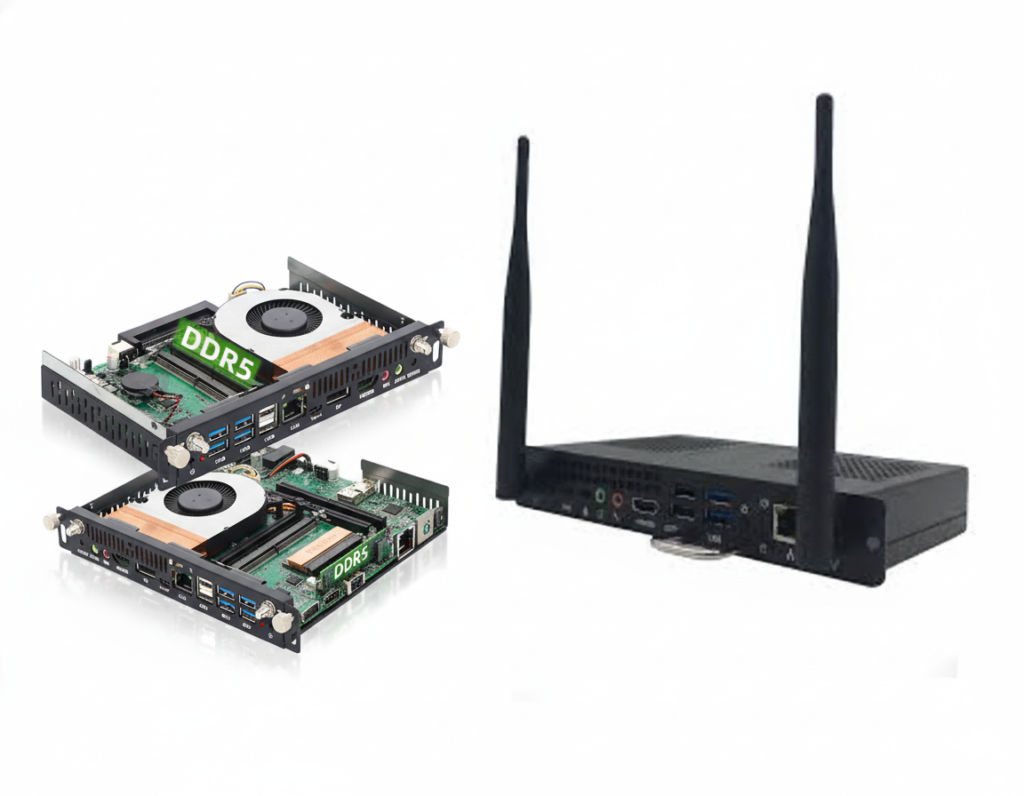
Know More About OPS Computer
OPS (Open Pluggable Specification) is a standardized computer module that can be easily inserted into and removed from digital displays like Ikinor Smart Board. This allows users to upgrade or replace the computing power of their display without the need for buying a whole new display or performing complex installations.
OPS modules were often used to replace the original operating system on interactive displays, typically switching to Windows. This provided users with greater flexibility and compatibility with various software applications.

Intel® i3 / i5 / i7 options with 4K output support

Plug-and-play design with cable-free, hidden installation

Compatible with Windows / Android / Linux

Supports Wi-Fi, Bluetooth, and Gigabit LAN connectivity
Compatibility with Interactive Flat Panel Displays
Our OPS PC Module is compatible with 65″, 75″, 86″, 98″, and 100″ Interactive Flat Panel Displays, providing seamless integration across multiple screen sizes.
Plug-In Design & Interface Positioning
The module uses an international standard OPS PC Slot, ensuring easy plug-in installation and broad compatibility with different brands and models. The slot-in design keeps cables hidden and maintains a clean, streamlined appearance.
Resolution, Refresh Rate & Touch Compatibility
The OPS module supports 4K output, standard refresh rates for commercial displays, and is fully compatible with mainstream touch drivers and interactive display firmware, ensuring smooth performance for teaching, meetings, and digital signage applications.

| OPS Computer Specification | |
|---|---|
| OPS Standard | Intel OPS / OPS-C Standard Compatible |
| OPS Module Size | 180 × 119 × 30 mm (OPS Standard) |
| Processor | Intel Core i3 / i5 / i7 (12th Gen Alder Lake / 13th Gen Raptor Lake Optional) |
| Chipset / Graphics | Integrated Intel UHD Graphics |
| Memory Type | DDR4 / DDR5 SO-DIMM |
| Memory Capacity | Max 32GB (DDR4) / Max 48GB (DDR5) |
| Storage Type | M.2 M-Key 2280 SSD |
| Storage Capacity | 128GB / 256GB / 512GB / 1TB SSD (Optional) |
| Display Output | HDMI 2.0 ×1, HDMI (OPS 80-pin) ×1, DP 1.2 / Mini DP ×1 |
| Multi-Display Support | Dual Display Output Supported |
| USB Ports | USB 3.0 ×2, USB 2.0 ×2 |
| Network | Gigabit LAN (RJ45) |
| Wireless | PCIe + USB Wi-Fi / Bluetooth Module, Intel CNVi Supported |
| Operating System Support | Windows 10 / Windows 11 / Linux (Android Optional) |
| TPM | TPM 2.0 Supported (Optional) |
| Intel vPro | Supported (Optional, CPU Dependent) |
| Power Supply | Powered Directly via OPS Slot (No External Adapter Required) |
| Cooling System | Active Cooling (Smart Fan Control) |
| Operating Temperature | 0°C – 40°C |
| Warranty | 3 Years |
FAQs
Selection depends on usage scenarios. Classrooms typically require Intel i3/i5 with 8–16GB RAM, while corporate meeting rooms or training centers often need i5/i7 processors, more RAM, and larger SSDs for conferencing and multitasking.
Confirm OPS slot compatibility (OPS or OPS-C standard), power support, display output interfaces, OS requirements, and whether the OPS supports your target software. Always verify compatibility with the interactive display brand and model.
For large projects, bundled purchasing simplifies compatibility and warranty management. Buying separately offers more flexibility in CPU, memory, and storage selection, which can reduce costs or improve performance depending on project needs.
In education and corporate environments, OPS computers typically last 5–7 years. Choosing higher specifications upfront helps extend usability and delays replacement or upgrade cycles.
OPS computers usually carry a 3-year warranty. For large deployments, buyers should confirm local service availability, spare parts supply, and clear RMA processes to minimize downtime during operation.
Yes. OPS computers are designed for easy removal and upgrading. Memory and SSDs can often be expanded, and the entire OPS module can be replaced without removing or reinstalling the interactive display.
 English
  Spanish
  Arabic
  French
  Indonesian
  German
  Portuguese
  Russian
  Vietnamese
  Thai
Thai  Italian