
Recentemente, temos recebido um número crescente de consultas de clientes interessados em Molduras Ubi touch para transformar TVs comuns em telas interativas inteligentesEssa solução tem se tornado cada vez mais popular entre empresas, escolas e até mesmo usuários domésticos que buscam uma maneira econômica de adicionar funcionalidade de toque sem investir em um quadro interativo completo.
Neste artigo, vamos explicar o que é um Ubi Touch Frame, como funciona e como ele pode transformar sua TV em um poderoso quadro interativo. Mais importante ainda, também compartilharemos dicas práticas. guia de compra Para ajudar você a escolher a moldura touchscreen ideal com base em suas necessidades, orçamento e cenários de uso.
O que é um Ubi Touch Frame?
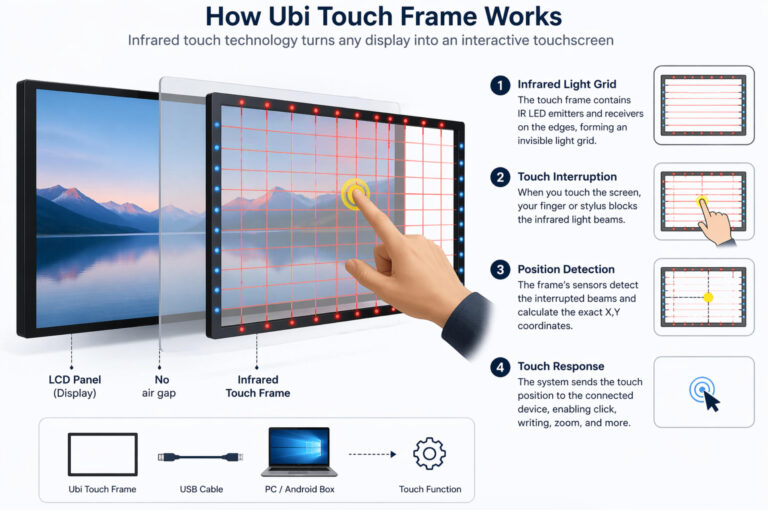
UM Moldura Ubi Touch é externo sobreposição de toque infravermelho (IV) que pode ser montado em uma tela comum — como uma TV, monitor ou sinalização digital — para transformá-la em um dispositivo com tela sensível ao toque.
Em termos simples, funciona como uma "moldura" instalada ao redor das bordas da tela. Em vez de substituir a própria tela, adiciona uma camada sensível ao toque por cima, permitindo que uma tela padrão funcione como uma tela digital. quadro interativo inteligenteOs usuários podem interagir com a tela usando os dedos ou uma caneta stylus, possibilitando ações como escrever, desenhar, clicar e ampliar.
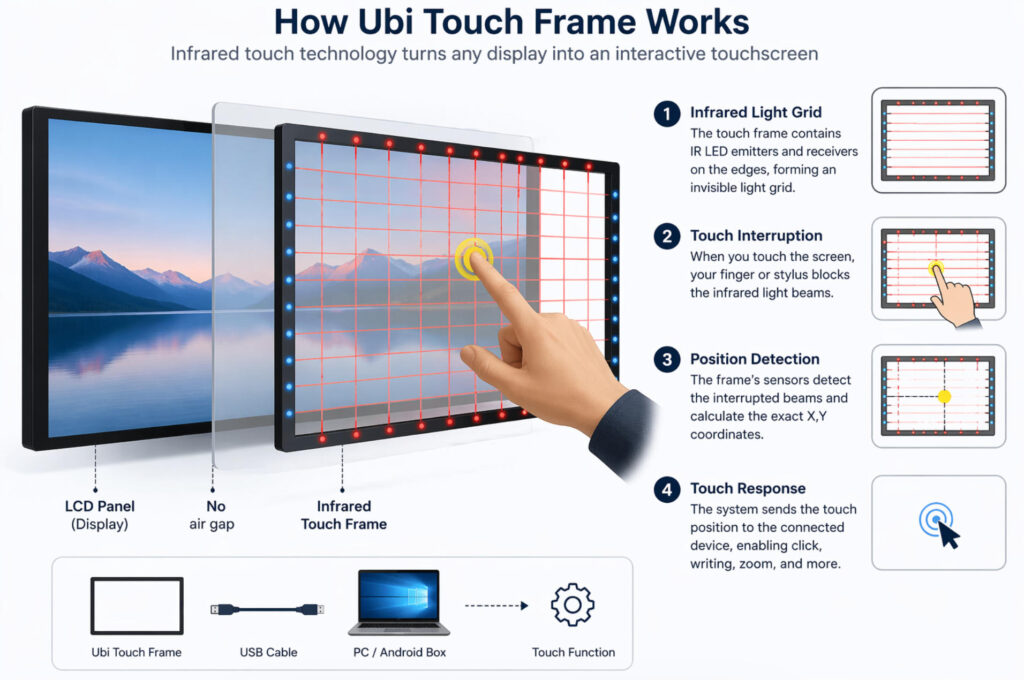
O princípio de funcionamento baseia-se em tecnologia de toque infravermelhoA estrutura está equipada com... emissores e receptores infravermelhos ao longo de suas bordas, que criam uma grade invisível de luz sobre a superfície da tela. Quando um dedo ou objeto toca a tela, interrompe os feixes infravermelhos. O sistema então detecta as coordenadas exatas da interrupção e as traduz em um comando de toque.
Esse processo permite uma interação precisa e responsiva sem modificar o próprio painel de exibição. Como resultado, um Ubi Touch Frame oferece uma maneira prática e econômica de atualizar telas tradicionais para soluções interativas adequadas para aplicações educacionais, comerciais e de sinalização digital.
Principais características da moldura Ubi Touch
O Moldura Ubi Touch Oferece uma gama de funcionalidades práticas que a tornam uma solução eficiente para converter telas padrão em sistemas interativos.
Uma de suas capacidades mais importantes é suporte multitoque, geralmente variando de Toque de 10 a 20 pontosIsso permite que vários usuários interajam com a tela simultaneamente, possibilitando atividades colaborativas como discussões em grupo, aulas ou brainstorming em equipe. Seja usando os dedos ou uma caneta stylus, o sistema consegue detectar com precisão múltiplos pontos de toque em tempo real.
Outra vantagem fundamental é a sua funcionalidade plug-and-playA moldura sensível ao toque geralmente é conectada a um computador por meio de um cabo simples. Cabo USBque transmite sinais táteis sem exigir configurações complexas. Na maioria dos casos, uma vez conectado, o sistema reconhece automaticamente o dispositivo, tornando a instalação rápida e fácil mesmo para usuários sem conhecimento técnico.
Em termos de compatibilidade, os Ubi Touch Frames suportam ambos Sistemas operacionais Windows e AndroidIsso significa que eles podem funcionar perfeitamente com diferentes configurações de hardware, incluindo Módulos OPS comumente usado em telas interativas, bem como Caixas Android para configurações mais econômicas. Essa flexibilidade os torna adequados para uma ampla gama de casos de uso.
Finalmente, quando combinado com uma TV padrão, o Ubi Touch Frame permite uma solução de quadro interativo de baixo custoOferece funcionalidade interativa sem a necessidade de investir em um display interativo completo, tornando-se uma opção ideal para usuários com orçamento limitado que buscam soluções práticas e escaláveis.
Cenários típicos de aplicação
O Moldura Ubi Touch É amplamente utilizado em diferentes ambientes devido à sua flexibilidade e relação custo-benefício.
Em salas de aula interativasServe como uma solução prática de modernização para escolas. Por exemplo, um de nossos clientes em Índia A escola adquiriu vários Ubi Touch Frames para modernizar suas salas de aula sem substituir as TVs existentes. Com a funcionalidade de toque, os professores podem escrever, fazer anotações e interagir com o conteúdo digital, melhorando significativamente o engajamento dos alunos e mantendo os custos sob controle.
Em salas de reuniõesOs Ubi Touch Frames aprimoram apresentações e colaboração. As equipes podem interagir diretamente com os slides, desenhar ideias na tela e fazer brainstorming em tempo real. Isso torna as reuniões mais dinâmicas e eficientes em comparação com as configurações de tela tradicionais.
Para displays comerciais e sinalização digitalA moldura sensível ao toque possibilita experiências interativas para o cliente. As empresas podem utilizá-la para navegação de produtos, quiosques de informação ou displays de autoatendimento, permitindo que os usuários interajam diretamente com o conteúdo em vez de apenas visualizá-lo passivamente.
É também uma ótima solução para escritórios em casa, especialmente para trabalho remoto e colaboração online. Os usuários podem transformar sua TV em uma grande tela interativa Para videoconferências, apresentações ou tarefas criativas.
Em resumo, o Ubi Touch Frame oferece uma maneira versátil de trazer interatividade para diversos cenários sem exigir um investimento completo em telas interativas profissionais.
Onde comprar a moldura Ubi Touch e dicas
Se você está pensando em comprar um Moldura Ubi Touch (sobreposição de toque infravermelho)Existem diversas opções de fornecimento confiáveis, dependendo do seu orçamento e volume de pedidos.
Primeiro, muitos Fabricantes de quadros interativos na China oferecem molduras sensíveis ao toque como parte de suas linhas de produtos. Esses fornecedores normalmente fornecem Serviços OEM/ODM, permitindo que você personalize tamanhos (de 27” a 300”), pontos de contato e marca. A maioria dos produtos vendidos diretamente da fábrica oferece suporte a essa personalização. Conexão USB plug-and-play, multitoque (10 a 20 pontos) e compatibilidade com sistemas Windows, Android e Mac. Essa opção é ideal para compradores em grande quantidade, distribuidores ou aquisições baseadas em projetos.
Você também pode encontrar molduras sensíveis ao toque em Plataformas B2B como o Alibaba, onde vários fornecedores oferecem preços competitivos e personalização. Os preços podem variar bastante dependendo do tamanho e dos recursos, normalmente variando de cerca de $60 a $180+ para tamanhos padrão Para quantidades menores, marketplaces como Amazon ou eBay também estão disponíveis, embora as opções de personalização possam ser limitadas.



 Portuguese
  English
  Spanish
  Arabic
  French
  Indonesian
  German
  Russian
  Vietnamese
  Thai
Thai  Italian