
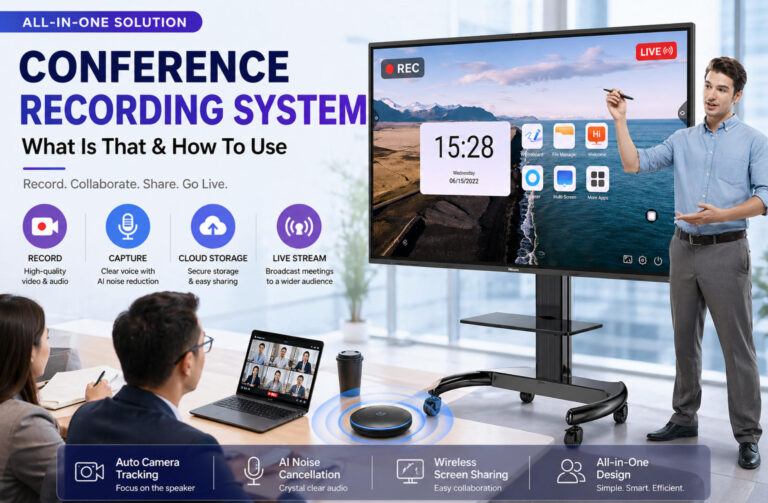
O que é um sistema de gravação de conferências?
Um sistema de gravação de conferências é uma solução projetada para capturar, armazenar e distribuir o conteúdo de reuniões, incluindo áudio, vídeo e apresentações na tela. Em termos simples, ele transforma o que acontece em uma reunião presencial ou virtual em conteúdo digital que pode ser revisado, compartilhado ou reutilizado posteriormente.
Um sistema típico consiste em vários componentes principais. Câmeras são usadas para capturar as imagens da reunião, como palestrantes ou participantes. Microfones processam a entrada de áudio, garantindo que as vozes sejam claras e inteligíveis. Placas de captura ou dispositivos de codificação processam e convertem os sinais brutos em formatos digitais, enquanto softwares de gravação ou plataformas em nuvem gerenciam o armazenamento, a reprodução e a distribuição. Juntos, esses elementos criam um fluxo de trabalho de gravação contínuo.
Os sistemas de gravação de conferências são amplamente utilizados em diversos cenários. Em ambientes corporativos, auxiliam na documentação de reuniões internas e processos de tomada de decisão. Em treinamentos e educação, permitem a gravação de palestras ou workshops para consulta futura. Também são essenciais para webinars e eventos online. Mais recentemente, com o crescimento dos ecossistemas de transmissão ao vivo, muitas organizações não apenas gravam reuniões, mas também as transmitem em tempo real para um público mais amplo.
O principal valor de um sistema de gravação de conferências reside na sua capacidade de transformar "reuniões em tempo real" em ativos reutilizáveis. Em vez de as informações se perderem após o término da reunião, elas se tornam conteúdo pesquisável e compartilhável. Ao mesmo tempo, permite que as reuniões sejam transformadas em materiais ao vivo ou sob demanda, ampliando seu alcance e impacto muito além dos participantes originais.
Por que as empresas precisam de um sistema de gravação de conferências?
À primeira vista, as reuniões parecem temporárias — as pessoas conversam, decisões são tomadas e, em seguida, todos seguem em frente. Mas, na realidade, a maior parte das informações valiosas se perde no momento em que a reunião termina. É aí que um sistema de gravação de conferências se torna essencial.
O primeiro valor é retenção de informaçõesEm vez de depender de anotações fragmentadas ou da memória, as empresas podem preservar discussões, decisões e contexto completos. Isso reduz mal-entendidos e garante que nada importante seja perdido.
Em segundo lugar, isso é significativamente melhora a eficiênciaAs equipes não precisam mais repetir as mesmas explicações para diferentes partes interessadas. Uma reunião gravada pode ser compartilhada instantaneamente, economizando tempo e reduzindo a comunicação redundante.
Terceiro, isso possibilita colaboração remotaPara empresas com equipes distribuídas, fusos horários e locais não são mais barreiras. Os membros da equipe podem acessar as mesmas informações de forma assíncrona, mantendo-se alinhados sem precisar participar de todas as reuniões em tempo real.
Outra vantagem crescente reside em treinamento e otimização internaAs gravações de reuniões podem ser usadas para integrar novos funcionários, demonstrar fluxos de trabalho e apoiar revisões de projetos. Com o surgimento de ferramentas de IA como ChatGPT e Claude, essas gravações agora podem ser analisadas, resumidas e transformadas em conhecimento estruturado, ajudando as empresas a aprimorar processos internos e construir sistemas mais inteligentes.
For example, we regularly hold project meetings with the SEO Agency we work with. We record these meetings so that discussions, recommendations, deliverables, and follow-up actions can be archived as part of the project documentation. This gives both sides a clear reference point and makes it easier to review what was agreed upon and what has already been delivered.
Componentes Essenciais de um Sistema de Gravação de Conferências
Um sistema de gravação de conferências não é um dispositivo único, mas sim uma combinação de hardware e software que trabalham em conjunto. Compreender seus componentes principais ajuda a projetar um sistema eficiente e escalável.
Primeiro é o sistema de captura de vídeoIsso geralmente inclui câmeras PTZ (pan-tilt-zoom) ou câmeras USB, dependendo do tamanho da sala e do orçamento. Configurações avançadas geralmente oferecem suporte ao rastreamento automático, permitindo que a câmera siga a pessoa que está falando, o que melhora muito a experiência de visualização.
Em segundo lugar está o sistema de áudioO áudio, que é indiscutivelmente ainda mais importante que o vídeo, é essencial. Microfones omnidirecionais são comumente usados para captar as vozes de todos os participantes, enquanto as tecnologias de redução de ruído e cancelamento de eco garantem a clareza do som. Uma qualidade de áudio ruim pode tornar as gravações inutilizáveis, portanto, este é um investimento crucial.
O terceiro é o camada de codificação e gravaçãoIsso pode ser feito por meio de codificadores de hardware ou soluções baseadas em software. As empresas podem optar entre armazenamento local para segurança e controle, ou armazenamento em nuvem para acesso e compartilhamento mais fáceis. Muitos sistemas modernos oferecem suporte a ambos.
Finalmente, há o sistema de exibição e controle. Displays interativos Desempenham um papel central nesse processo, permitindo o compartilhamento de tela, anotações e controle. Notavelmente, soluções multifuncionais de marcas como Promethean e ViewSonic podem integrar captura, gravação e apresentação em um único dispositivo, simplificando a implementação. Um sistema de controle central pode otimizar ainda mais as operações em todos os componentes.
Soluções de sistemas de gravação de conferências em que você pode confiar.
Aqui estão algumas soluções de sistemas de gravação de conferências bem conhecidas e com experiência comprovada — talvez valha a pena explorar as ofertas que elas oferecem.
| Marca | Ideal para | Principal vantagem |
|---|---|---|
| Logitech | Salas de reunião de pequeno a grande porte | Confiável, fácil de implementar, alta compatibilidade |
| Yealink | salas de conferência para PMEs | Design tudo-em-um, configuração simples |
| Cisco Webex | Grandes empresas | Segurança de nível empresarial e gravação em nuvem |
| Crestron | Salas de conferência de alto padrão | Integração avançada de sistemas |
| Televic | Governo/Instituições | Sistemas com fio ultraestáveis |
| Jabra | Configurações focadas em áudio | Som de alta qualidade e otimização por IA |
| Poli | Implantações empresariais | Estabilidade e escalabilidade comprovadas |
| Ikinor | Salas de reunião e treinamento | Tela interativa multifuncional com gravação |
O que você deve considerar ao escolher um sistema de gravação de conferências?
Escolher o sistema de gravação de conferências certo não se resume apenas a comparar especificações — trata-se de encontrar uma solução que se adapte ao seu fluxo de trabalho e seja escalável para o seu negócio.
Primeiro, verifique compatibilidade com vários dispositivosUm sistema confiável deve integrar-se perfeitamente com câmeras, microfones, monitores e plataformas populares como Zoom ou Microsoft Teams. A incompatibilidade geralmente leva a custos extras e atritos operacionais.
Em segundo lugar, considere recursos de controle remotoA capacidade de gerenciar gravações, ajustar configurações ou solucionar problemas em dispositivos remotamente pode melhorar significativamente a eficiência, especialmente para equipes distribuídas ou implantações em várias salas.
Terceiro, avalie suporte para armazenamento em nuvemA gravação em nuvem permite fácil acesso, compartilhamento e backup do conteúdo das reuniões. Também possibilita a integração com ferramentas de IA para transcrição e análise, transformando as gravações em valiosos ativos de negócios.
Em quarto lugar, pense em escalabilidadeSuas necessidades hoje podem ser simples, mas à medida que sua organização cresce, você pode precisar de recursos mais avançados. Um sistema que suporte atualizações ou expansão modular evitará substituições dispendiosas.
Mais importante ainda, Não se concentre apenas no preço — concentre-se na solução completa.Um sistema mais barato que carece de integração ou flexibilidade pode custar mais a longo prazo.
Para muitas pequenas e médias empresas, uma abordagem mais simples costuma funcionar melhor. Escolher uma solução de exibição interativa tudo-em-umSoluções como as oferecidas pela Ikinor podem reduzir a complexidade, ao mesmo tempo que oferecem recursos de gravação, apresentação e colaboração em um único dispositivo.




 Portuguese
  English
  Spanish
  Arabic
  French
  Indonesian
  German
  Russian
  Vietnamese
  Thai
Thai  Italian