
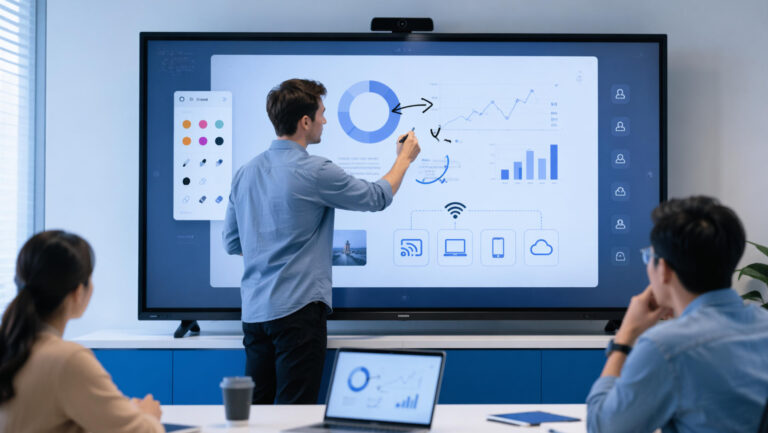
В последнее время мы получаем все больше запросов от клиентов, которые хотят Превратите обычный телевизор в интерактивную сенсорную доску.Этот спрос особенно распространен в классах, конференц-залах и небольших компаниях, ищущих экономичное интерактивное решение. Вместо того чтобы инвестировать в полноценный интерактивный дисплей, многие изучают способы модернизации существующих телевизоров с помощью сенсорного управления и интеллектуальных функций.
В этом руководстве мы шаг за шагом расскажем вам, как осуществить эту трансформацию, включая необходимое оборудование и программное обеспечение, практические методы настройки и важные моменты. Независимо от того, стремитесь ли вы улучшить взаимодействие или повысить эффективность обучения, эта статья поможет вам понять наиболее эффективный способ превратить ваш телевизор в интерактивную доску.
Что такое «умная доска с телевизором» и почему стоит её приобрести?
«Интерактивная доска для телевизора» — это устройство, которое превращает обычный телевизор в интерактивный дисплей. Возможности сенсорного управления, аннотирования и совместной работы.обеспечивая аналогичный опыт для интерактивная доска.
Ключевое различие между стандартный телевизор и интерактивная доска Дело в функциональности. Обычный телевизор в основном используется для пассивного просмотра контента, в то время как интерактивная доска поддерживает Сенсорное взаимодействие, ввод текста в реальном времени, беспроводная демонстрация экрана и многопользовательская совместная работа.что делает его гораздо более подходящим для производственных сред.
Это решение широко применимо в различных сценариях. переговорные комнатыЭто улучшает презентации и командную работу; классыЭто позволяет проводить интерактивное обучение; и в домашние офисыЭто улучшает удаленную связь и обмен контентом.
Самое главное, это дает четкую... преимущество в стоимостиПо сравнению с покупкой совершенно новой интерактивной доски, модернизация существующего телевизора обходится значительно дешевле. Для организаций с ограниченным бюджетом или в развивающихся регионах переоборудование старых телевизоров в интерактивные доски — это практичный и экономически эффективный способ осуществления цифровой трансформации без значительных инвестиций.
Каковы основные решения? (Объяснение основных методов)
Существует несколько практических способов превратить обычный телевизор в интерактивную доску, в зависимости от вашего бюджета и потребностей в производительности.
Наиболее распространенный подход заключается в использовании внешние вычислительные устройстванапример, Компьютер OPS или Android-приставкаЭти устройства подключаются к телевизору через HDMI и предоставляют полноценную операционную систему, позволяющую использовать приложения, создавать презентации и облачные инструменты для совместной работы. Этот метод прост и экономичен, особенно для базового использования в бизнесе или в учебных целях.
Еще одно ключевое решение — это опция сенсорной рамкиобычно с использованием инфракрасная сенсорная рамка размещенные вокруг телевизора. Такие товары, как Ubi Touchframe Это позволит экрану распознавать сенсорный ввод, превращая телевизор в интерактивную поверхность. Это необходимо, если вы хотите получить настоящую функциональность интерактивной доски, такую как письмо, рисование и взаимодействие с несколькими касаниями.
Для случаев с низкой интенсивностью использования, беспроводные решения для совместного использования экрана и программные решения Также могут быть эффективны такие инструменты, как приложения для зеркального отображения экрана или облачные платформы для совместной работы, позволяющие пользователям управлять контентом с ноутбуков, планшетов или смартфонов, не касаясь экрана физически.
Наконец, есть комплексные решениякоторые объединяют сенсорное управление, вычислительные модули и программное обеспечение в более интегрированную систему. Хотя такой подход не так удобен, как профессиональная интерактивная доска, он обеспечивает практически полный функционал и идеально подходит для пользователей, стремящихся к балансу между стоимостью и производительностью.
Необходимый список аппаратного и программного обеспечения
Для успешного превращения телевизора в интерактивную доску вам потребуется правильное сочетание следующих элементов: аппаратное и программное обеспечение для обеспечения бесперебойной работы и удобства использования.
Что касается аппаратной части, то основой является телевизор высокого качества с достаточным размером и разрешением (желательно 4K для четкости). Далее вам понадобится сенсорное устройствонапример, инфракрасная сенсорная рамка, если требуется интерактивная функциональность, такая как письмо и рисование. Кроме того, компьютер или модуль ОПС Это необходимо для запуска приложений, управления файлами и поддержки облачных инструментов. В зависимости от вашей конфигурации, вы также можете рассмотреть возможность приобретения дополнительных аксессуаров, таких как стилус, камера и микрофон, для расширения возможностей совместной работы.
Что касается программного обеспечения, выбор правильных инструментов не менее важен. Надежный программное обеспечение для интерактивной доски позволяет пользователям писать, добавлять комментарии и совместно работать в режиме реального времени. инструменты для трансляции или зеркального отображения экрана Обеспечивает беспрепятственный обмен контентом с ноутбуков или мобильных устройств. Для бизнеса или дистанционного обучения интеграция... система видеоконференцсвязи Такие платформы, как Zoom, Teams или Google Meet, обеспечивают эффективную коммуникацию.
При выборе подходящей конфигурации бюджет играет ключевую роль. бюджетные установкиВ таком случае может быть достаточно простой Android-приставки в сочетании с функцией трансляции экрана. решения среднего ценового сегментаДобавление сенсорной рамки и улучшенное программное обеспечение повышают удобство взаимодействия. потребности более высокого уровняКомпьютер OPS с полной интеграцией обеспечивает практически профессиональный опыт работы с интерактивной доской, отличаясь при этом большей стабильностью и производительностью.
Инструкция по установке и настройке (пошаговая)
Настройка смарт-панели с телевизором включает в себя несколько ключевых шагов, чтобы обеспечить бесперебойную работу всех компонентов. Во-первых, сосредоточьтесь на подключения устройствТелевизор обычно подключается к компьютеру или операционному модулю через HDMI для вывода видеосигнала, а сенсорная панель подключается через USB для обеспечения сенсорного ввода. Стабильная работа. сетевое соединение Для работы с облачными сервисами, совместного использования экрана и обновления программного обеспечения также требуется Wi-Fi или локальная сеть (LAN).
Далее следует калибровка сенсорного экрана и настройка системыПосле установки сенсорной рамки вам потребуется запустить программное обеспечение для калибровки, чтобы точно выровнять точки касания с дисплеем. Этот шаг крайне важен для обеспечения точной реакции на ввод текста и жесты. Одновременно настройте операционную систему, установите программное обеспечение для интерактивной доски и настройте инструменты для совместного использования экрана или проведения конференций в зависимости от ваших задач.
В процессе установки вы можете столкнуться с некоторыми проблемами. общие проблемыНапример, если Сенсорный экран не реагируетПроверьте, правильно ли подключен USB-кабель и установлен ли необходимый драйвер. Если... Точность сенсорного ввода снижена.Необходимо откалибровать сенсорную рамку и убедиться в ее правильной установке без зазоров и смещения. Проблемы, связанные с сетью, такие как медленная трансляция экрана, часто можно решить, переключившись на проводное соединение.
При правильной настройке и устранении неполадок ваша система сможет обеспечить плавную и надежную работу в интерактивном режиме.
Плюсы, минусы и рекомендации по покупке
Превращение телевизора в интерактивную доску дает ряд очевидных преимуществ. Самое очевидное преимущество заключается в следующем: экономия затратПо сравнению с приобретением полнофункционального интерактивного дисплея, это решение требует значительно меньших первоначальных инвестиций. Оно также обеспечивает высокая гибкостьэто позволяет пользователям выбирать различные комбинации аппаратного и программного обеспечения в зависимости от их потребностей и бюджета.
Однако следует учитывать и некоторые ограничения. тактильные ощущения может быть не таким плавным или точным, как профессиональная интерактивная доскаособенно при использовании внешних сенсорных панелей. Кроме того, стабильность системы Это может варьироваться в зависимости от качества компонентов и состояния сети. При неоптимизированной настройке могут возникать такие проблемы, как задержки, ошибки калибровки или проблемы совместимости.
Это решение идеально подходит для экономные пользователиОн подходит для малых предприятий или образовательных учреждений с ограниченными ресурсами. Также он подходит для временных решений или сценариев, где полная интерактивность не требуется ежедневно. С другой стороны, он может быть не лучшим выбором для организаций, которые предъявляют высокие требования. высокая производительность, надежность и бесшовная интеграция.
Для большинства предприятияособенно те, у кого достаточно средств, инвестируют в профессиональный интерактивный дисплей Зачастую это лучшее долгосрочное решение. Такие системы обеспечивают превосходную производительность сенсорного управления, встроенные программные экосистемы и большую стабильность. В подобных случаях выбор полностью интерактивного дисплея гарантирует эффективность, масштабируемость и более удобный пользовательский интерфейс.



 Russian
  English
  Spanish
  Arabic
  French
  Indonesian
  German
  Portuguese
  Vietnamese
  Thai
Thai  Italian