
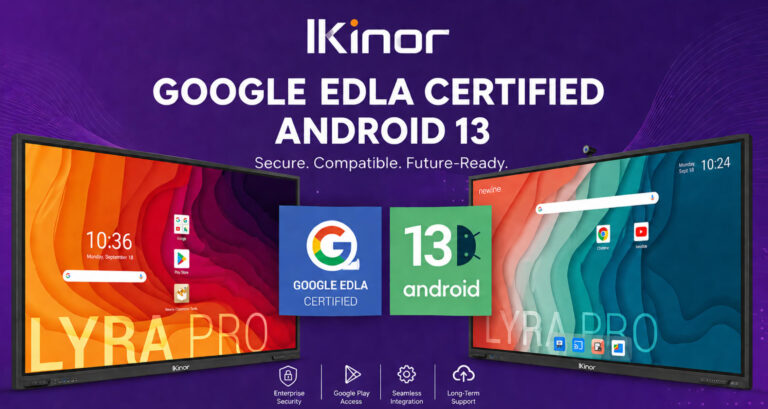
Google EDLA entwickelt sich rasant zu einem wichtigen Standard in der interaktiven Displaybranche, insbesondere im Bildungs- und Unternehmensbereich. Da immer mehr Organisationen auf Google Workspace und cloudbasierte Kollaborationstools setzen, steigt die Nachfrage nach vollständig zertifizierten Android-Systemen. Vielen Einkäufern und Projektmanagern ist jedoch noch immer nicht klar, was EDLA genau ist und warum es bei der Auswahl eines interaktiven Displays so wichtig ist. Der Unterschied zwischen EDLA-zertifizierten Geräten und nicht zertifizierten Android-Displays kann sich direkt auf App-Kompatibilität, Sicherheit und langfristige Nutzbarkeit auswirken. In diesem Leitfaden erläutern wir, was Google EDLA bedeutet, welche Folgen eine fehlende Zertifizierung hat, wie Hersteller diese erhalten und wie OEM/ODM-Projekte eine erfolgreiche Implementierung in realen Anwendungen gewährleisten können.
Was ist Google EDLA?
BBecause most interactive displays run on Android, they face the same issue as smartphones: they need official certification to access the full Google ecosystem. This is where Google EDLA comes in.
Google EDLA, or Enterprise Devices Licensing Agreement, is a licensing program that allows commercial Android devices—such as interactive panel displays—to legally integrate Google services. In simple terms, it is the official authorization that ensures a device is not just running Android, but running a Google-certified version of Android.
For education, enterprise, and professional collaboration environments, a Google EDLA certified interactive display provides a more reliable way to access Google services while meeting enterprise requirements for security, compatibility, and long-term software support.
Der Hauptunterschied zwischen EDLA und dem Standard-Android (AOSP) liegt im Zugriff auf das Ökosystem und der Kompatibilität. AOSP ist zwar Open Source und flexibel, beinhaltet aber standardmäßig keine Google-Dienste. Ohne EDLA können Geräte den Google Play Store oder wichtige Google-Anwendungen nicht offiziell nutzen.
Mit der EDLA-Zertifizierung erhalten interaktive Displays Zugriff auf:
- Google Play Store for app installation;
- Google Mobile Services (GMS);
- Native Google Workspace apps like Docs, Meet, and Drive;
- Regular security updates and enterprise-level compliance.
In short, EDLA transforms an Android display into a fully connected, enterprise-ready device.
Was ermöglicht Google EDLA für interaktive Displays?
Was kann ein interaktives Display also tatsächlich leisten, sobald es über Google EDLA verfügt?
Erstens ermöglicht es den vollen Zugriff auf die Google Play StoreDadurch können Nutzer Apps direkt auf das Gerät herunterladen und installieren. Dies macht das riskante Sideloading von APK-Dateien überflüssig und gewährleistet, dass alle Anwendungen geprüft, stabil und regelmäßig aktualisiert sind.
Zweitens ermöglicht EDLA Native Integration mit Google Workspace-ToolsAnwendungen wie Google Docs, Meet, Drive und YouTube laufen reibungslos auf dem Display und ermöglichen so die einfache Zusammenarbeit, Präsentation und Kommunikation in Echtzeit. In Besprechungsräumen bedeutet dies sofortige Videokonferenzen und die gemeinsame Nutzung von Dateien über die Cloud. In Klassenzimmern können Lehrkräfte und Schüler mit vertrauten Werkzeugen ohne Kompatibilitätsprobleme arbeiten.
Ein weiterer großer Vorteil ist Sicherheits- und Geräteverwaltung auf UnternehmensebeneMit EDLA profitieren Geräte von Googles Sicherheitsframework, einschließlich regelmäßiger Systemaktualisierungen, Datenschutz und Kompatibilität mit Enterprise Mobility Management (EMM)-Systemen. Dies ist entscheidend für Unternehmen, die mehrere Geräte an verschiedenen Standorten verwalten müssen.
Schließlich schafft EDLA eine vollständiges und zuverlässiges Software-ÖkosystemNutzer müssen sich keine Sorgen mehr um das Herunterladen inoffizieller oder raubkopierter Apps machen, die zu Instabilität oder Sicherheitsrisiken führen können. Stattdessen erhalten sie eine einheitliche, hochwertige Nutzererfahrung, die von Googles globaler Plattform unterstützt wird.
Kurz gesagt, EDLA verwandelt ein interaktives Display von einem einfachen Bildschirm in ein vollständig vernetztes, sicheres und professionelles Kollaborationsgerät.
Was passiert, wenn ein interaktives Display kein Google EDLA hat?
Ohne Google EDLA läuft ein interaktives Display auf einem einfachen Android-System ohne offizielle Google-Zertifizierung – und das führt zu mehreren Einschränkungen.
Erstens gibt es Kein Zugriff auf den Google Play StoreNutzer sind auf das manuelle Installieren von APK-Dateien angewiesen, um Apps zu installieren, was erhebliche Risiken birgt. Nicht verifizierte APK-Dateien können Schadsoftware, veraltete Versionen oder modifizierten Code enthalten, was zu Sicherheitslücken und instabiler Leistung führt.
Zweite, App-Kompatibilität und -Stabilität werden zu großen ProblemenViele beliebte Anwendungen sind so konzipiert, dass sie innerhalb des Google-Ökosystems funktionieren. Ohne Google Mobile Services lassen sich diese Apps möglicherweise nicht installieren, stürzen häufig ab oder weisen Mängel in Bezug auf wichtige Funktionen auf, was zu einer schlechten Benutzererfahrung führt.
Ein weiteres wichtiges Anliegen ist das Fehlen der Google-SicherheitszertifizierungEDLA-zertifizierte Geräte erhalten regelmäßige Sicherheitsupdates und erfüllen strenge Compliance-Standards. Ohne diese Zertifizierung sind Geräte anfälliger für Datenlecks, Systemschwachstellen und langfristige Zuverlässigkeitsprobleme.
Aus Unternehmenssicht, Die IT-Verwaltung wird schwierigerGeräte, die nicht unter die EDLA-Richtlinien fallen, lassen sich nicht vollständig in Google Workspace oder Enterprise Mobility Management-Systeme integrieren, was die Gerätesteuerung, Aktualisierungen und Benutzerverwaltung ineffizient macht.
Schließlich wirken sich diese Einschränkungen direkt auf die praktische Anwendung aus. Im Bildungsbereich kann der Zugriff auf Apps und Kollaborationswerkzeuge für Lehrkräfte problematisch sein. In Besprechungsräumen gestaltet sich die Videokonferenz und der Dateiaustausch weniger reibungslos. In Unternehmensumgebungen wird die Effizienz der Arbeitsabläufe beeinträchtigt.
Kurz gesagt, ohne EDLA wird ein interaktives Display zu eingeschränkt, weniger sicher und schwieriger in großem Umfang zu handhaben..
Wie können interaktive Displays die Google EDLA-Zertifizierung erhalten?
Die Erlangung der Google EDLA-Zertifizierung ist ein strukturierter Prozess, der sowohl die Hardware-Bereitschaft als auch die strikte Einhaltung der Software-Vorgaben erfordert.
Zunächst müssen die Hersteller bestimmte Kriterien erfüllen. Googles HardwareanforderungenDies umfasst die Verwendung kompatibler Chipsätze (wie z. B. ARM-basierter Plattformen), ausreichend Arbeitsspeicher und Speicherplatz sowie die Integration notwendiger Sicherheitskomponenten wie Secure Boot und Trusted Execution Environments. Diese Elemente gewährleisten, dass das Gerät Google-Dienste zuverlässig und sicher unterstützt.
Zweitens muss das Gerät einen bestimmten Modus ausführen. Unterstützte Android-VersionGoogle verlangt in der Regel relativ aktuelle Android-Versionen mit ordnungsgemäßer Systemoptimierung und aktuellen Sicherheitspatches. Veraltete oder stark modifizierte Android-Systeme erfüllen die Zertifizierungsstandards möglicherweise nicht.
Der Kern des Prozesses ist der ZertifizierungsworkflowHersteller müssen eine Lizenz für Google Mobile Services (GMS) beantragen und anschließend eine Reihe technischer Tests durchlaufen. Dazu gehören die Compatibility Test Suite (CTS) und die Vendor Test Suite (VTS), die überprüfen, ob das Gerät die Kompatibilitäts- und Leistungsanforderungen von Android erfüllt. Nach erfolgreichem Bestehen dieser Tests wird das Gerät von Google abschließend geprüft und freigegeben.
Zeitlich gesehen dauert der gesamte Prozess in der Regel 3 bis 6 MonateDie Kosten hängen von der Komplexität des Projekts und der Erfahrung des Herstellers ab. Sie können ebenfalls variieren und umfassen Ingenieurressourcen, Tests und mögliche Nachbesserungen, falls während der Validierung Probleme auftreten.
Kurz gesagt, die EDLA-Zertifizierung ist nicht nur eine Formalität – sie ist eine umfassender Qualifizierungsprozess Dadurch wird sichergestellt, dass die Geräte Googles Standards für Leistung, Sicherheit und Kompatibilität mit dem Ökosystem erfüllen.
Welche Marken interaktiver Displays unterstützen Google EDLA?
Mit steigender Nachfrage nach zertifizierten Android-Ökosystemen setzen immer mehr Hersteller interaktiver Displays auf Google EDLA (Enterprise Devices Licensing Agreement), um Funktionalität, Sicherheit und Kompatibilität zu verbessern. EDLA-Unterstützung entwickelt sich heute zu einem entscheidenden Wettbewerbsvorteil sowohl im Bildungsbereich als auch im Unternehmensumfeld für die Zusammenarbeit.
Weltweit führende Marken wie Samsung, LG, ViewSonic, BenQ und Promethean haben bereits EDLA-zertifizierte Android-Systeme in ihre interaktiven Displays integriert. Diese Marken nutzen EDLA, um nativen Zugriff auf den Google Play Store, nahtlose Integration mit Tools wie Google Meet und Drive sowie Gerätemanagement auf Unternehmensebene zu ermöglichen – was sie bei internationalen Ausschreibungen äußerst wettbewerbsfähig macht.
At the same time, emerging brands and Chinese OEM manufacturers such as Ikinor are rapidly catching up as a professional multimedia board manufacturer, by aligning hardware configurations(e.g., RK3588 chipsets) with Google’s certification requirements and upgrading Android OS versions, these manufacturers are entering international markets with EDLA-ready solutions. This shift enables them to compete not only on price but also on ecosystem completeness and compliance.
In realen Anwendungen wird EDLA immer wichtiger. Im Bildungsbereich benötigen Schulen einen sofort einsatzbereiten Zugriff auf Google Classroom und Docs. In Unternehmen sind reibungslose Videokonferenzen und die Zusammenarbeit über die Cloud unerlässlich. Dies gilt insbesondere für Projekte wie die, die für … durchgeführt werden. Südafrikanische VertriebspartnerDie EDLA-Zertifizierung wurde wiederholt als zwingende Voraussetzung in Ausschreibungsunterlagen aufgeführt.
Insgesamt ist EDLA nicht mehr optional – es entwickelt sich schnell zu einer Standardfunktion für ernsthafte interaktive Display-Implementierungen weltweit.
Wie lässt sich Google EDLA in OEM/ODM-Projekten für interaktive Displays sicherstellen?
Ensuring Google EDLA compliance in OEM/ODM interactive display projects requires planning from both hardware and software stages—not just a last-minute certification step.
First, choose an EDLA-compatible hardware platform. Mainstream chipsets from RK (such as RK3576 and RK3588) or MTK are commonly used because they align with Google’s compatibility requirements. Selecting the right chipset early ensures smoother certification later and avoids costly redesigns.
Zweitens: Planen Sie Ihre Android-Roadmap sorgfältig. EDLA beschränkt sich nicht nur auf die aktuelle Version, sondern erfordert auch langfristigen Support. OEMs sollten sicherstellen, dass ihre Geräte stabile Upgrades (z. B. von Android 12 auf 14 und dann auf 15) erhalten und Googles Sicherheitspatch-Anforderungen erfüllen. Andernfalls können selbst zertifizierte Geräte bei Ausschreibungen für Unternehmen schnell an Wettbewerbsfähigkeit verlieren.
Drittens sollten Sie mit Lösungsanbietern zusammenarbeiten, die bereits Erfahrung mit EDLA haben. Die Zertifizierung umfasst strenge Prozesse, darunter die Integration von GMS (Google Mobile Services) und das Bestehen der CTS (Compatibility Test Suite) und VTS (Vendor Test Suite). Erfahrene Partner können die Bearbeitungszeiten deutlich verkürzen und das Ausfallrisiko minimieren.
Schließlich ist Risikomanagement entscheidend – insbesondere die Vermeidung von „Pseudo-EDLA“. Damit sind Geräte gemeint, die Google-Kompatibilität behaupten, aber lediglich das Sideloading von APKs oder nur teilweise GMS-Funktionen ohne offizielle Zertifizierung unterstützen. Diese Produkte umgehen häufig formale Tests, was zu App-Instabilität, Sicherheitsrisiken und Ablehnung in Großprojekten führt.
Die Konsistenz über verschiedene Produktionschargen hinweg ist gleichermaßen wichtig. Selbst zertifizierte Modelle müssen sicherstellen, dass Hardwarekonfigurationen, Firmwareversionen und Sicherheitsmodule unverändert bleiben. Andernfalls gilt die Zertifizierung möglicherweise nicht für alle ausgelieferten Geräte.
For businesses planning long-term OEM/ODM cooperation, selecting a Google EDLA certified smart board factory can significantly reduce certification risks and improve project reliability. A qualified EDLA-certified manufacturer should not only provide certified hardware but also have experience in Android customization, firmware management, production consistency, and long-term technical support.
In der Praxis ist die echte Einhaltung der EDLA-Vorschriften eine Fähigkeit auf Systemebene – und nicht nur ein Etikett.
Ist Google EDLA für interaktive Panel-Displays unerlässlich?
Ist Google EDLA für interaktive Panel-Displays unerlässlich? In den meisten professionellen Anwendungsfällen lautet die Antwort zunehmend ja – jedoch mit einigen Nuancen.
Für Projekte im Bildungs-, Unternehmens- und Regierungsbereich ist EDLA mittlerweile fast schon Pflicht. Schulen benötigen nahtlosen Zugriff auf Google Classroom, Docs und Drive, während Unternehmen für die Zusammenarbeit auf Tools wie Google Meet angewiesen sind. EDLA-zertifizierte Geräte gewährleisten vollen Zugriff auf das Google Play-Ökosystem, eine gleichbleibende App-Performance und Sicherheit auf Unternehmensniveau. Daher wird EDLA in vielen Ausschreibungen, insbesondere auf internationalen Märkten, explizit als obligatorische Spezifikation aufgeführt.
Allerdings ist EDLA nicht für jeden Anwendungsfall zwingend erforderlich. In einfachen Umgebungen oder geschlossenen Systemen – wie etwa bei Digital Signage, Werksarmaturenbrettern oder internen Anzeigesystemen – können Geräte auch ohne EDLA mit angepassten Android-Versionen oder spezieller Software betrieben werden. Der Verzicht auf EDLA reduziert die Hardwarekosten jedoch nicht wesentlich. Der Hauptnutzen von EDLA liegt im Zugriff auf das Software-Ökosystem und in der Einhaltung von Vorschriften, nicht in teuren Hardwarekomponenten.
Mit Blick auf die Zukunft entwickelt sich EDLA rasant zum Standard für Android-basierte kommerzielle Displays. Da immer mehr Anwendungen auf cloudbasierte Zusammenarbeit umsteigen und die Sicherheitsanforderungen steigen, stoßen nicht zertifizierte Systeme zunehmend an ihre Grenzen. Für Marken, die globale Märkte bedienen, geht es bei der Einführung von EDLA weniger um zusätzliche Funktionen, sondern vielmehr darum, die grundlegenden Erwartungen an Kompatibilität, Sicherheit und langfristige Nutzbarkeit zu erfüllen.
Häufig gestellte Fragen zu Google EDLA für interaktive Displays
Wie viel kostet die EDLA-Zertifizierung?
EDLA ist keine eigenständige Zertifizierung zum Festpreis. Sie ist Teil des umfassenderen GMS-Lizenzierungsrahmens (Google Mobile Services), der von Google verwaltet wird. Die Gesamtkosten umfassen in der Regel Hardwareanpassung, Android-Systemoptimierung, GMS-Integration, CTS/VTS-Tests und Unterstützung bei der Zertifizierung. Für OEM/ODM-Hersteller handelt es sich eher um eine projektbezogene Investition als um eine einfache Gebühr. In den meisten Fällen können die Gesamtkosten je nach Chipset-Plattform, Entwicklungskomplexität und Expertise des Partners zwischen mehreren Zehntausend und über 100.000 PKR liegen.
Kann man Google-Apps ohne EDLA installieren?
Technisch gesehen lassen sich einige Google-Apps per APK-Sideloading installieren, dies ermöglicht jedoch keinen vollständigen Zugriff auf das Google-Ökosystem. Ohne EDLA (Electronic Data Launcher) können Geräte in der Regel nicht auf den Google Play Store zugreifen, und App-Kompatibilität und -Stabilität sind nicht gewährleistet. Zudem birgt das Fehlen einer offiziellen Zertifizierung potenzielle Sicherheitsrisiken. Für Bildungs- und Unternehmensumgebungen ist dies im Allgemeinen nicht akzeptabel.
Wie lange dauert der Zertifizierungsprozess?
Der vollständige EDLA-Zertifizierungsprozess dauert in der Regel 3–6 Monate. Dies umfasst die GMS-Anmeldung, die Systemintegration, die CTS- (Compatibility Test Suite) und VTS-Tests (Vendor Test Suite) sowie die abschließende Genehmigung. Die Bearbeitungszeiten können kürzer sein, wenn die Hardwareplattform gut vorbereitet ist und der OEM mit erfahrenen Lösungsanbietern zusammenarbeitet.
Hat EDLA Auswirkungen auf Auslandsverkäufe und Gebotsverfahren?
Ja – und zwar in erheblichem Maße. Für Distributoren und Systemintegratoren ist die EDLA-Zertifizierung zu einer unverzichtbaren Voraussetzung geworden, insbesondere bei Projekten im Bildungs-, Regierungs- und Unternehmensbereich. Produkte ohne EDLA-Zertifizierung werden oft schon früh im Ausschreibungsprozess disqualifiziert. Da die globalen Märkte höhere Compliance und eine stärkere Integration in das Ökosystem fordern, wird die EDLA-Zertifizierung schnell zu einem Schlüsselfaktor für die internationale Wettbewerbsfähigkeit.



 German
  English
  Spanish
  Arabic
  French
  Indonesian
  Portuguese
  Russian
  Vietnamese
  Thai
Thai  Italian