
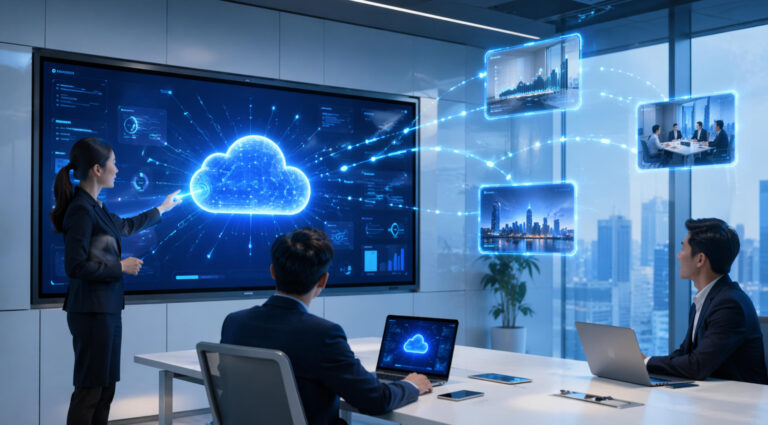
Según nuestra experiencia, muchos clientes que se acercan a nosotros para Personalización OEM/ODM solicitud específica integración en la nube en soluciones de visualización interactivaEn términos sencillos, la integración en la nube significa que los dispositivos pueden conectarse y administrarse a través de Internet, lo que permite un control centralizado en múltiples ubicaciones. Esto permite a las empresas y escuelas realizar Mantenimiento remoto, actualizaciones del sistema y gestión de contenido. Sin necesidad de operaciones in situ. En lugar de gestionar cada pantalla individualmente, todo se puede actualizar en tiempo real a través de una plataforma unificada. A medida que las pantallas interactivas se popularizan, la integración en la nube deja de ser una opción para convertirse en un requisito indispensable para lograr escalabilidad, eficiencia y una gestión de dispositivos más inteligente.
¿Qué es la integración en la nube en las pantallas interactivas?
La integración en la nube en pantallas interactivas se refiere a la capacidad de conectar dispositivos a plataformas basadas en la nube, lo que permite... acceso remoto, sincronización de datos y gestión centralizada de contenidoEn lugar de operar cada pantalla de forma independiente, las organizaciones pueden gestionar múltiples dispositivos a través de un sistema unificado en la nube. Esto incluye actualizar el contenido, supervisar el rendimiento y controlar las aplicaciones en tiempo real, independientemente de la ubicación.
En la práctica, las pantallas interactivas se conectan a plataformas en la nube a través de tecnologías como SaaS (Software como servicio), CMS (Sistemas de gestión de contenido) y marcos de trabajo de IoTPor ejemplo, marcas como Promethean y ViewSonic Ofrecemos ecosistemas basados en la nube donde los usuarios pueden subir materiales didácticos, compartir pantallas y gestionar dispositivos de forma remota a través de plataformas web. Estas integraciones permiten una colaboración fluida en aulas, oficinas o entornos comerciales.
Las principales ventajas de la integración en la nube incluyen: actualizaciones en tiempo real, gestión centralizaday fuerte escalabilidadLas empresas pueden implementar cientos de dispositivos en diferentes ubicaciones manteniendo un control y una entrega de contenido uniformes. Esto no solo mejora la eficiencia, sino que también reduce los costos operativos. En la siguiente sección, analizaremos con más detalle estos beneficios y su impacto en las aplicaciones prácticas.
Beneficios clave para las empresas y la educación.
Una de las mayores ventajas de las pantallas interactivas integradas en la nube es administración remota de dispositivos en múltiples ubicacionesLas organizaciones pueden controlar y actualizar todas las pantallas desde una única plataforma sin necesidad de estar físicamente presentes. Por ejemplo, durante una reunión anual de toda la empresa o una ceremonia de bienvenida, los equipos de TI pueden mostrar instantáneamente el mismo póster, vídeo o anuncio en todas las pantallas de las oficinas, garantizando así una imagen de marca y una comunicación coherentes.
Otro beneficio clave es Compartir contenido y colaborar sin problemasEn las reuniones de negocios, los equipos pueden compartir presentaciones, anotar documentos en tiempo real y sincronizar actualizaciones entre dispositivos. En las aulas, los profesores pueden subir materiales didácticos a la nube, lo que permite a los alumnos acceder al contenido en varias pantallas o incluso en sus propios dispositivos, creando un entorno de aprendizaje más interactivo y atractivo.
La integración en la nube también permite análisis de datos y seguimiento del rendimientoLos administradores pueden supervisar el uso de las pantallas, identificar los momentos de mayor uso y analizar qué contenido tiene mejor rendimiento. Por ejemplo, una escuela puede hacer un seguimiento de qué materiales didácticos generan mayor interacción, mientras que una empresa puede evaluar qué contenido promocional atrae más atención.
Finalmente, ayuda reducir los costos operativos y de mantenimiento de TIGracias a las actualizaciones remotas, la resolución de problemas y el control centralizado, se reduce la necesidad de soporte técnico presencial. Esto no solo ahorra tiempo, sino que también disminuye significativamente los gastos operativos a largo plazo, convirtiendo la integración en la nube en una solución altamente eficiente para implementaciones escalables.
Consideraciones técnicas y requisitos del sistema
Para aprovechar al máximo la integración en la nube en pantallas interactivas, se deben evaluar cuidadosamente varios factores técnicos. Primero, estabilidad de la red es esencial. Ya sea usando WiFi, LAN o 4G/5GUna conexión fiable garantiza una sincronización fluida de los datos, actualizaciones en tiempo real y un rendimiento ininterrumpido. Por ejemplo, en una gran conferencia o en un entorno escolar, una conectividad inestable puede provocar retrasos en las actualizaciones de contenido o la caída del sistema, lo que repercute directamente en la experiencia del usuario.
Otro aspecto crítico es seguridad y privacidad de los datosDado que las pantallas integradas en la nube suelen manejar información confidencial, como presentaciones comerciales, datos de estudiantes o comunicaciones internas, es necesaria una protección robusta. Esto incluye: cifrado de datos, sistemas de inicio de sesión seguros y control de acceso basado en rolesPor ejemplo, una empresa puede restringir los permisos de edición a administradores específicos, permitiendo a los usuarios generales solo visualizar el contenido, evitando así el acceso no autorizado o las fugas de datos.
Compatibilidad con los sistemas existentes también es clave. Las pantallas interactivas deben integrarse sin problemas con sistemas operativos ampliamente utilizados como Windows y Androidasí como plataformas en la nube de terceros. Esto garantiza que las organizaciones puedan adoptar soluciones en la nube sin necesidad de renovar su infraestructura de TI actual, ahorrando tiempo y costes.
Por último, el Fiabilidad de las actualizaciones de CMS (Sistemas de Gestión de Contenidos) y OTA (Actualizaciones Inalámbricas) Esto es fundamental. Un CMS estable permite un control centralizado del contenido, mientras que las actualizaciones OTA garantizan que los dispositivos reciban automáticamente las últimas mejoras de software y parches de seguridad. En conjunto, estas capacidades minimizan la intervención manual y mantienen los sistemas funcionando de manera eficiente a lo largo del tiempo.
Fabricante de pantallas interactivas OEM/ODM frente a pantalla interactiva de marca: ¿cuál ofrece una mejor integración en la nube?
Para las organizaciones que ponen un fuerte énfasis en integración en la nube Al comprar pantallas interactivas, surge una pregunta común: ¿debería elegir una? Fabricante OEM/ODM o un solución de marcaEn esta sección, desglosaremos las diferencias clave para ayudarte a tomar una decisión más informada.
Cuando se trata de personalización de la integración en la nubeLos fabricantes OEM/ODM ofrecen una ventaja significativa. Pueden personalizar las funciones en la nube, como las plataformas CMS, las conexiones API e incluso las implementaciones de nube privada, según las necesidades específicas de cada negocio. En cambio, las soluciones de marca suelen operar dentro de ecosistemas fijos y cerrados, lo que limita la flexibilidad.
En términos de integración y compatibilidad del sistemaLas soluciones OEM/ODM pueden diseñarse para conectarse sin problemas con los sistemas empresariales existentes, como ERP, LMS o plataformas internas. Sin embargo, las pantallas de marca suelen priorizar sus propios entornos en la nube, lo que puede restringir la integración con sistemas de terceros.
Control y seguridad de los datos Este es otro factor crítico. Los fabricantes OEM/ODM pueden ofrecer soporte para implementaciones en la nube privada o en las instalaciones, lo que brinda a las organizaciones control total sobre los datos confidenciales. Las soluciones de marca suelen depender de la infraestructura de la nube pública, lo que ofrece menos control sobre la propiedad de los datos y las políticas de seguridad.
Por fin, escalabilidad y eficiencia de costos Se recomiendan las soluciones OEM/ODM, especialmente para implementaciones a gran escala. Estas ofrecen una expansión flexible a un menor costo a largo plazo, mientras que los productos de marca suelen implicar cuotas de suscripción recurrentes y mayores costos al expandirse a múltiples ubicaciones.




 Spanish
  English
  Arabic
  French
  Indonesian
  German
  Portuguese
  Russian
  Vietnamese
  Thai
Thai  Italian