
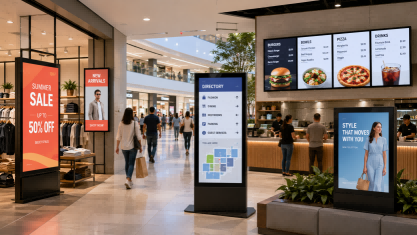
Muchas empresas aún consideran la publicidad como un proceso lento: diseñar un cartel, imprimirlo, enviarlo, instalarlo y repetir los mismos pasos cada vez que cambien los precios, los menús, las promociones o los mensajes de la campaña. Para una sola tienda, esto puede ser manejable. Sin embargo, para restaurantes, centros comerciales, hoteles, cadenas minoristas o proyectos de publicidad en múltiples ubicaciones, rápidamente se vuelve costoso, inconsistente y difícil de controlar.
Aquí es donde marketing de señalización digital Se convierte en algo más que simplemente reemplazar un póster por una pantalla. Ayuda a las empresas a mejorar la eficiencia publicitaria al actualizar el contenido con mayor rapidez, mostrar mensajes más relevantes en el momento oportuno, reducir los costos de ejecución repetida, gestionar campañas en diferentes ubicaciones y guiar a los clientes hacia acciones como escanear, realizar pedidos, visitar o hacer consultas. Esta guía explica cómo la señalización digital mejora los flujos de trabajo publicitarios, qué casos de uso son los más importantes y cómo los compradores pueden elegir la configuración adecuada antes de solicitar una solución.
¿Qué es el marketing mediante señalización digital?
Marketing de señalización digital es el uso de redes exhibidores comerciales entregar publicidadpromociones, mensajes de marca, menús, información de orientación o contenido interactivo en espacios comerciales físicos. No es solo una pantalla que muestra un video. Una pantalla completa sistema de marketing de señalización digital Por lo general, incluye hardware de visualización, gestión de contenido, programación de reproducción, conexión de red, planificación de la instalación y un objetivo publicitario claro.
En comparación con los carteles impresos, publicidad en señalización digital Es más fácil de actualizar y ajustar. Un cartel impreso muestra un mensaje fijo hasta que se reemplaza, mientras que una pantalla digital puede mostrar contenido diferente según la hora, la ubicación, las necesidades de la campaña o el comportamiento del cliente. Por ejemplo, un restaurante puede mostrar desayunos por la mañana, menús combinados al mediodía y ofertas por tiempo limitado por la noche utilizando la misma red publicitaria.
También es diferente de usar un televisor normal o una sola pantalla publicitaria sin conexión. Un televisor básico puede reproducir contenido desde una unidad USB, pero señalización digital comercial Está diseñado para un uso empresarial más controlado, como listas de reproducción programadas, actualizaciones de contenido centralizadas, gestión de múltiples pantallas y un funcionamiento estable durante largas jornadas. Para los compradores que gestionan tiendas minoristas, restaurantes, hoteles, centros comerciales o áreas de servicio público, esta diferencia es importante porque la publicidad no se trata solo de mostrar contenido, sino de gestionar el mensaje adecuado en el lugar y momento precisos.
En este sentido, marketing de señalización digital Funciona como un sistema de comunicación flexible. Su valor reside en su facilidad de gestión, actualización, programación y escalabilidad para adaptarse a las diferentes necesidades de publicidad comercial.
Cómo la señalización digital mejora la eficiencia publicitaria en flujos de trabajo de marketing reales
La señalización digital mejora la eficacia publicitaria al transformar la forma en que se crean, actualizan, muestran y miden las campañas. En lugar de tratar la publicidad como un póster fijo o un único vídeo en bucle, las empresas pueden gestionar el contenido como un flujo de trabajo flexible: actualizar los mensajes con mayor rapidez, programar el contenido para diferentes momentos, controlar múltiples ubicaciones desde un solo sistema, hacer que el contenido sea más atractivo y vincular los mensajes en pantalla con las acciones del cliente.
Actualizaciones de campaña más rápidas sin necesidad de reimprimir
La publicidad tradicional suele depender de un ciclo de producción lento. Una empresa necesita diseñar el cartel, aprobar el diseño, imprimirlo, enviarlo, instalarlo y retirarlo cuando finaliza la campaña. Si cambia el precio, se agota un producto o hay que lanzar una promoción rápidamente, todo el proceso se vuelve ineficiente.
Con publicidad en señalización digitalLa misma pantalla puede mostrar contenido actualizado sin necesidad de reimprimirlo. Un restaurante puede cambiar los precios del menú, un hotel puede actualizar la información de eventos y una tienda puede reemplazar la promoción del día anterior con una nueva oferta. Esto mejora la eficiencia publicitaria, ya que el equipo de marketing dedica menos tiempo a esperar materiales físicos y más tiempo a ajustar las campañas según las necesidades reales del negocio.
Publicidad basada en el tiempo para diferentes momentos del cliente.
Un cartel estático suele mostrar el mismo mensaje durante todo el día. Sin embargo, las necesidades de los clientes cambian a lo largo del día. Una cafetería puede querer promocionar desayunos por la mañana, menús de almuerzo al mediodía y postres u ofertas para llevar por la noche. Un centro comercial puede necesitar contenido diferente para los días laborables, los fines de semana, los días festivos o las horas punta.
La señalización digital facilita esto mediante la programación de contenido. En lugar de cambiar manualmente cada pantalla, las empresas pueden preparar diferentes listas de reproducción para distintos momentos. Esto hace que la publicidad sea más relevante, ya que el mensaje en pantalla se ajusta al momento del cliente. La mejora en la eficiencia no solo se traduce en una entrega de contenido más rápida, sino también en un mejor aprovechamiento de la atención del cliente en cada pantalla.
Control centralizado en múltiples ubicaciones
Para las empresas con múltiples tiendas, sucursales, restaurantes o puntos de venta, la eficacia publicitaria depende en gran medida de la coherencia. Sin un control centralizado, cada establecimiento puede actualizar el contenido de forma diferente, usar imágenes obsoletas, mostrar precios incorrectos o no lanzar las campañas a tiempo.
A Sistema de gestión de contenidos (CMS) para señalización digital Esto ayuda a solucionar el problema al permitir que los equipos gestionen el contenido de las pantallas desde una plataforma centralizada. La sede central puede publicar campañas de marca, mientras que los equipos locales pueden ajustar el idioma, los precios o la información específica de la ubicación según los permisos del sistema. Esto resulta especialmente útil para cadenas regionales, redes de franquicias, centros comerciales, grupos hoteleros y redes de servicios públicos.
Un ejemplo público es el despliegue global de menús digitales de Little Caesars con NowSignage. Los informes describen el proyecto como una transición de procesos manuales de menú a un CMS centralizado basado en la nube en miles de restaurantes de 16 países, que permite la actualización en tiempo real de la información del menú, precios, disponibilidad, varios idiomas y monedas. Este tipo de flujo de trabajo demuestra la importancia de la gestión centralizada en proyectos de publicidad y visualización de menús a gran escala.
Contenido más atractivo que los carteles estáticos.
La eficacia publicitaria también depende de la rapidez con la que un mensaje capte la atención. En espacios comerciales concurridos, la gente puede mirar una pantalla solo durante unos segundos. Los carteles estáticos funcionan bien para mensajes sencillos, pero resultan limitados cuando una empresa necesita mostrar vídeos de productos, promociones rotativas, campañas de temporada o narración visual.
La señalización digital puede mostrar gráficos animados, vídeos cortos, diapositivas de productos, cuentas atrás, menús rotativos y contenido visual de marca. Esto ofrece a los profesionales del marketing formatos más creativos para explicar las ofertas rápidamente. Por ejemplo, una tienda puede mostrar imágenes de productos y mensajes promocionales cerca de la caja, mientras que la pantalla del vestíbulo de un hotel puede combinar mensajes de bienvenida, horarios de eventos y contenido de marca.
La clave no es hacer que la pantalla sea demasiado llamativa. El objetivo es que el mensaje sea más fácil de percibir, comprender y poner en práctica dentro del tiempo de visualización disponible.
Códigos QR, interacción táctil y publicidad basada en acciones.
Una de las principales ventajas de marketing de señalización digital Su principal ventaja es que permite conectar la publicidad física con la acción del cliente. Un cartel impreso puede mostrar un mensaje, pero la señalización digital puede guiar al espectador hacia la exploración, el pedido, la búsqueda, la reserva o el envío de una consulta.
Por ejemplo, una pantalla puede mostrar un código QR para un cupón, una página de pedidos móviles, un catálogo de productos, un formulario de inscripción a un evento o una consulta por WhatsApp. Una pantalla táctil o un quiosco interactivo permite a los usuarios explorar productos, consultar mapas, comparar opciones o solicitar más información. Esto mejora la eficacia publicitaria, ya que la pantalla deja de ser solo un punto de visualización y se convierte en parte del proceso de conversión.
McDonald's Japón ofrece un ejemplo público muy útil. En su campaña digital de publicidad exterior con códigos QR cambiantes, los códigos mostrados en las pantallas variaban según factores como el clima y la hora. Los usuarios podían escanear los códigos para recibir recomendaciones del menú y realizar pedidos a través de la aplicación móvil. Este tipo de campaña demuestra cómo la publicidad en pantalla puede pasar de la visualización pasiva a la interacción activa.
Pruebas, seguimiento y optimización de campañas más sencillos.
La publicidad impresa es difícil de ajustar una vez instalada. Si el mensaje no funciona bien, la empresa podría no saber el motivo hasta que finalice la campaña. La señalización digital ofrece a los profesionales del marketing más margen para probar y mejorar el contenido durante el periodo de la campaña.
El seguimiento básico puede incluir escaneos de códigos QR, uso de códigos de cupón, envíos de formularios de consulta, comparación de ventas, registros de reproducción y rendimiento de la rotación de contenido. Un restaurante puede comparar qué promoción del menú recibe más escaneos. Una sala de exposición puede probar si un video de producto o una pantalla de consulta con código QR genera más clientes potenciales. Una tienda minorista puede comparar el contenido de las promociones de fin de semana con el contenido de los días laborables.
Sin embargo, los compradores deben comprender que el análisis avanzado no es automático en todos los sistemas. Funcionalidades como la medición de audiencia, los sensores, los datos detallados de interacción o la integración con el punto de venta dependen del software, el hardware y la configuración del proyecto. Para la mayoría de los proyectos comerciales, el punto de partida práctico es definir qué se debe medir antes de la implementación. De esta manera, la señalización digital se convierte no solo en una herramienta de visualización, sino en un flujo de trabajo publicitario repetible que se puede actualizar, probar y mejorar con el tiempo.
Casos de uso de la señalización digital para marketing en diferentes tareas publicitarias
Si bien las empresas pueden usar señalización digital en diferentes ubicaciones, las tareas de marketing suelen ser similares. Un restaurante puede necesitar presentar menús con claridad, un centro comercial promocionar eventos, un hotel guiar a sus visitantes y una sala de exposiciones convertir el interés por un producto en consultas. En lugar de elegir una pantalla únicamente por su tamaño o apariencia, los compradores deben identificar primero la función publicitaria que desean que cumpla el sistema.
Exhibición de promoción y campaña
Este caso de uso es adecuado cuando el objetivo principal es mantener visible el contenido promocional en zonas de mucho tránsito. Tiendas minoristas, centros comerciales, vestíbulos de hoteles, stands de exposiciones y mostradores de atención al cliente pueden usar pantallas para mostrar campañas de temporada, lanzamientos de nuevos productos, ofertas por tiempo limitado, promociones de membresía o mensajes de eventos.
El contenido suele ser breve, visual y centrado en la campaña. Los formatos de hardware comunes incluyen: Señalización digital de pie, señalización digital montada en la paredPantallas de pago, pantallas en el vestíbulo y pantallas publicitarias. En este caso, la clave es no mostrar demasiados mensajes a la vez. Una oferta clara, un elemento visual impactante y una llamada a la acción sencilla suelen funcionar mejor que un diseño recargado.
Menú digital y recomendación de productos
Las pantallas digitales de menús y recomendaciones de productos son útiles cuando el objetivo publicitario es ayudar a los clientes a tomar decisiones de compra más rápidas. Esto es común en restaurantes, cafeterías, cadenas de comida rápida, tiendas de conveniencia, panaderías y establecimientos de bebidas.
El contenido puede incluir elementos del menú, comidas combinadas, los más vendidos, recomendaciones de complementos, productos nuevos, ofertas por tiempo limitado o imágenes de productos. Menú digital Es el formato más común, pero también se pueden usar pantallas de pared, vitrinas de mostrador y pantallas para autoservicio, según la distribución. Para los compradores, lo importante es la legibilidad, la estructura del menú, la calidad de la imagen del producto y si la posición de la pantalla facilita el proceso de compra del cliente.
Atracción de la ventana y la entrada
El atractivo de escaparates y entradas es ideal cuando el objetivo principal de marketing es captar la atención antes de que la gente entre al local. Esto se aplica a tiendas a pie de calle, entradas de centros comerciales, entradas de hoteles, salas de exposición, tiendas efímeras y pabellones de exposiciones.
El contenido debe ser lo suficientemente sencillo para que la gente lo entienda al pasar. Algunos ejemplos son un mensaje de bienvenida, una oferta de descuento, un vídeo de la marca, una reseña de un producto o el anuncio de un evento. El hardware adecuado puede incluir pantallas de alto brillo para escaparates, señalización digital exterior, carteles LED y pantallas de entrada independientes. En este caso, la visibilidad es más importante que la cantidad de contenido. El mensaje debe ser llamativo, breve y fácil de leer a distancia.
Orientación mediante publicidad
La señalización mediante publicidad resulta útil cuando las personas ya necesitan detenerse a buscar información. Los centros comerciales, hospitales, aeropuertos, edificios de oficinas, campus universitarios y centros de servicios públicos suelen utilizar pantallas de directorio o quioscos táctiles para ayudar a los visitantes a encontrar tiendas, departamentos, puertas de acceso, mostradores o salas.
El valor publicitario reside en combinar una navegación útil con contenido promocional relevante. Por ejemplo, un directorio de un centro comercial puede mostrar la ubicación de las tiendas y, al mismo tiempo, promociones de restaurantes o anuncios de eventos. La pantalla del vestíbulo de un hospital puede mostrar indicaciones para llegar a los departamentos junto con anuncios de servicios de salud. Los formatos adecuados incluyen: quioscos de orientacióndirectorios interactivos, pantallas táctiles de pie y pantallas de directorio montadas en la pared. El contenido publicitario no debe interferir con la tarea principal de navegación del usuario.
Participación en la sala de espera
La interacción en las salas de espera es adecuada cuando los clientes, visitantes o pasajeros pasan tiempo en un mismo lugar antes de recibir atención. Bancos, clínicas, hospitales, restaurantes, aeropuertos, oficinas gubernamentales, talleres mecánicos y recepciones cuentan con este tipo de ambiente.
El contenido puede incluir pasos del servicio, información sobre la cola, preguntas frecuentes, historias de la marca, presentaciones de productos, recordatorios de seguridad o mensajes promocionales breves. Los formatos de hardware adecuados incluyen pantallas de pared, pantallas para la cola, pantallas de mostrador y pantallas publicitarias para salas de espera. En este caso, el tono debe ser útil en lugar de agresivo. El objetivo es mantener a las personas informadas, reducir la incertidumbre y aprovechar el tiempo de espera como una oportunidad para una comunicación sutil.
Captura interactiva de clientes potenciales y conversión mediante código QR
La captura interactiva de clientes potenciales es útil cuando la tarea publicitaria no termina con la visibilidad. Algunas empresas necesitan que los clientes den el siguiente paso, como escanear un código, consultar los detalles del producto, reservar un servicio, enviar una consulta, descargar un catálogo o contactar con el departamento de ventas.
Este caso de uso es común en salas de exposición, centros de venta de bienes raíces, concesionarios de automóviles, exhibidores de productos B2B, ferias y centros de experiencias. El hardware adecuado puede incluir quioscos táctiles, pantallas de consulta de productos, pantallas para salas de exposición, pantallas con códigos QR y señalización digital interactiva. El contenido debe indicar claramente la siguiente acción. Un botón claro, un formulario breve, un código QR visible o una ruta de navegación sencilla pueden ayudar a conectar la atención presencial con la conversión en línea.
Gestión de campañas en múltiples ubicaciones
La gestión de campañas multisede es adecuada cuando la tarea publicitaria involucra numerosas sucursales, tiendas, ciudades o países. Las cadenas de restaurantes, las marcas minoristas, los grupos hoteleros, las franquicias, los centros comerciales y las redes de publicidad exterior suelen necesitar una imagen de marca coherente, a la vez que permiten realizar ajustes locales.
El contenido puede incluir campañas de marca, plantillas de menú, promociones regionales, versiones en idiomas locales, actualizaciones de precios, campañas navideñas o anuncios específicos de cada tienda. El hardware adecuado puede incluir pantallas comerciales conectadas a un CMS, pantallas de señalización Android, menús digitales y redes de pantallas basadas en reproductores multimedia. Para este caso de uso, los compradores deben centrarse en los permisos de contenido, el control de plantillas, las necesidades de idioma, la agrupación de pantallas y si los equipos locales necesitan acceso de edición limitado.
Resumiendo, Casos de uso de marketing para señalización digital La planificación debe centrarse en las tareas publicitarias, no solo en sectores o tipos de pantalla. Una pantalla cerca de la entrada de una tienda, un menú en un restaurante, un quiosco táctil en una sala de exposiciones y un directorio en un centro comercial pueden contribuir a diferentes objetivos de marketing. Cuanto mejor se defina el caso de uso, más fácil será elegir el contenido, el formato de hardware y el método de gestión adecuados.
Cómo elegir la configuración de señalización digital adecuada según los objetivos de marketing.
El derecho configuración de señalización digital Se debe comenzar por el objetivo de marketing, no por el diseño de la pantalla. Una pantalla de pared, una pantalla de pie, una unidad para exteriores o un quiosco táctil pueden ser útiles, pero solo si su función se ajusta a la tarea publicitaria. Para los compradores, la pregunta más pertinente no es "¿Qué pantalla debo comprar?", sino "¿Qué necesito lograr con esta pantalla?".
Una práctica solución de señalización digital comercial Generalmente, se relacionan tres decisiones: el objetivo de la campaña, la función requerida y el formato de hardware adecuado. La siguiente tabla muestra cómo se pueden traducir los diferentes objetivos de marketing en requisitos de configuración.
| Objetivo de marketing | Configuración de funciones recomendada | Formato de hardware adecuado | Puntos clave de configuración |
|---|---|---|---|
| Atrae a los transeúntes y aumenta las visitas a la tienda. | Exhibición publicitaria de alta visibilidad con contenido promocional de ciclo corto. | Pantalla para escaparate, señalización digital de pie, señalización digital para exteriores, póster LED | Brillo, ángulo de visión, diseño antirreflejos, mensajes cortos, fuerte contraste visual. |
| Promocionar productos dentro de la tienda | Exhibición de promociones en tienda con campañas de productos programadas. | Exhibidor de pared, exhibidor de área de estante, pantalla de caja, exhibidor de cabecera de góndola | Diseño del contenido, calidad de la imagen del producto, programación de listas de reproducción, ubicación de la pantalla cerca de las decisiones de compra |
| Actualizar menús, precios u ofertas diarias. | Visualización de menú digital con programación de contenido basada en CMS. | Menú digital, señalización mural, pantalla para autoservicio, pantalla para mostrador | Actualización remota, programación horaria, plantilla de menú, reproducción estable, edición de precios sencilla. |
| Mejorar la experiencia de espera del cliente | Pantalla interactiva en la zona de espera con información sobre el servicio y contenido promocional sutil. | Pantalla de sala de espera, pantalla montada en la pared, pantalla de cola, pantalla de mostrador de servicio | Duración del ciclo de contenido, legibilidad, relevancia del tiempo de espera, tono publicitario equilibrado |
| Combine la señalización con la publicidad. | Visualización de directorio y navegación con rotación de anuncios | Quiosco de información, directorio interactivo, pantalla táctil de pie | Función táctil, interfaz de mapa, espacios publicitarios, soporte multilingüe, precisión de los datos de ubicación |
| Capturar clientes potenciales o impulsar la acción del cliente. | Visualización de conversión interactiva o basada en código QR | Quiosco táctil, pantalla de consulta de productos, pantalla de código QR, pantalla de sala de exposición | Seguimiento de códigos QR, formulario de consulta, conexión con la página de destino, interfaz táctil, claridad en la llamada a la acción. |
| Gestiona campañas en múltiples ubicaciones. | Red centralizada de señalización digital con CMS remoto | Pantallas comerciales conectadas a CMS, pantallas de señalización Android, red de señalización basada en reproductores multimedia | Permisos de usuario, plantillas de contenido, programación en múltiples ubicaciones, monitorización remota, localización de idiomas. |
| Apoye la publicidad exterior o semi-exterior. | Instalación de señalización resistente a la intemperie y de alto brillo | Señalización digital exterior, pantalla de alto brillo orientada hacia ventanas, pantalla semiexterior | Brillo, resistencia al agua, disipación de calor, estructura de instalación, acceso para mantenimiento |
Por ejemplo, un restaurante que principalmente necesita actualizar precios y ofertas diarias no debería empezar comparando solo tamaños de pantalla. Primero debería comprobar si el Menú digital Admite plantillas de menú claras, reproducción estable, contenido programado y edición sencilla. Un centro comercial que desee combinar navegación y publicidad debería centrarse más en la función táctil, la interfaz de mapas, la rotación de anuncios y el contenido multilingüe.
La misma lógica se aplica a las tiendas minoristas. Si el objetivo es atraer a personas del exterior, el brillo y la visibilidad son más importantes que las funciones interactivas. Si el objetivo es influir en las decisiones de compra dentro de la tienda, la ubicación de las pantallas cerca de los estantes de productos, las cajas registradoras o las zonas promocionales puede ser más importante. Para una cadena minorista con múltiples ubicaciones, la prioridad puede cambiar nuevamente hacia Sistema de gestión de contenidos (CMS) para señalización digitalpermisos de contenido, plantillas y monitorización remota.
Los compradores también deben tener en cuenta el entorno de instalación. Una pantalla utilizada en un vestíbulo interior con sombra requiere requisitos diferentes a los de una pantalla expuesta a la luz solar directa en una ventana. Un quiosco táctil en un área pública debe considerar el diseño de la interfaz de usuario y la durabilidad, mientras que una pantalla publicitaria exterior necesita mayor protección, disipación de calor y un acceso más sencillo para el mantenimiento.
Resumiendo, publicidad en señalización digital Funciona mejor cuando la configuración se ajusta al objetivo de marketing. Antes de solicitar una solución, los compradores deben preparar el escenario de aplicación, la ubicación de instalación, el tipo de contenido, la cantidad de pantallas, el estado de la red y los requisitos del CMS. Esto facilita que los proveedores recomienden una configuración que respalde la tarea publicitaria, en lugar de simplemente ofrecer una pantalla con un precio.
Errores comunes que reducen la eficacia de la publicidad en señalización digital.
Muchos publicidad en señalización digital Los proyectos no rinden al nivel esperado no porque la pantalla sea inadecuada, sino porque se planifican como si se tratara de una simple compra de hardware. Una pantalla puede mostrar contenido, pero la eficacia publicitaria depende del objetivo, el mensaje, la ubicación, el método de actualización y el seguimiento del rendimiento. Cuando faltan estos elementos, la señalización digital puede convertirse en una pantalla más en la pared.
- Comprar pantallas antes de definir los objetivos publicitarios
Problema: Algunos compradores comienzan preguntando por el tamaño, el precio o la apariencia de la pantalla antes de decidir qué función debe cumplir. Esto puede resultar en una configuración que se vea bien, pero que no cumpla con el objetivo de marketing real.
Mejor enfoque: Primero, define el objetivo. ¿La pantalla busca atraer transeúntes, promocionar productos, actualizar menús, guiar a los visitantes, captar clientes potenciales o gestionar campañas en diferentes ubicaciones? Una vez que el objetivo esté claro, será más fácil determinar el formato de visualización, el tipo de contenido, las necesidades del CMS y la ubicación de instalación. - Uso de diseños de pósteres estáticos directamente en pantallas digitales
Problema: Un común error de señalización digital Se trata de copiar el diseño de un póster impreso en una pantalla sin ajustar la maquetación. Los pósteres impresos suelen contener demasiado texto, detalles pequeños o información fija que no se visualiza bien en momentos breves.
Mejor enfoque: Diseña para visualización en pantalla. Utiliza titulares claros, imágenes impactantes del producto, mensajes breves, diseños sencillos y contenido fácil de entender. Las pantallas digitales no deben parecer un póster en PDF reproduciéndose en un monitor. - Mostrar demasiado texto en una sola pantalla
Problema: En tiendas, centros comerciales, restaurantes o espacios públicos concurridos, los usuarios no suelen detenerse el tiempo suficiente para leer un párrafo completo. Si una pantalla contiene demasiadas ofertas, precios, iconos, códigos QR y descripciones, el mensaje se vuelve difícil de comprender.
Mejor enfoque: Mantén cada pantalla centrada en una idea principal. Por ejemplo, la pantalla de un restaurante puede destacar una oferta combinada en lugar de mostrar todas las promociones a la vez. La pantalla de una tienda puede mostrar mensajes de diferentes productos de forma rotativa en lugar de agruparlos en un solo diseño. - Ignorando la distancia de visualización y el flujo de tráfico.
Problema: Una pantalla puede instalarse en un lugar donde la gente rara vez mira, se para demasiado cerca, camina demasiado rápido o no puede leer el mensaje con claridad. En ese caso, incluso un buen contenido puede no ser suficiente para lograr la eficacia publicitaria.
Mejor enfoque: Adapta la ubicación de la pantalla al movimiento de los clientes. Las pantallas de entrada deben mostrar mensajes cortos y llamativos. Las pantallas de caja pueden mostrar promociones adicionales. Las pantallas de la sala de espera pueden mostrar contenido informativo más extenso. La ubicación debe seguir el movimiento, las pausas y las decisiones que toman las personas en el espacio. - Uso de pantallas de bajo brillo en áreas luminosas o al aire libre.
Problema: Una pantalla que se ve nítida en interiores puede volverse difícil de leer cerca de ventanas, escaparates, áreas semiabiertas o bajo la luz solar directa. Si los espectadores no pueden ver el contenido con claridad, el valor publicitario disminuye de inmediato.
Mejor enfoque: Seleccione el nivel de brillo según el entorno de instalación. Una pared interior sombreada no requiere las mismas especificaciones que una pantalla publicitaria exterior o un panel para publicidad al aire libre. Para proyectos exteriores o semiexteriores, los compradores también deben considerar la disipación del calor, el nivel de protección, la estructura de instalación y el acceso para el mantenimiento. - Actualizar el contenido manualmente sin CMS
Problema: Para proyectos pequeños, las actualizaciones por USB pueden ser suficientes. Pero para restaurantes, cadenas minoristas, hoteles, centros comerciales o campañas con múltiples ubicaciones, las actualizaciones manuales pueden generar retrasos, contenido inconsistente y trabajo innecesario.
Mejor enfoque: Utilice un Sistema de gestión de contenidos (CMS) para señalización digital Cuando el proyecto requiere actualizaciones frecuentes, listas de reproducción programadas, control multipantalla o contenido basado en la ubicación. Esto no significa que todos los proyectos necesiten un sistema complejo, pero los proyectos comerciales suelen requerir un flujo de trabajo más manejable que la sustitución manual de archivos. - No se realiza un seguimiento de las acciones o resultados de la campaña.
Problema: Algunas empresas instalan pantallas, pero nunca miden si el contenido ayuda a generar escaneos, consultas, uso de cupones, visitas a la tienda o interés en los productos. Sin un seguimiento, es difícil saber qué contenido funciona y cuál debería modificarse.
Mejor enfoque: Antes de que comience la campaña, establezca puntos de medición sencillos. Estos pueden incluir escaneos de códigos QR, códigos de cupón, formularios de consulta, registros de reproducción, comparación de ventas o comentarios de los clientes. El análisis avanzado depende de la configuración del sistema, pero incluso un seguimiento básico puede ayudar a mejorar las decisiones sobre el contenido futuro.
Evitar estos errores ayuda a las empresas a tratar marketing de señalización digital Se trata de un sistema publicitario planificado, no solo de una compra de publicidad en pantalla. La pantalla es importante, pero la verdadera eficacia reside en la adecuación de los objetivos, el contenido, la ubicación, el método de gestión y la medición.
Qué deben preparar los compradores antes de solicitar una solución de señalización digital.
Antes de contactar con un proveedor de señalización digital or manufacturer, buyers should prepare a clear project brief instead of only asking for screen size and price. A supplier can give more accurate recommendations when the inquiry explains the advertising goal, installation environment, content type, management method, and deployment scale. For larger projects, understanding the Digital Advertising Display Supply Chain can also help buyers evaluate manufacturer capability, customization options, production consistency, and long-term support.
Aquí hay una lista de verificación práctica que los compradores pueden preparar antes de solicitar un solución de señalización digital comercial:
| Tipo de información | Lo que los compradores deben preparar |
|---|---|
| Objetivo de marketing | Atrae visitantes, promociona productos, actualiza menús, guía a los visitantes, recopila clientes potenciales o gestiona campañas en diferentes ubicaciones. |
| Escenario de aplicación | Tienda minorista, restaurante, hotel, centro comercial, nudo de transporte, sala de exposiciones, área de servicio público o espacio de exhibición. |
| Ubicación de instalación | Pared, entrada, ventana, área exterior, mostrador de caja, sala de espera, vestíbulo, pasillo, vestíbulo del ascensor o mostrador de servicio |
| Requisitos de pantalla | Tamaño de la pantalla, disposición horizontal o vertical, nivel de brillo, táctil o no táctil, uso en interiores o exteriores. |
| Tipo de contenido | Imágenes, vídeos, menús, códigos QR, mapas de orientación, promociones de productos, información sobre eventos o listas de reproducción publicitarias. |
| Requisito de CMS | Reproducción independiente, CMS en la nube, control multipantalla, permisos de usuario, programación de contenido, gestión de plantillas o monitorización remota. |
| Entorno de red | Wi-Fi, red cableada, reproducción sin conexión, actualizaciones USB o condiciones de red mixtas |
| Escala de despliegue | Una pantalla, lote pequeño, múltiples tiendas, red de centros comerciales, cadena de franquicias o implementación en varios países. |
| Necesidades de localización | Idioma, moneda, precios regionales, promociones locales o contenido de campañas basadas en la ubicación. |
| Necesidades de apoyo | Personalización OEM/ODM, compatibilidad con el sistema Android, compatibilidad con CMS, sugerencias de instalación, soporte técnico y mantenimiento postventa. |
Este tipo de resumen del proyecto ayuda al proveedor a comprender si la solicitud requiere una pantalla publicitaria sencilla, un menú digital, un quiosco interactivo, una pantalla exterior o una red de señalización conectada a un CMS. Además, reduce la comunicación innecesaria y facilita que ambas partes definan la configuración adecuada con antelación.
Si está planificando un proyecto de exhibición publicitaria para tiendas minoristas, restaurantes, hoteles, centros comerciales o espacios públicos, prepare su objetivo de marketing, ubicación de instalación, tipo de contenido, cantidad de pantallas, entorno de red y necesidades de CMS antes de solicitar una solución. fabricante de señalización digital y pantallas comercialesIkinor puede brindar soporte para debates basados en proyectos sobre formato de pantalla, sistema Android, compatibilidad con CMS, escenarios de instalación y personalización OEM/ODM.
Conclusión: Adapta el contenido, la pantalla y el escenario para una mayor eficacia publicitaria.
Marketing de señalización digital Funciona mejor cuando el contenido, el formato de pantalla, el escenario de instalación y el método de gestión se planifican conjuntamente. No se trata simplemente de sustituir carteles impresos por pantallas digitales. Una configuración eficaz debe respaldar el objetivo publicitario real, ya sea atraer visitantes, actualizar menús, promocionar productos, guiar a los clientes, captar clientes potenciales o gestionar campañas en múltiples ubicaciones.
Para un proyecto pequeño, una configuración de pantalla simple puede ser suficiente. Para proyectos comerciales, los compradores deben examinar con más detenimiento el brillo de la pantalla, el tipo de contenido, la estabilidad de la reproducción, las necesidades de CMS, el entorno de red, las condiciones de instalación y el soporte del proveedor a largo plazo. Antes de contactar con un proveedor de señalización digital, prepare su objetivo de marketing, ubicación de instalación, cantidad de pantallas, formato de contenido y requisitos de gestión. Como solución de señalización digital comercial Como fabricante, Ikinor puede brindar soporte para debates basados en proyectos sobre formato de pantalla, sistema Android, compatibilidad con CMS, escenarios de instalación y personalización OEM/ODM.
Preguntas frecuentes
El marketing mediante señalización digital utiliza pantallas digitales para mostrar publicidad, promociones, menús, mensajes de marca, información de orientación o contenido interactivo en espacios comerciales físicos. No se trata solo de reproducir vídeos en una pantalla. En proyectos comerciales, suele combinar hardware de pantalla, planificación de contenido, programación, conexión de red y un objetivo de marketing claro.
La señalización digital mejora la eficacia publicitaria al facilitar la actualización, programación, gestión y ajuste del contenido. En lugar de imprimir nuevos carteles para cada cambio de campaña, las empresas pueden mostrar mensajes actualizados en pantallas. Además, permite a los equipos mostrar contenido diferente según el momento, la ubicación o la situación del cliente, lo que aporta mayor flexibilidad a la publicidad en comparación con los materiales impresos tradicionales.
La señalización digital suele ser mejor cuando un negocio necesita actualizaciones frecuentes, múltiples campañas, precios cambiantes o control de contenido en varias ubicaciones. La publicidad impresa aún puede funcionar para mensajes sencillos a largo plazo, pero es menos flexible cuando las promociones cambian rápidamente. Para restaurantes, tiendas minoristas, hoteles, centros comerciales y espacios públicos, la publicidad en señalización digital suele ofrecer un mayor control y una ejecución de campañas más rápida.
Entre los casos de uso más comunes se incluyen pantallas promocionales, menús digitales, publicidad en escaparates, señalización con anuncios, interacción en zonas de espera, captación interactiva de clientes potenciales y gestión de campañas en múltiples ubicaciones. El caso de uso más adecuado depende de la tarea publicitaria. Por ejemplo, un restaurante puede centrarse en actualizar su menú, mientras que un centro comercial puede combinar pantallas informativas con promociones de sus tiendas.
Un CMS para señalización digital resulta útil cuando el proyecto requiere actualizaciones frecuentes de contenido, listas de reproducción programadas, múltiples pantallas, gestión remota o contenido diferente para distintas ubicaciones. Un proyecto pequeño de una sola pantalla puede utilizar una reproducción sencilla, pero los proyectos comerciales suelen necesitar un CMS para reducir el trabajo manual y mantener la coherencia del contenido publicitario.
Un televisor convencional puede ser suficiente para la reproducción de contenido en interiores, como un vídeo desde una memoria USB. Sin embargo, los proyectos de señalización digital comercial suelen requerir un funcionamiento más estable durante largas horas, mejores opciones de brillo, reproducción programada, actualizaciones remotas y flexibilidad de instalación. Para la publicidad comercial, los compradores deben comparar los televisores convencionales con las pantallas comerciales según las características específicas del proyecto.



 Spanish
  English
  Arabic
  French
  Indonesian
  German
  Portuguese
  Russian
  Vietnamese
  Thai
Thai  Italian