
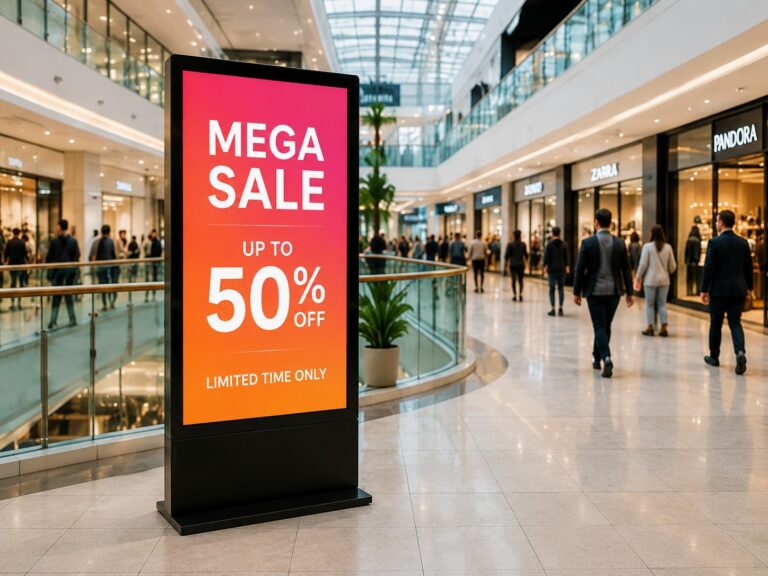
Muchas empresas instalan señalización digital Con grandes expectativas, la pantalla termina mostrando las mismas imágenes todos los días. Los clientes dejan de prestarle atención, el personal no la actualiza y la pantalla se convierte en un elemento decorativo en lugar de una herramienta de trabajo. El problema no suele ser la pantalla en sí, sino la falta de un objetivo claro, contenido útil, una ubicación adecuada y una gestión de contenido sencilla.
Esta guía explica Cómo utilizar la señalización digital Paso a paso para optimizar la publicidad de tu negocio y la comunicación con tus clientes. Aprenderás a definir tu objetivo, elegir la ubicación ideal para tus pantallas, crear contenido efectivo para señalización digital, añadir llamadas a la acción claras, gestionar las actualizaciones con software o CMS y comprobar si tus pantallas están contribuyendo realmente al éxito de tu negocio.
¿Qué es la señalización digital y cómo funciona?
señalización digital Es un sistema de visualización comercial que se utiliza para mostrar contenido dinámico como imágenes, vídeos, menús, promociones, anuncios, información de orientación o mensajes de marca. A diferencia de un cartel impreso o una pantalla convencional que reproduce archivos aleatorios, la señalización digital suele combinar una pantalla, un dispositivo de reproducción, contenido, conexión de red y un sistema de gestión. Está diseñada para ayudar a las empresas a comunicarse con clientes, visitantes o empleados de una manera más flexible y visual.
Un básico sistema de señalización digital Generalmente incluye varias partes:
- Pantalla: La pantalla comercial que muestra el contenido.
- Reproductor multimedia para señalización digital: Un dispositivo que almacena o recibe contenido y lo envía a la pantalla.
- Sistema de señalización digital Android: Algunas pantallas tienen un sistema Android integrado, por lo que pueden reproducir contenido sin necesidad de un reproductor externo.
- Sistema de gestión de contenidos (CMS) para señalización digital: Software utilizado para cargar, programar, actualizar y gestionar contenido.
- Conexión de red: Reproducción mediante Wi-Fi, LAN o sin conexión, según el proyecto.
- Configuración de la instalación: Montaje en pared, de pie, sobre mostrador, tipo quiosco u otros métodos de instalación.
Por ejemplo, un restaurante puede usar la señalización digital como menú digital para mostrar imágenes de platos, precios, menús combinados y productos agotados. El vestíbulo de una oficina puede usarla para mostrar mensajes de bienvenida, horarios de reuniones o información para visitantes. Una tienda puede usarla para promocionar nuevos productos, descuentos u ofertas mediante código QR cerca de la entrada o la caja.
El proceso de trabajo es simple: la empresa crea contenido, lo sube a través de software de señalización digital Mediante un CMS, se programa cuándo y dónde debe aparecer el contenido, y la pantalla lo reproduce automáticamente. Para una sola pantalla, las actualizaciones son sencillas. Para múltiples ubicaciones, la gestión remota de contenido resulta más útil, ya que los equipos pueden actualizar las campañas sin necesidad de visitar cada sitio. Por eso, la señalización digital no es solo una pantalla; es un sistema de comunicación empresarial controlable.
Paso 1: Define tu objetivo comercial antes de usar señalización digital.
Un error común es elegir primero la pantalla y pensar en el objetivo comercial después. Para los principiantes, esto suele llevar a un problema simple: la pantalla está instalada, pero el contenido no tiene un propósito claro. Antes de usar señalización digitalLas empresas deben decidir primero qué resultado quieren que admita la pantalla.
Tu objetivo no tiene por qué ser complicado. Puede ser una tarea empresarial clara:
| Objetivo empresarial | Cómo la señalización digital puede ayudarle |
|---|---|
| Promocionar productos | Muestra los productos nuevos, los más vendidos, los descuentos o las ofertas por tiempo limitado. |
| Aumentar el flujo de clientes que entran sin cita previa | Utilice imágenes llamativas para atraer a las personas que pasan por allí. |
| Guía para visitantes | Muestra indicaciones, pasos para llegar al servicio, información sobre el piso o mensajes de bienvenida. |
| Reducir la presión de espera | Muestra mensajes en cola, consejos útiles, entretenimiento o información del servicio. |
| Recopilar clientes potenciales | Añade códigos QR para reservas, consultas, cupones o para seguirnos en redes sociales. |
| Mostrar mensajes de marca | Muestre videos de la marca, valores de la empresa, testimonios o momentos destacados del evento. |
| Actualizar la información más rápido | Sustituye los carteles impresos por contenido que se pueda actualizar más fácilmente. |
Por ejemplo, un restaurante que quiera aumentar las ventas de menús combinados debería usar señalización digital Mostrar imágenes claras de los platos, mensajes breves sobre las ofertas y llamadas a la acción sencillas. El objetivo es facilitar la toma de decisiones. Un edificio de oficinas que busca mejorar la orientación de los visitantes tiene un objetivo diferente. El contenido de sus pantallas debe centrarse en mensajes de bienvenida, instrucciones de recepción, indicaciones para llegar a reuniones o información de la empresa.
Por eso es un básico estrategia de señalización digital Siempre se debe comenzar con la pregunta: "¿Qué debe hacer o comprender el espectador después de ver esta pantalla?". Una vez que el objetivo está claro, resulta más fácil decidir la ubicación de la pantalla, el formato del contenido, la frecuencia de actualización y el método de medición. Una pantalla para promoción, una para guiar al visitante y una para la comunicación de la marca no deben planificarse de la misma manera.
Paso 2: Elija la ubicación correcta en la pantalla para su mensaje.
Una vez que el objetivo del negocio esté claro, el siguiente paso es ubicación de señalización digitalNo se debe instalar una pantalla solo porque haya una pared libre o una toma de corriente cerca. Debe colocarse donde la gente se detenga, mire, espere, decida o necesite información de forma natural. El mismo mensaje puede tener un impacto muy diferente según la ubicación de la pantalla.
Un buen ubicación de la pantalla Debe cumplir cuatro condiciones básicas: ser visible, fácil de leer, estar cerca del punto de decisión del usuario y no estar obstruida por muebles, estanterías, puertas o multitudes. En la mayoría de los espacios comerciales, las pantallas funcionan mejor cuando se colocan a la altura de los ojos, en zonas de mucho tránsito o cerca de puntos donde los clientes ya se detienen.
| Ubicación de la pantalla | Comportamiento del espectador | Mejor tipo de mensaje |
|---|---|---|
| Entrada | Las personas están entrando y formándose una primera impresión. | Mensaje de bienvenida, promoción destacada, mensaje de marca |
| Área de espera | La gente tiene más tiempo para mirar la pantalla. | Información sobre el servicio, vídeo de la marca, consejos útiles, publicidad sutil. |
| Contador de salidas | Los clientes están cerca de realizar la compra o el pago. | Ofertas adicionales, cupones con código QR, recordatorios de membresía. |
| Área de recepción | Los visitantes necesitan indicaciones o confirmación. | Mensaje de bienvenida, información de la reunión, pasos del servicio |
| Pasillo o corredor | La gente se mueve rápidamente | Mensajes cortos, flechas, recordatorios de eventos, anuncios sencillos |
| Mostrador de restaurante | Los clientes están decidiendo qué pedir. | Menú, menús combinados, especialidades del día, avisos de productos agotados |
| Fachada exterior | Los transeúntes pueden echar un vistazo durante unos segundos. | Imágenes impactantes, ofertas por tiempo limitado, mensaje de marca sencillo. |
| Sala de exposición o stand de exhibición | Los visitantes están comparando productos o servicios. | Características destacadas del producto, vídeos de demostración, presentación de la empresa. |
Por ejemplo, una pantalla en la sala de espera puede mostrar mensajes más largos porque los usuarios tienen más tiempo. Una pantalla en el pasillo debe usar texto breve e imágenes directas porque la gente está en movimiento. Una pantalla en el mostrador de un restaurante debe ayudar a los clientes a tomar decisiones de pedido más rápidamente, mientras que una pantalla en la fachada de una tienda debe centrarse en captar la atención rápidamente.
El objetivo es hacer coincidir el mensaje con el comportamiento del espectador. Fuerte publicidad en señalización digital No se trata solo de contenido creativo; también se trata de mostrar el mensaje adecuado en el lugar preciso. Para proyectos específicos de venta minorista, la ubicación de las pantallas puede requerir una planificación más detallada que considere la distribución de la tienda, el flujo de clientes y el retorno de la inversión. Pero para la mayoría de los proyectos iniciales, comience con una regla simple: coloque la pantalla donde el público pueda verla fácilmente y donde el mensaje impulse una acción clara.
Paso 3: Crear planes claros y orientados a la acción. Contenido de señalización digital
Una razón contenido de señalización digital El error común es que las empresas intentan abarcar demasiado en una sola pantalla. Una pantalla no es un folleto, una página web ni un catálogo impreso. Los usuarios pueden mirarla solo durante unos segundos, especialmente en entradas, pasillos, mostradores o espacios comerciales concurridos. El contenido efectivo debe ser simple, visual y fácil de usar.
Mantén un mensaje principal en cada pantalla.
Cada pantalla debe centrarse en un mensaje claro. No incluyas varias promociones, múltiples códigos QR, descripciones de productos extensas ni diferentes llamadas a la acción en el mismo diseño. Demasiada información dificulta la lectura de la pantalla y hace que sea más fácil ignorarla.
Un enfoque mejor es crear diapositivas separadas para diferentes mensajes:
| Objetivo del contenido | Mejor ejemplo de mensaje |
|---|---|
| Promoción | “Solo hoy: Compra 1 y llévate 1 gratis” |
| Oferta de código QR | “Escanea para obtener tu cupón” |
| Pantalla de bienvenida | “Bienvenidos a nuestra sala de exposiciones” |
| Guía de servicio | “Por favor, regístrese en la recepción”. |
| Producto destacado | “Novedad: Ligera, rápida y fácil de usar” |
Para Contenido publicitario para señalización digitalEl mensaje debe ser lo suficientemente breve como para entenderse rápidamente. El espectador no debería tener que detenerse a leer durante mucho tiempo.
Facilita la lectura del texto a distancia.
Bien diseño de señalización digital Se debe tener en cuenta la distancia de visualización. Si la pantalla está lejos, el texto debe ser más grande y más corto. Si las personas se mueven, el mensaje debe ser aún más sencillo.
Hacer:
- Utilice fuentes grandes
- Mantén los titulares breves.
- Elige un fuerte contraste entre el texto y el fondo.
- Utilice imágenes o vídeos claros.
- Deja suficiente espacio vacío
- Haga que los precios, las ofertas o las acciones clave sean fáciles de ver.
No:
- Utilice texto pequeño
- Rellena la pantalla con párrafos.
- Coloca texto sobre una imagen recargada.
- Utiliza demasiados colores o estilos de fuente.
- Mostrar fotos de productos poco claras
- Esconde el código QR en una esquina.
Una regla simple es que la mayor parte del contenido de la pantalla debe entenderse dentro 5–10 segundosSi los espectadores necesitan más tiempo, probablemente el contenido esté demasiado saturado.
Añade una llamada a la acción clara.
Una pantalla no solo debe verse atractiva. Debe guiar al espectador hacia el siguiente paso. Aquí es donde entra en juego una Llamada a la acción (CTA) de señalización digital se vuelve importante.
Algunos ejemplos comunes de llamadas a la acción (CTA) son:
- Escanear ahora
- ¡Haz tu pedido hoy!
- Pregunte al personal
- Visite el mostrador
- Reserva ahora
- Obtén un cupón
- Síguenos
- Pruébalo aquí
Para el contenido del código QR, asegúrese de que el código QR sea lo suficientemente grande, visible desde la distancia esperada y esté respaldado por una breve instrucción. En lugar de solo mostrar un código, escriba lo que los usuarios obtendrán después de escanearlo, como por ejemplo:
Paso 4: Utilice la señalización digital para publicidad y promociones.
Una vez que su contenido esté claro, puede utilizar publicidad en señalización digital Para respaldar diferentes tipos de promociones comerciales, la clave está en adaptar el mensaje publicitario a la situación actual del cliente. Una persona que entra al vestíbulo de un hotel, espera en la barra de un restaurante, camina por un gimnasio o visita una sala de exposiciones puede responder a distintos tipos de mensajes.
Aquí hay formas prácticas en que las empresas pueden utilizar promociones de señalización digital:
| Uso publicitario | Cómo usarlo | Escenario de ejemplo |
|---|---|---|
| Ofertas por tiempo limitado | Mostrar promociones breves con urgencia | Un restaurante promociona un menú combinado para el almuerzo disponible solo hoy. |
| Lanzamientos de productos | Presenta nuevos productos con imágenes o vídeos cortos. | Una sala de exposición destaca una nueva serie de productos cerca de la entrada. |
| Campañas de temporada | Actualiza el contenido para días festivos, eventos locales o temporadas altas. | El vestíbulo de un hotel promociona paquetes vacacionales o servicios para eventos. |
| Vídeos de marca | Muestra la historia de la marca, la calidad del servicio o las fortalezas de la empresa. | En la pantalla de recepción corporativa se reproduce una breve introducción a la marca. |
| Promociones de eventos | Mostrar próximas actividades, horarios o información del stand. | Un stand de exposición muestra demostraciones de productos y horarios de eventos. |
| Mensajes de venta adicional | Anime a los clientes a elegir una opción de mayor valor. | Una cafetería promociona una oferta combinada de bebida y postre en el mostrador. |
| Mensajes de venta cruzada | Recomendar productos o servicios relacionados | Un gimnasio promociona paquetes de entrenamiento personal cerca de la zona de fitness. |
| Anuncios de terceros | Utilice el espacio de la pantalla para mostrar publicidad de socios o patrocinadores. | Un centro comercial, un hotel o un centro de transporte exhibe anuncios de negocios locales. |
Para publicidad empresarialLa señalización digital funciona mejor cuando el mensaje es oportuno y relevante. Una oferta por tiempo limitado debe aparecer cuando los clientes puedan actuar de inmediato. Un video de marca es más adecuado para áreas de espera, vestíbulos, salas de exposición o espacios de exhibición donde las personas tienen más tiempo para verlo. El mensaje de lanzamiento de un producto debe colocarse donde el público pueda relacionar fácilmente la promoción con el producto o servicio.
La señalización digital también permite una exposición repetida. Por ejemplo, un gimnasio puede mostrar mejoras de membresía, horarios de clases y ofertas de entrenamiento personal a lo largo del día. Un restaurante puede rotar las promociones de desayuno, almuerzo y cena. Un hotel puede usar las pantallas del vestíbulo para promocionar salas de reuniones, servicios de spa, ofertas de restaurantes o información turística local.
Para ubicaciones con mucho tránsito peatonal, publicidad digital También pueden convertirse en espacios publicitarios. Centros comerciales, nudos de transporte, recintos para eventos y grandes edificios comerciales pueden usar pantallas para mostrar anuncios de socios o mensajes de patrocinadores. En este caso, la programación del contenido y la clara propiedad de la pantalla cobran importancia para que la publicidad no entre en conflicto con la información del cliente o la comunicación de la marca.
El objetivo no es llenar todas las pantallas con mensajes de venta. Las buenas promociones en señalización digital deben satisfacer las necesidades del espectador, a la vez que ayudan a la empresa a captar su atención, promocionar ofertas y generar más oportunidades publicitarias.
Paso 5: Añadir códigos QR, pantallas táctiles o elementos interactivos.
El contenido estático puede informar a los espectadores, pero señalización digital interactiva Puede guiarlos para que actúen. Esta es la diferencia entre una pantalla que solo muestra información y una que facilita la conversión. Con el elemento interactivo adecuado, los usuarios pueden escanear, hacer clic, navegar, realizar pedidos, reservar, seguir o dejar su información de contacto.
Un punto de partida sencillo es Señalización digital con código QRLas empresas pueden colocar códigos QR en el contenido de sus pantallas para conectar a los usuarios sin conexión con acciones en línea. Por ejemplo, un restaurante puede usar un código QR para cupones o pedidos en línea. Una sala de exposiciones puede guiar a los visitantes a un catálogo de productos. Un hotel puede usar un código QR para reservas, guías locales o información sobre eventos. La clave está en explicar a los usuarios qué obtendrán al escanear el código, no solo mostrarlo.
| Método interactivo | Qué pueden hacer los espectadores | Escenario adecuado |
|---|---|---|
| Cupón con código QR | Escanea para recibir un descuento o una oferta especial. | Restaurantes, cafeterías, tiendas minoristas |
| Escanea para seguir | Sigue las redes sociales o únete a un programa de membresía. | Gimnasios, salones de belleza, tiendas, stands para eventos |
| Escanee para realizar su pedido. | Abra una página de pedidos en línea o el menú. | Servicio de comidas, restaurantes de comida rápida |
| Escanee para reservar | Concierte una cita, reserve una habitación o solicite un servicio. | Hoteles, clínicas, centros de servicio |
| Navegación de productos mediante pantalla táctil | Explora los detalles del producto, las categorías o las comparaciones. | Salas de exposición, tiendas de electrónica, ferias |
| Quiosco de autoservicio | Regístrate, realiza tu pedido, paga, imprime tus entradas o envía tu información. | Restaurantes, hospitales, oficinas, espacios públicos |
| Quiosco de información | Buscar direcciones, pisos, tiendas o instalaciones | Centros comerciales, hoteles, campus universitarios, centros de transporte |
| Recopilación de formularios de clientes potenciales | Deje sus datos de contacto o solicite un presupuesto. | Ferias comerciales, salas de exposición, exposiciones B2B |
Para quienes se inician en el mundo digital, los códigos QR suelen ser la forma más sencilla de crear señalización interactiva. Son fáciles de añadir y actualizar, y funcionan bien incluso en pantallas no táctiles. Sin embargo, el código QR debe ser lo suficientemente grande, estar bien ubicado y acompañarse de una breve instrucción como «Escanea para obtener un cupón», «Escanea para ver el menú» o «Escanea para reservar una demostración».
Para proyectos más avanzados, señalización digital con pantalla táctil o un quiosco interactivo Puede crear una experiencia más completa. Los visitantes pueden consultar un catálogo de productos, comparar opciones, buscar direcciones, enviar información o completar un proceso de autoservicio. Esto funciona especialmente bien en salas de exposición, centros comerciales, hoteles, hospitales, campus universitarios y stands de ferias.
La regla principal es simple: no añada interactividad solo porque la tecnología esté disponible. Cada elemento interactivo debe facilitar una acción clara. Si los usuarios escanean, tocan o envían información, el siguiente paso debe ser útil, rápido y fácil de entender. Esto transforma la señalización digital de una pantalla publicitaria pasiva en una herramienta empresarial práctica para la interacción, el servicio y la generación de clientes potenciales.
Paso 6: Programar, actualizar y gestionar el contenido con un CMS
Muchos señalización digital Los proyectos empiezan bien, pero pierden valor porque el contenido no se actualiza con regularidad. Una pantalla puede mostrar una promoción antigua, un menú obsoleto o el mismo vídeo de la marca durante semanas. Por eso es importante la gestión de contenidos. Las empresas necesitan una forma sencilla de programar, actualizar y controlar lo que aparece en cada pantalla.
Para una sola pantalla, las actualizaciones de contenido pueden ser sencillas. Una pequeña empresa puede utilizar la reproducción USB, el almacenamiento integrado y Señalización digital Android sistema, o un básico reproductor multimedia de señalización digitalEsto puede ser suficiente si el contenido cambia solo ocasionalmente.
Sin embargo, si el negocio tiene varias pantallas, promociones frecuentes o varias ubicaciones, Sistema de gestión de contenidos (CMS) para señalización digital Se vuelve más útil. Un CMS permite a los equipos actualizar el contenido de forma remota, programar diferentes listas de reproducción, administrar las pantallas por ubicación y controlar quién puede publicar o editar contenido.
| Tipo de proyecto | Necesidad de gestión de contenido |
|---|---|
| Pantalla única, baja frecuencia de actualización | La reproducción básica o las actualizaciones manuales sencillas pueden ser suficientes. |
| Restaurante o cafetería | Horarios de menú para la mañana, la tarde y la noche. |
| Comercio minorista o de servicios | Actualizaciones de días laborables, fines de semana, temporadas o campañas |
| Varias pantallas en una misma ubicación. | Contenido diferente para la entrada, el mostrador, la zona de espera o las salas de reuniones. |
| Negocio con múltiples ubicaciones | Gestión remota de contenido, agrupación de tiendas y publicación unificada de campañas. |
| Control de contenido basado en equipos | Permisos de usuario, proceso de aprobación y gestión basada en roles |
Por ejemplo, un restaurante puede mostrar los platos del desayuno por la mañana, los menús combinados del almuerzo al mediodía y las promociones de la cena por la noche. Sin programación de señalización digitalEs posible que el personal tenga que actualizar la pantalla manualmente varias veces al día. Con un CMS, el contenido puede cambiar automáticamente en función del tiempo.
Un negocio con múltiples ubicaciones enfrenta un desafío diferente. Puede necesitar lanzar la misma campaña en varias tiendas, hoteles, clínicas u oficinas. Con gestión remota de contenidoLa sede central puede actualizar el contenido desde una única plataforma en lugar de pedir a cada sucursal que modifique los archivos por separado. Esto ayuda a mantener la coherencia de los mensajes y reduce el trabajo manual.
Los permisos de usuario también son importantes cuando más de una persona gestiona el contenido. Por ejemplo, la sede central puede controlar las plantillas de marca, mientras que los equipos locales actualizan los mensajes específicos de cada ubicación. Esto permite que el contenido sea flexible sin perder la coherencia de la marca.
El objetivo de software de señalización digital El objetivo no es complicar el sistema, sino facilitar el control del contenido a lo largo del tiempo. Si sus pantallas requieren actualizaciones periódicas, diferentes horarios o publicación en múltiples ubicaciones, un CMS puede convertir la señalización digital, de una simple pantalla de un solo uso, en un sistema de comunicación manejable.
Paso 7: Mida el rendimiento y mejore el contenido de su señalización digital.
A señalización digital El proyecto no debe terminar una vez que las pantallas estén activas. Para saber si funciona, las empresas necesitan hacer un seguimiento de los resultados y mejorar el contenido con el tiempo. El objetivo no es crear un sistema de análisis complejo desde el principio, sino comprender si la pantalla atrae la atención, incita a la acción y contribuye al objetivo comercial original.
Antes de medir los resultados, establezca una línea de base simple. Por ejemplo, registre cuántos escaneos de cupones, consultas, ventas de productos, reservas o preguntas de clientes suele recibir antes de usar la pantalla. Después de que el contenido se ejecute durante un período de tiempo, compare los cambios. Esto permite rendimiento de la señalización digital más fácil de entender.
| Área de medición | Métricas de ejemplo | Lo que te ayuda a comprender |
|---|---|---|
| Respuesta del código QR | Escaneos de códigos QR, descargas de cupones, vistas de menú | Si los espectadores están tomando medidas |
| Resultados de la promoción | Uso de cupones, ventas de productos, compras adicionales | Ya sea que el mensaje respalde las ventas o las ofertas |
| Generación de clientes potenciales | Envío de formularios, consultas, reservas | Si la pantalla crea oportunidades de negocio |
| Comentarios de los clientes | Comentarios del personal, preguntas de los clientes, comentarios de las encuestas | Si el contenido es claro y útil |
| Operación de la pantalla | Tiempo de actividad de la pantalla, estado de reproducción, problemas de visualización de contenido | Si el sistema está funcionando correctamente |
| Rendimiento del contenido | Diapositivas con mejor rendimiento, respuesta basada en el tiempo, resultados de pruebas A/B | ¿Qué mensaje funciona mejor? |
Para un proyecto de iniciación, un seguimiento sencillo puede ser suficiente. Un restaurante puede comparar el uso de cupones antes y después de añadir una promoción en pantalla. Una sala de exposiciones puede controlar cuántos visitantes escanean el código QR de un catálogo de productos. Una empresa de servicios puede comprobar si aumentan las consultas tras mostrar información sobre citas o reservas.
Las pruebas A/B también son útiles. Puedes probar dos versiones de un mensaje, como «Consigue tu cupón hoy» y «Escanea para obtener un descuento de 10%», y comparar cuál recibe más escaneos. También puedes comparar diferentes periodos de tiempo, ubicaciones en la pantalla o formatos de contenido. Si una diapositiva funciona mejor, utiliza esa información para mejorar el contenido futuro.
Bien análisis de señalización digital no significa recopilar datos por el mero hecho de hacerlo. Significa utilizar métodos sencillos. Indicadores clave de rendimiento (KPI) de señalización digital Para tomar mejores decisiones. Si nadie escanea el código QR, este podría ser demasiado pequeño, la oferta poco clara o la pantalla estar mal ubicada. Si los clientes hacen menos preguntas repetidas, la pantalla podría estar mejorando la comunicación.
Al medir los resultados con regularidad, las empresas pueden convertir la señalización digital de una pantalla pasiva en una herramienta de comunicación cada vez más eficaz. Cuanto más se pruebe y ajuste el contenido, más fácil será crear mejores resultados. resultados de señalización digital con el tiempo.
Errores comunes al usar señalización digital
Muchos señalización digital Los proyectos no fracasan porque la pantalla sea mala. Fracasan porque se usa sin un mensaje claro, una ubicación adecuada, actualizaciones periódicas o una forma de medir los resultados. Para los principiantes, evitar estos errores comunes puede marcar la diferencia entre una herramienta empresarial útil y una pantalla que pasa desapercibida.
| Error común | Por qué perjudica el rendimiento | Cómo solucionarlo |
|---|---|---|
| Demasiado texto | Los espectadores no tienen tiempo para leer párrafos largos en una pantalla. | Utilice títulos cortos, frases sencillas y un mensaje por diapositiva. |
| Tamaño de fuente pequeño | El contenido se vuelve difícil de leer desde una distancia de visualización normal. | Utilice un texto más grande, un fuerte contraste y menos palabras. |
| Llamada a la acción poco clara | Los espectadores pueden ver la pantalla pero no saben qué hacer a continuación. | Agregue una acción clara como "Escanear ahora", "Preguntar al personal" o "Hacer pedido hoy". |
| Mala ubicación de la pantalla | La pantalla puede estar bloqueada, demasiado alta, demasiado baja o colocada donde la gente no mira. | Coloque las pantallas a la altura de los ojos, en zonas de mucho tránsito o cerca de puntos de decisión. |
| Contenido obsoleto | Las ofertas antiguas, los eventos caducados o los menús incorrectos reducen la confianza. | Revisar y actualizar el contenido periódicamente |
| Sin programación de contenidos | El mismo mensaje se reproduce durante todo el día, incluso cuando cambian las necesidades de los clientes. | Planifica el contenido por hora, día, temporada o campaña. |
| Uso de un televisor doméstico para uso prolongado | Los televisores convencionales pueden no ser adecuados para largas jornadas de funcionamiento o entornos comerciales. | Considere la posibilidad de utilizar pantallas comerciales en su negocio. |
| No hay CMS para proyectos multipantalla. | Actualizar cada pantalla manualmente se vuelve lento e inconsistente. | Utilice un CMS de señalización digital cuando gestione múltiples pantallas o ubicaciones. |
| Sin medición | Las empresas no pueden saber si la pantalla está ayudando o no. | Realice un seguimiento de resultados sencillos como escaneos de códigos QR, consultas, uso de cupones o comentarios. |
Una de las más comunes errores en el contenido de la señalización digital Dejar contenido antiguo en pantalla después de que finalice una campaña publicitaria es un error común. Por ejemplo, un restaurante puede seguir mostrando una oferta de fin de semana el lunes, o una tienda puede mostrar una promoción que ya no está disponible. Esto da una sensación de desorganización en la pantalla y puede confundir a los clientes.
Otro error común es tratar todas las pantallas por igual. Una pantalla en un pasillo, una recepción y una caja no siempre deben mostrar el mismo mensaje. La capacidad de atención y el propósito del usuario varían en cada lugar. El contenido debe adaptarse al comportamiento de las personas en ese espacio.
Las empresas a menudo olvidan que la señalización digital requiere de un responsable. Alguien debe encargarse de revisar el contenido, actualizar las campañas, eliminar los mensajes caducados y evaluar el rendimiento básico. Sin un responsable, incluso una buena configuración de pantalla puede volverse ineficaz con el tiempo.
El mejor mejores prácticas de señalización digital Suelen ser sencillas: el mensaje debe ser breve, el contenido fácil de leer, la pantalla debe estar ubicada en un lugar visible, actualizarse con regularidad y medir la respuesta del público. Si una pantalla no capta la atención, el primer paso no siempre es comprar una mejor. Puede tratarse de mejorar el mensaje, la ubicación, el horario o el proceso de gestión.
Cómo elegir la configuración de señalización digital adecuada para su negocio.
Antes de contactar con un proveedor de señalización digital, it helps to prepare your business goal, screen location, content type, and management needs. The right setup is not always the biggest screen or the lowest price. A small shop, a hotel lobby, a restaurant counter, an outdoor storefront, and a multi-location business may all need different combinations of display, player, software, installation, and support. For businesses evaluating suppliers in different markets, comparing options such as Digital Signage Australia Suppliers can help understand available solutions, service models, and project support capabilities.
Un buen solución de señalización digital comercial debe coincidir con la forma en que se utilizará la pantalla:
| Necesidad empresarial | Configuración adecuada de señalización digital |
|---|---|
| Promoción sencilla en interiores | Pantalla de montaje en pared con reproducción básica o sistema Android. |
| Publicidad en la entrada o exhibición de productos | Pantalla de pie o señalización digital tipo póster |
| Menú, precios u ofertas diarias | Pantallas o dispositivos de señalización digital Android con actualizaciones de contenido sencillas. |
| Gestión de múltiples pantallas | Sistema de gestión de contenidos para señalización digital con control remoto de contenido. |
| Navegación interactiva de servicios o productos | Quiosco con pantalla táctil o pantalla interactiva |
| Publicidad exterior o en escaparates | Señalización digital de alto brillo o para exteriores con la protección adecuada. |
| Reproducción de contenido flexible | Reproductor multimedia de señalización digital conectado a pantallas existentes. |
| Negocio con múltiples ubicaciones | Sistema de gestión de contenido centralizado, agrupación de pantallas, permisos de usuario y soporte de proveedores. |
Para una tienda pequeña, la configuración puede ser simple: una pantalla montada en la pared o una pantalla de pie con fácil reproducción de contenido. El enfoque principal es el funcionamiento estable y las actualizaciones rápidas de contenido. Para un restaurante, una Señalización digital Android Las pantallas o los menús digitales pueden resultar más útiles, ya que los menús, los precios y las promociones pueden cambiar con frecuencia.
Para una sala de exposición, un stand de feria, un centro comercial, un hotel o un centro de servicios, el negocio puede necesitar funciones interactivas. Una pantalla táctil, un quiosco de autoservicio o un quiosco de información pueden ayudar a los visitantes a explorar productos, buscar información, registrar datos o encontrar direcciones. En este caso, la pantalla no solo sirve para mostrar información, sino que se integra al proceso de atención al cliente.
Para empresas con múltiples pantallas o ubicaciones, Sistema de gestión de contenidos (CMS) para señalización digital El soporte técnico cobra mayor importancia. En lugar de actualizar cada pantalla manualmente, los equipos pueden publicar contenido de forma remota, programar campañas, administrar usuarios y supervisar el estado de las pantallas desde una única plataforma.
Antes de solicitar un presupuesto, prepare esta información básica:
- Objetivo comercial: publicidad, orientación, pedidos, promoción, imagen de marca o soporte al cliente.
- Ubicación de la pantalla: interior, escaparate, mostrador, vestíbulo, pasillo, exterior o semi-exterior.
- Tipo de pantalla: de pared, de pie, táctil, para quiosco o para exteriores.
- Tipo de contenido: imágenes, vídeos, menú, promociones, código QR, catálogo de productos o instrucciones.
- Necesidad de gestión: reproducción USB, sistema Android, reproductor multimedia o CMS.
- Escala del proyecto: una pantalla, proyecto piloto, configuración de múltiples pantallas o implementación en múltiples ubicaciones.
- Necesidades personalizadas: logotipo, diseño de la carcasa, sistema Android, interfaz o requisitos OEM/ODM.
Para los compradores que necesitan una solución basada en proyectos, trabajar con un fabricante puede simplificar las conversaciones sobre la configuración. Por ejemplo, Ikinor ofrece soporte para proyectos de pantallas comerciales y señalización digital con opciones como pantallas de pared, señalización de pie, señalización digital Android, quioscos táctiles y personalización OEM/ODM. En lugar de elegir una pantalla estándar solo por tamaño o precio, los compradores pueden compartir la ubicación de la pantalla, el tipo de contenido, el método de instalación, las necesidades de CMS y la escala del proyecto, para luego confirmar qué configuración se adapta mejor a su escenario comercial.
Preguntas frecuentes
La mejor manera de usar la señalización digital es comenzar con un objetivo claro y luego adaptar la ubicación de la pantalla, el tipo de contenido y el método de actualización a dicho objetivo. Por ejemplo, una pantalla para publicidad debe mostrar mensajes promocionales breves, mientras que una pantalla para guiar a los visitantes debe centrarse en indicaciones o información sobre servicios. Evite usar la señalización digital como una presentación pasiva. Debe respaldar una acción comercial clara.
Un buen contenido para señalización digital puede incluir promociones, información destacada de productos, menús, pasos del servicio, mensajes de bienvenida, videos de marca, información de eventos, ofertas con código QR o indicaciones para orientarse. El mejor contenido depende de la ubicación de la pantalla y de las necesidades del usuario en ese momento. El mensaje debe ser breve, visual y fácil de entender en pocos segundos.
La señalización digital puede impulsar las ventas promocionando productos, ofertas por tiempo limitado, complementos, especiales de menú o cupones con código QR en el lugar adecuado. Sin embargo, no aumenta las ventas automáticamente. El resultado depende de la ubicación de la pantalla, la calidad del contenido, la frecuencia de actualización y si el mensaje coincide con la intención del cliente. Funciona mejor cuando se utiliza como parte de una estrategia publicitaria o promocional clara.
Es posible que no necesite un software avanzado de señalización digital para una sola pantalla con actualizaciones sencillas y poco frecuentes. La reproducción básica puede ser suficiente para una configuración pequeña. Sin embargo, si administra varias pantallas, actualiza el contenido con frecuencia o gestiona varias ubicaciones, un CMS de señalización digital resulta mucho más útil. Este sistema facilita las actualizaciones remotas, la programación de contenido, la agrupación de pantallas, los permisos y la gestión de la reproducción.
Un televisor convencional puede utilizarse para pantallas sencillas o temporales, pero no es la mejor opción para un uso comercial prolongado. Los entornos empresariales suelen requerir mayor brillo, reproducción estable, instalación más segura, gestión remota de contenido y mayor durabilidad. Para restaurantes, tiendas, vestíbulos, salas de exposición o espacios públicos, una pantalla de señalización digital comercial suele ser más adecuada.
Puedes medir el rendimiento de la señalización digital con indicadores sencillos como escaneos de códigos QR, uso de cupones, consultas de productos, reservas, comentarios de clientes, tiempo de actividad de la pantalla o estado de reproducción del contenido. Para el contenido publicitario, compara los resultados antes y después de usar la pantalla. Para la información de servicio, comprueba si los clientes hacen menos preguntas repetidas. El objetivo es usar los resultados básicos para mejorar el contenido futuro.



 Spanish
  English
  Arabic
  French
  Indonesian
  German
  Portuguese
  Russian
  Vietnamese
  Thai
Thai  Italian