
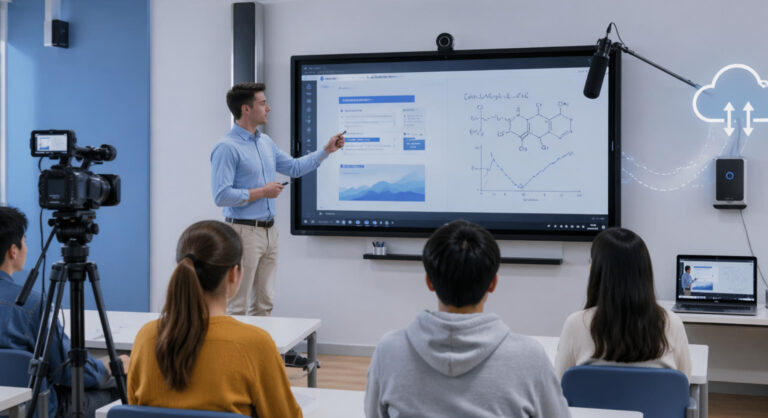
In recent years, many clients exploring education interactive display solutions have emphasized that lecture capture systems for recording lessons are one of their top priorities. The reason is clear: with the rapid growth of remote learning and AI-driven education, recording and reusing teaching content has become more important than ever. Schools and training institutions are no longer focused only on live teaching—they also need reliable ways to capture, store, and share lessons for flexible learning.
In this article, I’d like to share several practical lecture capture system solutions, helping you understand how to build an efficient setup and choose the right approach based on your needs.
What Is Lecture Capture Systems Exactly?
Simply put, a lecture capture system is a combination of hardware and software designed to record lessons or meetings in a complete and structured way. It goes beyond basic video recording by capturing multiple content sources at the same time, including the teacher or presenter’s video, audio through microphones, presentation materials such as PPT or screen content, and interactive elements like whiteboard writing or on-screen demonstrations.
All of this content is automatically synchronized and uploaded to a platform—either cloud-based or local—making it easy to replay, review, or share at any time. For students, this means they can revisit key points as needed. For businesses, it helps build a reusable knowledge base, improving training efficiency and consistency.
For example, with Ikinor’s all-in-one interactive display, the system can record the teacher’s video and voice while also capturing every annotation and interaction on the interactive whiteboard. This ensures a complete “what you see is what you get” recording of the session. Such an integrated solution makes it easier to digitize learning content and supports modern needs like remote and hybrid education.
How Does It Work?
A complete lecture capture system consists of several key components working together to record and manage lesson content efficiently. First, a camera captures the instructor’s video, recording their presentation and body language. At the same time, a microphone ensures clear audio recording so that every explanation is accurately preserved. In parallel, the system performs screen capture, recording presentations such as PPT slides, software demonstrations, or whiteboard annotations.
All these input sources are synchronized and processed in real time, then stored and managed through a platform, which can be cloud-based or on-premise. Unlike traditional recording methods, a lecture capture system can automatically combine video, audio, and screen content into a complete recording without the need for external editing, saving significant time and effort.
With the advancement of AI technology, many systems can now perform intelligent scene switching. For example, the system can automatically switch between the instructor view and screen content depending on the context, creating a more professional and engaging final video.
Finally, the recorded content can be distributed through an LMS (Learning Management System) or cloud platform, allowing students to access, review, and learn anytime, anywhere.
6 Recommended Lecture Capture Systems Solutions
| Brand / Solution | Introduction | Software Included | Hardware Included | Overall Evaluation |
|---|---|---|---|---|
| Media Architects | IP-based lecture capture system supporting dual video sources (camera + presentation PC), with modes like picture-in-picture and side-by-side. Suitable for small to mid-sized education setups. | Recording management software (multi-mode support) | Camera, encoder, network devices | ⭐⭐⭐⭐☆ Flexible solution, but limited brand influence |
| Panasonic | A global brand offering a complete hardware and software ecosystem for lecture capture. Designed for large universities and professional recording environments, with strong stability and compatibility. | Professional lecture capture software, centralized management platform | Cameras, control systems, AV equipment | ⭐⭐⭐⭐⭐ Industry benchmark, highly reliable but higher cost |
| Uniguest | Centralized IP-based lecture capture solution supporting live streaming, recording, and content distribution. Ideal for enterprise training and multi-location deployments. | Cloud platform, recording system, streaming software | Cameras, servers, network devices | ⭐⭐⭐⭐☆ Strong software capabilities, suitable for scalable deployments |
| Universal AV | Provides basic lecture capture and streaming solutions, focusing on audio/video recording and IP distribution. Often used in AV integration projects. | Basic recording software, streaming system | Cameras, audio equipment, AV systems | ⭐⭐⭐☆☆ Entry-level solution, suitable for budget-limited projects |
| IQBoard (IQVideo) | All-in-one lecture capture system with one-touch recording, auto-tracking, 4K recording, and multi-source capture. Designed for smart classrooms. | Built-in recording system, live streaming platform, management software | AI camera, microphones, interactive display | ⭐⭐⭐⭐⭐ Cost-effective and widely used in education |
| Ikinor Solution | Integrated lecture capture solution combining interactive display + AI technology, supporting one-touch recording, auto-tracking, 4K recording, multi-source capture, and AI-powered editing. Designed for smart classrooms and hybrid learning environments. | Built-in recording system, live streaming platform, centralized management software, AI editing features | AI camera, AI microphone, integrated interactive display | ⭐⭐⭐⭐⭐ Highly integrated with strong AI capabilities, ideal for digital education upgrades and OEM/ODM projects |
The Importance of Lecture Capture Systems in Modern Education
In today’s rapidly evolving digital and AI-driven era, lecture capture systems have become a critical foundation for modern education. They are transforming how knowledge is delivered—shifting from one-time, in-person teaching to content that can be stored, reused, and scaled over time.
First, one of the most immediate benefits is the ability to replay lessons anytime. Students are no longer limited to a single live session. They can pause, rewind, and review key concepts at their own pace. If something is unclear, they can simply watch it again, significantly improving learning outcomes.
Second, lecture capture systems strongly support remote and hybrid learning. Even if students cannot attend classes in person, they can still access recorded content and continue learning. This flexibility makes it ideal for online education, cross-region training, and blended learning environments.
Third, they greatly improve teaching and training efficiency. Instructors only need to deliver content once, and it can be reused multiple times. For example, a company offering digital marketing training used Ikinor’s lecture capture solution to efficiently record course videos, build a content library, and significantly increase production efficiency.
Finally, lecture capture systems help eliminate the risk of missing lessons. Students who are absent can easily catch up by watching recordings, ensuring continuity in learning.
Overall, lecture capture systems make education more flexible, efficient, and sustainable.
Why Interactive Display–Based Lecture Capture Systems Are the Optimal Solution
In my view, a lecture capture system centered around an interactive display is one of the most efficient and practical solutions available today. The key advantage lies in its high level of integration, which simplifies what used to be a complex setup involving multiple devices.
Traditional lecture capture solutions often require separate components such as cameras, computers, capture cards, audio systems, and standalone software. This not only creates a complicated setup with messy cabling, but also increases the risk of compatibility issues during daily use. In contrast, an interactive display–based solution can combine display, touch, annotation, recording, and live streaming into a single device, achieving a true all-in-one experience. This significantly reduces equipment clutter and improves usability.
From a management perspective, this approach is also much more efficient. IT teams can manage devices, update systems, and control content through a centralized platform, instead of handling multiple pieces of hardware separately. At the same time, teachers or presenters can easily start recording and sharing content with minimal training.
Cost is another major advantage. By reducing hardware requirements, installation complexity, and long-term maintenance, organizations can lower overall investment. For schools and enterprises, this integrated solution offers better value and aligns well with the future direction of smart education and digital transformation.



 English
  Spanish
  Arabic
  French
  Indonesian
  German
  Portuguese
  Russian
  Vietnamese
  Thai
Thai  Italian