
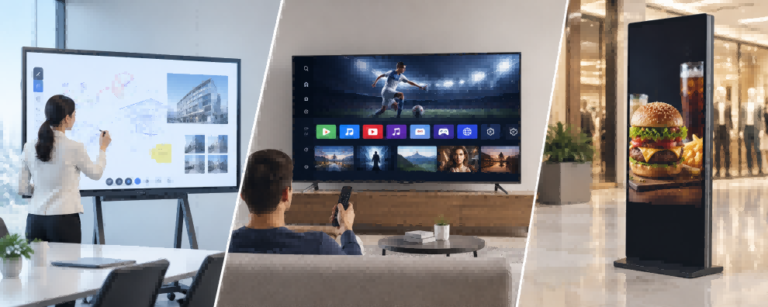
Interactive displays, smart TVs, and digital signage screens may look similar, but they are designed and manufactured for different purposes. Interactive displays prioritize touch-based collaboration and whiteboarding, smart TVs focus on entertainment and everyday viewing, while digital signage is engineered for commercial content delivery, extended operation, and centralized management.
These differences go beyond software features. Each product category has distinct hardware requirements, including touchscreen integration, processing systems, power supplies, thermal design, and manufacturing quality tests. Even displays with the same screen size and resolution may have different components, production requirements, and costs.
This guide compares their features, applications, hardware components, BOM structures, manufacturing requirements, leading manufacturers, and sourcing options to help buyers understand the differences and select the right display solution.
What Is the Difference Between an Interactive Display, Smart TV, and Digital Signage?
The main difference between an interactive display, smart TV, and digital signage is their intended use. An interactive display, often called an interactive flat panel display (IFPD), combines a large touchscreen with digital whiteboarding and collaboration tools. It is commonly used in classrooms, conference rooms, and training environments where users need to write, annotate, present, and interact directly with the screen.
A smart TV is primarily designed for entertainment and general-purpose viewing. It integrates a display panel, processing system, internet connectivity, and applications for streaming movies, television programs, and other media. By comparison, digital signage focuses on delivering commercial information, advertising, digital menus, and announcements, often through scheduled playback or a content management system (CMS).
| Feature | Interactive Display | Smart TV | Digital Signage |
|---|---|---|---|
| Primary Purpose | Collaboration and interaction | Entertainment and viewing | Commercial information display |
| Touch Interaction | Usually integrated | Usually not included | Optional |
| Main Software | Whiteboarding and collaboration | Streaming and TV applications | Signage playback and CMS |
| Content Management | Local apps and device management | Built-in apps or external systems | Local or centralized management |
| Typical Applications | Classrooms, meeting rooms | Homes, lounges, break rooms | Retail, restaurants, public spaces |
| Main Advantage | Interactive collaboration | Convenience and affordability | Commercial content delivery |
| Typical Product Design | Touch-enabled collaborative panel | Consumer entertainment display | Commercial display system |
These distinctions reflect product priorities rather than absolute hardware limitations. All three can display high-resolution video and support external inputs, but their operating systems, interaction features, management capabilities, and intended operating conditions differ. Understanding these differences is the starting point for choosing the right screen.
Which Display Should You Choose for Different Applications?
The best display depends on what users need to accomplish, not simply on screen size or resolution. Projects requiring handwriting, annotation, and group collaboration generally benefit from interactive displays. Projects focused on broadcasting information, frequently changing content, or operating screens for extended periods are better suited to digital signage. Smart TVs remain a practical choice when ordinary viewing is the main requirement.
For example, a corporate meeting room that only displays presentations may work perfectly well with a smart TV. However, if employees regularly annotate drawings, brainstorm on a digital whiteboard, or collaborate directly on the screen, an interactive display provides a more appropriate workflow. Similarly, a small café showing a basic menu may use a smart TV, while a restaurant chain requiring synchronized menu updates across locations can benefit from a dedicated digital signage system.
| Application | Recommended Display | Main Reason |
|---|---|---|
| Interactive Classroom | Interactive Display | Teaching, annotation, and collaboration |
| Corporate Conference Room | Interactive Display / Smart TV | Depends on interaction requirements |
| Training Room | Interactive Display / Smart TV | Collaborative training versus passive viewing |
| Restaurant Digital Menu Board | Digital Signage | Scheduled menus and commercial playback |
| Retail Advertising | Digital Signage | Content management and commercial visibility |
| Employee Break Room | Smart TV | Casual viewing and streaming |
| Shopping Mall Wayfinding | Interactive Digital Signage | Visitor navigation and self-service |
| Factory KPI Dashboard | Digital Signage | Continuous production information |
| Hotel Lobby | Digital Signage | Guest information and announcements |
| Product Showroom | Interactive Display / Digital Signage | Product exploration versus passive promotion |
Some environments benefit from combining different display categories rather than selecting one type for an entire facility. A school may use interactive flat panels in classrooms, digital signage in corridors, and smart TVs in staff lounges. A retail showroom may use signage screens for promotional videos while installing interactive displays where customers or sales teams need to explore product information.
Before purchasing, buyers should establish four requirements: interaction, operating hours, content management, and installation environment. These conditions provide a more reliable starting point than assuming that the most expensive or most feature-rich display is automatically the best choice.
How Do Their Features and Technical Specifications Compare?
Although all three categories can provide 4K resolution and large-format viewing, they differ considerably in their software capabilities and interaction workflows. Interactive displays typically integrate multi-touch technology, digital whiteboarding, wireless screen sharing, and collaboration applications. Smart TVs focus on streaming, picture processing, audio, and convenient media access. Digital signage emphasizes scheduled content, remote administration, and commercial deployment.
The following comparison highlights the specifications and capabilities most relevant to business buyers. Actual availability depends on the model, operating system, and installed software.
| Feature / Specification | Interactive Display | Smart TV | Digital Signage |
|---|---|---|---|
| Multi-Touch | Common, often 20–40 points | Not standard | Optional |
| Digital Whiteboarding | Core capability | Requires additional hardware/software | Not standard |
| Wireless Screen Sharing | Common | Common | Model-dependent |
| Video Conferencing | Supports collaborative meeting workflows | Possible with compatible devices/apps | Possible with external systems |
| Streaming Applications | Platform-dependent | Core capability | Platform-dependent |
| CMS Integration | Optional or software-dependent | Requires compatible software/player | Common |
| Remote Device Management | Available on supported systems | Model/platform-dependent | Common |
| Content Scheduling | Software-dependent | Software-dependent | Common |
| Brightness | Typically suited to indoor collaboration | Varies by TV model | Indoor to high-brightness commercial options |
| Rated Operating Hours | Model-dependent | Check manufacturer specifications | Commonly 16/7 or 24/7 |
| Portrait Orientation | Model-dependent | Often restricted | Commonly supported |
| Anti-Glare Treatment | Common on interactive panels | Model-dependent | Common on commercial models |
| OPS / Slot-in PC | Common option | Not typical | Available on selected models |
One important distinction is that touch capability alone does not make a screen an interactive flat panel. An interactive display is designed around activities such as simultaneous handwriting, annotation, presentation, and collaborative software. A touch-enabled digital signage kiosk may use similar touchscreen technology, but its interface is designed for customer navigation, product selection, or self-service operations. The difference lies in the complete user experience rather than the presence of a touch sensor.
Display performance also depends on the operating environment. A conference room generally requires comfortable indoor visibility and accurate touch response, while a storefront screen exposed to strong ambient light may require substantially higher brightness. Operating ratings such as 16/7 and 24/7 indicate that a display is specified for up to 16 or 24 hours of operation per day, seven days a week. These ratings must be checked against the exact model rather than assumed from its product category. Commercial display specifications also show that features such as portrait mounting, anti-glare treatment, and continuous-duty operation can be engineered together for demanding installations.
Content management becomes especially important when a project expands beyond simple playback. A smart TV may display presentations through USB, built-in applications, or an external media player. Digital signage systems can provide centralized playlists, scheduled campaigns, remote updates, device monitoring, and recovery functions. Some commercial displays include an integrated SoC player, so an additional external media player is not always necessary. For businesses operating screens across multiple sites, management requirements and operational reliability can matter more than small differences in display specifications.
Top 10 Interactive Display, Smart TV & Digital Signage Brands and Manufacturers
The following ten companies represent established display brands and manufacturers across interactive displays, smart TVs, and commercial digital signage. Each appears only once under a representative product category, although several operate across multiple segments. This is a non-ranked selection based on product relevance and industry presence, not a market-share ranking.
The country or region shown refers to the company’s brand origin or corporate background, not necessarily the manufacturing location of every product. The profiles focus on products and capabilities relevant to display buyers.
Top Interactive Display Brands and Manufacturers
1. Hikvision
| Item | Details |
|---|---|
| Brand / Manufacturer | Hikvision |
| Country / Region | China |
| Main Products | WonderHub interactive flat panels, commercial displays, smart collaboration solutions |
| Key Strengths | Interactive meeting and education displays, audiovisual system integration |
| Contact | hikvision.com |
2. ViewSonic
| Item | Details |
|---|---|
| Brand / Manufacturer | ViewSonic |
| Country / Region | United States |
| Main Products | ViewBoard interactive displays, education displays, professional monitors |
| Key Strengths | Interactive learning, collaboration software, device management solutions |
| Contact | viewsonic.com |
3. MAXHUB
| Item | Details |
|---|---|
| Brand / Manufacturer | MAXHUB |
| Country / Region | China |
| Main Products | Interactive flat panels, conference displays, collaboration solutions |
| Key Strengths | Enterprise collaboration, integrated meeting technology, large-format interactive displays |
| Contact | maxhub.com |
4. Ikinor

| Item | Details |
|---|---|
| Company / Manufacturer | Dongguan Ikinor Technology Co., Ltd. (Ikinor) |
| Country / Region | Dongguan, Guangdong, China |
| Main Products | Interactive Flat Panels, Smart Blackboards, Interactive Whiteboards, Digital Signage, Interactive Kiosks, Portable Smart TVs |
| Manufacturing Capabilities | In-house R&D, display assembly, touchscreen integration, quality testing, and scalable OEM/ODM production |
| OEM/ODM Strengths | Custom hardware and software, IR/PCAP touch options, branding, firmware customization, and SKD/CKD solutions |
| Contact | ikinor-tech.com |
Top Smart TV Brands and Manufacturers
5. Samsung
| Item | Details |
|---|---|
| Brand / Manufacturer | Samsung |
| Country / Region | South Korea |
| Main Products | Smart TVs, OLED and Neo QLED TVs, commercial displays |
| Key Strengths | Display technology, smart TV ecosystem, broad consumer and business product portfolios |
| Contact | samsung.com |
6. LG Electronics
| Item | Details |
|---|---|
| Brand / Manufacturer | LG Electronics |
| Country / Region | South Korea |
| Main Products | OLED smart TVs, QNED TVs, commercial displays |
| Key Strengths | OLED television technology, webOS ecosystem, home entertainment and business display solutions |
| Contact | lg.com |
7. Sony
| Item | Details |
|---|---|
| Brand / Manufacturer | Sony |
| Country / Region | Japan |
| Main Products | BRAVIA smart TVs, OLED TVs, professional displays |
| Key Strengths | Image processing, premium audiovisual performance, entertainment-focused display technology |
| Contact | sony.com |
8. TCL
| Item | Details |
|---|---|
| Brand / Manufacturer | TCL |
| Country / Region | China |
| Main Products | Smart TVs, QLED TVs, Mini LED TVs, large-screen televisions |
| Key Strengths | Large-screen TV production, Mini LED product development, broad consumer television portfolio |
| Contact | tcl.com |
Top Digital Signage Brands and Manufacturers
9. Hisense
| Item | Details |
|---|---|
| Brand / Manufacturer | Hisense |
| Country / Region | China |
| Main Products | Commercial digital signage, professional displays, interactive displays, smart TVs |
| Key Strengths | Commercial display solutions, large-screen technology, diversified display manufacturing |
| Contact | hisense.com |
10. Sharp
| Item | Details |
|---|---|
| Brand / Manufacturer | Sharp |
| Country / Region | Japan |
| Main Products | Professional LCD displays, digital signage screens, interactive display solutions |
| Key Strengths | Professional display technology, large-format commercial displays, enterprise visualization |
| Contact | global.sharp |
A company known for smart TVs may also supply commercial displays, while an interactive display supplier may offer digital signage or other professional display products. Buyers should therefore compare specific product lines and technical specifications.
Where Should Buyers Source These Displays: China or South Korea?
China and South Korea are important participants in the global display industry, but their strengths differ across panel technology, product manufacturing, and commercial display solutions. China is particularly attractive for large-scale display manufacturing, flexible OEM/ODM production, and customized commercial hardware, while South Korea is strongly associated with advanced display technologies, established global brands, and premium television products.
According to the 2025 industry analysis published by Invest KOREA, China’s share of the global display market exceeded 50% in 2024, supported by extensive investment and competitive LCD manufacturing. South Korea has increasingly concentrated on OLED technology and higher-value display applications. These industry trends provide useful context for sourcing decisions, although panel manufacturing strength does not automatically indicate where a finished display product is assembled.
| Sourcing Consideration | China | South Korea |
|---|---|---|
| Interactive Displays | Broad OEM/ODM manufacturing and configurable solutions | Selected branded collaboration and professional display solutions |
| Smart TVs | Large-scale manufacturing, broad product ranges, competitive pricing | Established premium brands and advanced display technologies |
| Digital Signage | Commercial LCD displays, kiosks, custom enclosures, project manufacturing | Branded commercial displays and integrated business solutions |
| OEM/ODM Customization | Flexible hardware, housing, system, and branding options | Depends on manufacturer and project requirements |
| Production Flexibility | Suitable for various bulk and customized orders | Often oriented toward established product lines and distribution channels |
| Procurement Priorities | MOQ, configurations, customization, lead times | Product portfolio, channel support, warranty, integration |
For buyers sourcing interactive displays or digital signage for schools, retailers, and system integration projects, Chinese manufacturers can be particularly competitive when customization is required. Common requirements include screen size, Android configuration, OPS compatibility, touch technology, enclosure design, branding, and software integration. Buyers seeking established premium smart TV products or specific proprietary display technologies may find Korean brands more suitable, depending on the project.
However, brand origin, manufacturing location, and customs country of origin are not necessarily the same. A product sold under a Korean brand may be manufactured in another country. Before placing an international order, buyers should confirm the actual manufacturing location, applicable certifications, warranty terms, spare-parts availability, minimum order quantity, production lead time, and import requirements in the destination market.
How Do Their Components, BOM, and Manufacturing Requirements Differ?
Although interactive displays, smart TVs, and digital signage screens may share similar LCD panel technologies, their internal components, manufacturing processes, and quality requirements differ according to their intended applications. A Bill of Materials (BOM) identifies the components required to manufacture a display, including the panel, mainboard, power supply, memory, protective materials, enclosure, and optional modules. Understanding these differences helps buyers evaluate product configurations, manufacturing complexity, and purchasing costs.
| Hardware Component | Interactive Display | Smart TV | Digital Signage |
|---|---|---|---|
| Display Panel | Large-format LCD, commonly LED-backlit | LCD, Mini LED LCD, or OLED | Commercial LCD and other display technologies |
| Touch Module | Commonly IR or PCAP | Generally absent | Optional for interactive applications |
| Touch Controller | Required for touch operation | Generally absent | Required on touch-enabled models |
| Protective Glass | Common, often anti-glare | Model-dependent | Application-dependent |
| Mainboard / SoC | Interactive applications and collaboration | Image processing, streaming, TV functions | Commercial media playback and device control |
| RAM and Storage | Supports whiteboarding and collaboration applications | Supports smart TV operating systems and apps | Supports signage applications and content storage |
| OPS / Slot-in PC | Common optional configuration | Not typical | Available on selected models |
| Power Supply | Matched to display, touch, and computing requirements | Designed for consumer TV hardware | Matched to commercial hardware and operating ratings |
| Thermal Management | Designed around touch and computing loads | Based on television operating requirements | May be optimized for extended operation and high brightness |
| Network and Control | Wi-Fi, Ethernet, HDMI, USB, wireless casting | Wi-Fi, Ethernet, HDMI, TV interfaces | Ethernet, HDMI, remote control and monitoring interfaces |
| Enclosure and Mounting | Collaboration-oriented structure and mounting | Consumer television housing | Wall-mounted, portrait, floor-standing, or kiosk configurations |
Manufacturing differences become particularly evident during touchscreen integration and assembly. Interactive flat panels often require infrared touch frames or projected capacitive sensors, touch controllers, protective glass, and accurate alignment between the touch system and LCD module. Manufacturers must verify touch accuracy, multi-touch performance, and compatibility with the operating system. Smart TV production places greater emphasis on picture processing, audiovisual performance, wireless connectivity, and consumer software integration. Digital signage manufacturing varies according to deployment requirements, with additional attention to mounting orientation, commercial control interfaces, enclosure design, and operating conditions.
Thermal design and reliability testing are especially important when comparing manufacturing requirements. A high-brightness digital signage display may require different backlight components, power capacity, heat dissipation, and enclosure ventilation from a conventional indoor smart TV. Outdoor signage may additionally require weather-resistant construction and environmental protection. Manufacturing validation can include display uniformity inspection, power and temperature testing, burn-in procedures, interface verification, and application-specific functional testing. The exact procedures and acceptance criteria depend on the product model and its specified operating environment.
From a manufacturing and sourcing perspective, two 75-inch 4K displays can have substantially different BOM costs even when their screen size and resolution are identical. Touch hardware, SoC performance, memory capacity, brightness requirements, mechanical construction, quality-control requirements, and production volume all influence the final configuration and manufacturing cost. A well-designed display is not necessarily the one with the most expensive components, but the one whose hardware and manufacturing requirements match its intended application. Buyers comparing OEM/ODM suppliers should therefore evaluate complete specifications, available customization, manufacturing verification, and quality consistency rather than relying only on screen size and price.
Can These Displays Replace One Another?
Yes, interactive displays, smart TVs, and digital signage can replace one another for certain functions, but replacement suitability depends on the intended application. A smart TV can serve as a basic digital signage screen through compatible signage software, USB playback, or an external media player. This may be sufficient for a small business displaying occasional announcements or promotional content. However, commercial-use warranty conditions, operating hours, brightness, automatic startup behavior, and remote administration should be checked before deployment.
A smart TV can also function as a presentation display in a meeting room, but it does not automatically provide the multi-touch input, handwriting recognition, and integrated collaboration workflow of an interactive flat panel. External touch systems and computing devices may provide additional functionality, although compatibility, installation complexity, and total cost must be considered.
Similarly, a digital signage display can show television broadcasts, streaming content, or video from an HDMI-connected receiver. However, professional signage screens may not provide a built-in television tuner, consumer streaming applications, or entertainment-oriented audio features. The key distinction is that technical compatibility does not always mean the equipment is the best operational choice. A device should be selected according to the complete workflow it needs to support.
Which Is More Cost-Effective for Long-Term Use?
Smart TVs generally offer an attractive initial purchase price, especially for simple viewing applications. However, businesses evaluating interactive displays and digital signage should compare the total cost of ownership rather than the display price alone. A lower-cost television may require an additional media player, manual content updates, or earlier replacement in demanding environments. Conversely, purchasing an expensive commercial display for occasional viewing may provide little practical benefit.
A useful cost model is:
TCO = Hardware + Software + Installation + Operation + Maintenance + Replacement
| Cost Factor | Interactive Display | Smart TV | Digital Signage |
|---|---|---|---|
| Initial Hardware | Includes collaborative display hardware | Often lower for comparable size | Depends on commercial rating and configuration |
| Additional Equipment | Optional OPS, camera, microphone | Optional media player or other accessories | Integrated or external player |
| Software Cost | Depends on collaboration platform | Usually basic apps included; signage software extra | CMS subscription or licensed software may apply |
| Installation | Mounting, connectivity, collaboration setup | Usually straightforward | Varies by environment and installation type |
| Daily Management | Collaboration and device administration | Often local or app-based | Centralized management commonly available |
| Maintenance | Touch, software, and computing components | Consumer device maintenance | Hardware, software, and network management |
| Replacement Planning | Based on usage and warranty | Based on actual commercial suitability | Based on rated operation and lifecycle |
Consider two projects: a small office requiring one screen for occasional presentations, and a restaurant chain operating dozens of digital menu boards. The office may achieve the lowest practical cost with a smart TV. The restaurant chain may justify commercial signage through centralized menu updates, scheduled content changes, and reduced on-site maintenance.
Interactive displays present a different economic calculation. Where a project needs touchscreen collaboration, digital whiteboarding, and computing capabilities, an integrated interactive panel may reduce the need for separate equipment. However, the actual savings depend on which accessories and software licenses are included. The most cost-effective display is the one that meets the project’s operational requirements without unnecessary hardware or management expenses.
Conclusion
Choosing between an interactive display, smart TV, and digital signage depends primarily on how the screen will be used. Interactive displays are best suited to teaching, meetings, and touch-based collaboration. Smart TVs are practical for entertainment and simple viewing, while digital signage is designed for commercial content delivery and managed installations.
Before purchasing, compare the required features, rated operating conditions, hardware configuration, maintenance requirements, and total cost. For international buyers, evaluating manufacturers and OEM/ODM capabilities can further help match the display solution to project requirements.
FAQs
A signage TV is intended for commercial content display, often supporting extended operating hours and centralized management. A Smart TV primarily focuses on consumer entertainment, streaming applications, and everyday viewing.
Yes. A Smart TV can display signage content through compatible apps, USB playback, or an external media player. Check operating hours, brightness, warranty, and remote management requirements.
An interactive display typically includes multi-touch, digital whiteboarding, and collaboration tools. A Smart TV mainly provides entertainment, streaming, and conventional screen viewing.
Yes. A digital signage screen can display television content through a compatible external receiver or streaming device, although built-in TV tuners and consumer applications may be absent.
It can be when extended operation, commercial warranty coverage, higher brightness, or centralized device management is required. For occasional viewing, a Smart TV may be more economical.


 English
  Spanish
  Arabic
  French
  Indonesian
  German
  Portuguese
  Russian
  Vietnamese
  Thai
Thai  Italian