
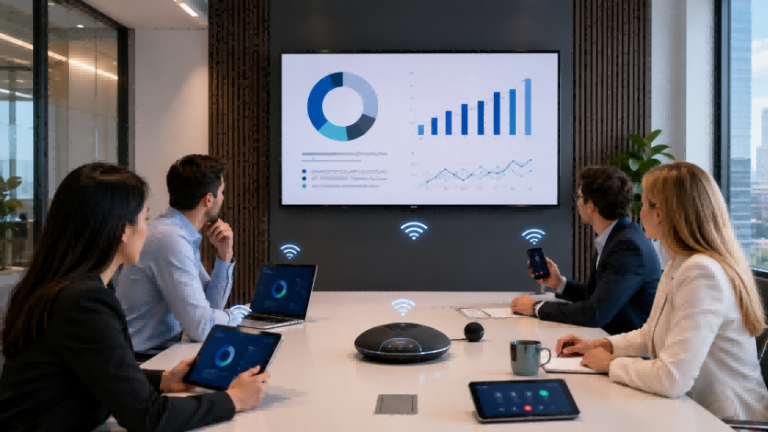
Многие конференц-залы выглядят современно, но демонстрация экрана по-прежнему сопряжена с трудностями. Посетитель может принести MacBook, сотрудник — ноутбук с Windows, а другой докладчик хочет выступить с планшета. Когда всё ещё используется один HDMI-кабель, отсутствует адаптер USB-C или несовместимый источник входного сигнала, совещание может затянуться ещё до начала презентации. Именно здесь и возникает проблема. Беспроводные и Bluetooth мониторы Это становится полезным для беспроводных дисплеев в конференц-залах. Вместо того чтобы рассматривать экран как простой монитор, компании могут создать беспроводную систему отображения информации в переговорных комнатах, которая поддерживает совместное использование экрана, устройства BYOD, периферийные устройства Bluetooth и обеспечивает более эффективное взаимодействие в конференц-залах, учебных помещениях и гибридных средах для проведения совещаний.
Что такое беспроводные и Bluetooth-мониторы?
Беспроводные и Bluetooth мониторы можно понимать как беспроводное решение для отображения информации в конференц-залеа не традиционный «Bluetooth-монитор».
Проще говоря, они решают распространенную проблему конференц-зала: разные люди приходят в комнату с разными устройствами. Один может использовать MacBook, другой — ноутбук с Windows, а третий хочет поделиться контентом с планшета. Если каждому приходится искать кабель HDMI, адаптер USB-C или нужный источник входного сигнала, конференция быстро превращается в хаос. Цель беспроводные мониторы Цель состоит в том, чтобы помочь пользователям быстрее выводить контент с ноутбука, телефона или планшета на главный экран конференц-зала.
Важный момент заключается в том, что термин монитор с Bluetooth-экраном может ввести в заблуждение. Bluetooth Обычно это не основная технология для передачи видео высокого качества. В коммерческих конференц-залах видеоконтент чаще всего демонстрируется через Wi-Fiа локальная сеть, AirPlay, Миракаста USB-C адаптер для трансляции контентаили специализированной беспроводной презентационной системой. Bluetooth Чаще всего используется для подключения периферийных устройств в конференц-зале, таких как колонки, микрофоны, пульты дистанционного управления, клавиатуры или мыши.
Например, сотрудник может войти в переговорную комнату и по беспроводной связи вывести презентацию PowerPoint со своего ноутбука на основной экран. При этом в комнате может использоваться Bluetooth-микрофон или Bluetooth-динамик для улучшения качества звука во время гибридной встречи. В этом случае экран становится не просто монитором, а частью комплексной системы. беспроводной дисплей для конференц-зала система.
| Срок | Простой смысл | Использовать в конференц-залах |
|---|---|---|
| Беспроводной монитор экрана | Дисплей, способный принимать контент по беспроводной связи. | Демонстрация презентаций PowerPoint, экранов ноутбуков, документов или визуального контента. |
| Беспроводной презентационный дисплей | Беспроводной дисплей, предназначенный для деловых презентаций. | Корпоративные встречи, презентации для клиентов, учебные классы |
| Периферийные устройства Bluetooth | Устройства, подключенные через Bluetooth. | Колонки, микрофоны, пульты дистанционного управления, клавиатуры, мыши |
| Интерактивный конференц-дисплей | Дисплей для совещаний с сенсорным управлением и функциями для аннотирования. | Использование интерактивной доски, обсуждение в онлайн-формате, совместная работа над обучением. |
Итак, реальная ценность Беспроводные и Bluetooth мониторы Речь идёт не просто о «прокладке кабелей». Речь идёт о том, чтобы помочь участникам конференц-залов перейти от «поиска кабелей, переключения портов и настройки устройств» к следующему этапу. Быстрое подключение, быстрый обмен данными и более быстрое начало совещаний.Для корпоративных офисов, отелей, учебных классов и многофункциональных конференц-залов такой подход зачастую оказывается более практичным, чем использование только обычного монитора.
Почему беспроводные дисплеи в конференц-залах важны для современных команд
Для современных команд эффективность переговорной комнаты заключается не только в наличии большого экрана. Важно, чтобы люди могли быстро обмениваться идеями, плавно переключаться между докладчиками и поддерживать концентрацию внимания как присутствующих в комнате, так и удаленных участников на одном и том же контенте. Вот почему беспроводные дисплеи для конференц-залов Они становятся все более ценными в офисах, учебных центрах, отелях и многофункциональных бизнес-пространствах. Они не просто делают помещение чище. Они уменьшают мелкие технические помехи, которые часто нарушают ход обсуждений, презентаций и принятия решений.
1. Они создают более чистое и гибкое пространство для проведения встреч.
В традиционных переговорных комнатах часто используются стационарные кабели, адаптеры и входные порты. Со временем эти аксессуары могут создавать беспорядок на столе и ограничивать возможности для сидения или проведения презентаций. беспроводной дисплей для конференц-зала Это дает командам больше гибкости в обмене контентом, не привязывая их к одной физической точке подключения.
2. Они поддерживают формат совещаний с использованием собственных устройств (BYOD).
Современные команды и посетители часто используют различные устройства, включая ноутбуки на базе Windows, MacBook, планшеты и смартфоны. беспроводной дисплей для конференц-зала Это упрощает пользователям обмен данными со своих собственных устройств, что полезно для презентаций клиентам, внутренних обсуждений, тренингов и гибридных рабочих пространств.
3. Они делают переключение между докладчиками более плавным.
На многих совещаниях необходимо, чтобы презентацию проводило более одного человека. При использовании проводного подключения каждому докладчику может потребоваться отключать, подключать и настраивать источник изображения. Беспроводная система позволяет командам более естественно переключаться между докладчиками, сосредотачиваясь на содержании совещания, а не на оборудовании.
4. Они улучшают качество проведения гибридных совещаний.
Сейчас многие совещания включают как присутствующих в помещении, так и удаленных участников. Когда демонстрация экрана, аудиоустройства, камеры и микрофоны работают согласованно, всем легче следить за одним и тем же контентом. беспроводной дисплей для конференц-зала Настройка помогает уменьшить количество сбоев, вызванных переключением устройств или плохим качеством соединения.
5. Они снижают нагрузку на службу ИТ-поддержки.
Если в каждом конференц-зале используются разные кабели, адаптеры или способы подключения, ИТ-командам часто приходится снова и снова решать одни и те же основные проблемы. Более стандартизированный подход необходим. переговорная комната BYOD Настройка может сократить количество обращений в службу поддержки и упростить повседневную работу в нескольких переговорных комнатах.
Для компаний, школ, учебных центров, отелей и предприятий, работающих в условиях кооперативного бизнеса, ценность беспроводные дисплеи для конференц-залов Это не просто более чистое помещение. Настоящая ценность заключается в более быстрой совместной работе, лучшей совместимости устройств, более плавных презентациях и меньшем количестве перерывов во время совещаний.
Основные характеристики, делающие беспроводные дисплеи для совещаний полезными
A беспроводной дисплей для совещаний Не следует оценивать устройство только по возможности подключения без кабеля. Для делового использования действительно важен вопрос о том, может ли дисплей поддерживать различные устройства, стили проведения совещаний, планировку помещений и потребности повседневной работы. Полезное устройство. беспроводной дисплей для конференц-зала Оно должно упрощать обмен данными, а также обеспечивать надежное качество изображения, бесперебойную совместную работу, интеграцию аудио/видео и простое управление.
| Особенность | Проблема, которую оно решает | Подходящий сценарий встречи |
|---|---|---|
| Беспроводная демонстрация экрана | Снижает зависимость от кабелей HDMI, адаптеров и стационарных точек подключения. | Презентации для клиентов, внутренние совещания, краткие командные обсуждения. |
| Кроссплатформенная совместимость | Позволяет пользователям обмениваться данными с устройств Windows, macOS, iOS, Android, ноутбуков, планшетов и телефонов. | Переговорные комнаты с возможностью использования собственных устройств (BYOD), встречи с посетителями, гибридные офисы. |
| Опция 4K-дисплея | Улучшает четкость слайдов, электронных таблиц, изображений продукции, чертежей и видеоконтента. | Залы заседаний, учебные классы, выставочные залы, помещения для совещаний руководителей. |
| Сенсорное взаимодействие | Позволяет пользователям писать, делать пометки, увеличивать масштаб и обсуждать материалы непосредственно на экране. | Тренировочные залы, мозговые штурмы, интерактивные семинары. |
| Аудиопериферийные устройства Bluetooth | Позволяет подключать динамики, микрофоны или спикерфоны для улучшения качества звука на совещаниях. | Гибридные встречи, видеозвонки, небольшие и средние конференц-залы. |
| Интеграция камеры, микрофона и динамика | Обеспечивает более плавную связь между участниками, находящимися в помещении, и участниками, находящимися удаленно. | Zoom, Teams, Google Meet, пространства для удаленной совместной работы |
| Доступ по ПИН-коду | Помогает пользователям подключиться к нужному экрану и предотвращает случайный обмен данными. | Общие офисные помещения, конференц-залы в отелях, общественные помещения для встреч. |
| Централизованное управление | Упрощает для ИТ-команд управление несколькими дисплеями, настройками и обновлениями. | Многокомнатные офисы, школы, гостиницы, корпоративные развертывания |
| Поддержка обновления прошивки | Помогает поддерживать стабильность, совместимость и безопасность системы в течение длительного времени. | Долгосрочные бизнес-проекты и организация переговорных комнат. |
| Поддержка гостевой сети | Позволяет посетителям обмениваться контентом без доступа к основной корпоративной сети. | Презентации для клиентов, встречи с партнерами, конференц-залы в отелях. |
Первое, на что обращают внимание большинство покупателей, это беспроводная демонстрация экранаОднако совместимость не менее важна. Дисплей, который хорошо работает только с одной экосистемой устройств, может создать проблемы в реальном конференц-зале. Во многих деловых средах сотрудники и посетители приносят разные ноутбуки, планшеты и телефоны. Именно поэтому важно иметь надежный дисплей. беспроводной презентационный дисплей Должна поддерживать распространенные операционные системы и гибкие методы подключения.
Качество изображения также имеет значение. Для обычных совещаний может быть достаточно стандартного дисплея. Но когда командам необходимо просматривать подробные электронные таблицы, изображения продукции, чертежи или учебные материалы, качество изображения может быть выше. опция отображения 4K Это может облегчить чтение контента. Если помещение используется для обучения, мозгового штурма или обсуждения решений, то... интерактивный конференц-дисплей Функции сенсорного управления и аннотирования могут принести больше пользы, чем простой экран.
Не следует игнорировать интеграцию аудио и видео. Для визуальной части совещания может использоваться дисплей, но гибридные совещания также зависят от микрофонов, динамиков, камер и иногда от спикерфонов Bluetooth. Именно здесь и возникает проблема. Периферийные устройства Bluetooth Они становятся полезными. Они помогают улучшить качество звука и удобство управления, в то время как основной способ обмена видео по-прежнему зависит от беспроводной трансляции или сетевого подключения.
Для корпоративных покупателей важны также функции управления. Если компания, отель, школа или учебный центр управляют множеством конференц-залов, централизованные настройки, обновления прошивки, контроль доступа и поддержка гостевой сети могут сократить ежедневные работы по техническому обслуживанию. Другими словами, хорошее решение беспроводной дисплей для совещаний Речь идёт не только о демонстрации контента на экране. Система должна обеспечивать более стабильную, гибкую и управляемую среду для проведения совещаний.
Где беспроводные и Bluetooth-мониторы обеспечивают наибольшую ценность
Беспроводные и Bluetooth мониторы Наиболее ценными они являются в местах, где люди часто обмениваются контентом, меняют докладчиков или используют разные устройства. На данном этапе цель состоит не в том, чтобы повторить принцип работы беспроводной передачи данных, а в том, чтобы определить, в каких сценариях проведения совещаний наиболее остро ощущается потребность в более гибком интерфейсе отображения.
Корпоративные конференц-залы Часто на одной встрече присутствует несколько докладчиков. Менеджер по продажам может показать коммерческое предложение, менеджер по продукту может объяснить план развития, а приглашенный партнер может поделиться файлами с другого устройства. Главная проблема заключается не в самом экране, а в прерываниях, вызванных переключением докладчиков, различиями в устройствах и медленной настройкой.
Небольшие переговорные комнаты Они используются для быстрых обсуждений и коротких командных совещаний. В таких комнатах обычно требуется простое управление, а не сложная аудиовизуальная система. Главная проблема заключается в том, что даже небольшая проблема с подключением может испортить значительную часть короткого совещания, особенно когда людям нужно быстро поделиться всего одним документом, одной диаграммой или одной идеей.
Учебные помещения и классы Для проведения тренингов требуется больше взаимодействия, чем в стандартных конференц-залах. Тренерам может потребоваться объяснять слайды, делать пометки, переключаться между материалами или предлагать участникам демонстрировать свои экраны. Главная проблема заключается в том, что пассивный показ может ограничивать вовлеченность, особенно когда сессия требует обсуждения, демонстрации или объяснения в режиме реального времени.
Конференц-залы и помещения для мероприятий в отеле Каждый день приходится обслуживать разных гостей. Один клиент может принести MacBook, другой — ноутбук с Windows, а третьему может понадобиться презентация с планшета. Главная проблема — неопределенность. Персонал отеля не может предсказать каждое устройство, адаптер или формат презентации до начала мероприятия.
Выставочные залы и центры для посетителей В значительной степени всё зависит от визуальной презентации. В ходе одной встречи с клиентом отделам продаж, возможно, придётся переключаться между изображениями продукции, видеороликами, веб-сайтами, брошюрами и файлами коммерческих предложений. Главная проблема — гибкость презентации. Если докладчик привязан к одному кабелю или одному устройству, общение с клиентом может казаться менее естественным.
Залы для совещаний правительственных и государственных служащих Часто требуются стабильные, стандартизированные и простые в использовании процессы проведения совещаний. Эти комнаты могут использоваться различными отделами или внешними посетителями. Главная проблема — это обеспечение единообразия. Если каждый пользователь подключается по-разному, управлять комнатой и оказывать поддержку становится сложнее.
| Сценарий применения | Основная болевая точка | Практическая ценность |
|---|---|---|
| Корпоративные конференц-залы | Несколько докладчиков, разные устройства, медленное переключение | Более плавный ход совещания |
| Небольшие переговорные комнаты | Короткие совещания легко могут быть сорваны из-за проблем с настройкой оборудования. | Более быстрое обсуждение в команде |
| Учебные помещения и классы | Пассивные способы демонстрации ограничивают взаимодействие и объяснение. | Улучшение взаимодействия и организации учебного процесса. |
| Конференц-залы в отеле | Устройства, используемые гостями, и форматы мероприятий непредсказуемы. | Упрощенная организация мероприятий |
| Выставочные залы и центры для посетителей | Контент для продаж требует частого переключения. | Более гибкая визуальная презентация |
| Помещения для правительственных/общественных служащих | Общие пространства требуют бесперебойной работы. | Более стандартизированное управление совещаниями |
Как подобрать конфигурацию беспроводного дисплея в соответствии с размером помещения и потребностями проведения совещаний
После подтверждения места использования дисплея следующим шагом является подбор соответствующего элемента. беспроводная конфигурация дисплея Размер помещения и стиль проведения встреч зависят от его размеров. Небольшая переговорная комната, зал заседаний среднего размера, конференц-зал и учебное помещение не требуют одинакового оборудования. Для покупателей B2B цель состоит не в выборе самой современной системы, а в выборе практичного решения. решение для отображения информации в конференц-зале который подходит для повседневного использования, бюджета и долгосрочного управления.
Небольшие комнаты: простой беспроводной обмен данными и легкая настройка.
Небольшие переговорные комнаты обычно нуждаются в простой и быстрой настройке. Ключевое требование — простота подключения, а не сложное управление аудио- и видеооборудованием. Компактный беспроводной дисплей для конференц-зала Базовая поддержка беспроводной демонстрации экрана и Bluetooth-аудио может быть достаточной для быстрых командных обсуждений, индивидуальных встреч и коротких презентаций.
Покупателям следует проверить, насколько легко подключается дисплей, поддерживает ли он распространенные устройства и достаточно ли чистый звук для общения в небольших группах.
Средние конференц-залы: улучшенное отображение, звук и совместимость с устройствами.
В конференц-залах среднего размера обычно больше участников и чаще проводятся презентации. В таких помещениях четкость изображения, расстояние до экрана и охват звука приобретают большее значение. Больший экран, стабильная беспроводная связь и улучшенная поддержка динамиков или микрофонов могут повысить качество проведения совещаний.
При выборе оборудования для таких помещений покупателям следует обратить внимание на совместимость устройств, читаемость экрана и возможность поддержки разных пользователей без сложной настройки.
Залы заседаний: стабильность, безопасность и профессиональная интеграция аудиовизуального оборудования.
В залах заседаний часто требуется более стабильная и профессиональная обстановка. На совещаниях могут участвовать руководители, клиенты, партнеры или проводиться важные заседания для принятия решений. Дисплей должен поддерживать надежную беспроводную передачу данных, обеспечивать четкое изображение, контролируемый доступ и интеграцию с камерами, микрофонами, динамиками или системами видеоконференцсвязи.
Для конференц-залов покупателям следует проверить безопасность подключения, доступ по PIN-коду, совместимость с аудиовизуальным оборудованием, а также возможность проведения официальных совещаний без частых технических перебоев.
Учебные пространства: сенсорное управление, аннотирование и интерактивное взаимодействие.
Training rooms need more than simple content sharing. Trainers may need to write on the screen, annotate documents, switch between materials, or invite participants to join the discussion. For spaces that require flexible setup and easy repositioning, Portable Smart Screen Solutions can provide a practical alternative to fixed display installations.
Покупателям следует проверить реакцию сенсорного экрана, удобство письма, инструменты для аннотирования, возможности сохранения контента, а также поддержку плавного переключения между учебными материалами и общим экраном.
Проекты с несколькими помещениями: централизованное управление и стандартизированное развертывание.
Для компаний, школ, отелей или учебных центров с несколькими конференц-залами управление становится ключевым фактором. Если в каждом зале используется свой способ подключения или система отображения, ежедневное обслуживание может стать затруднительным. Стандартизированная система беспроводная конфигурация дисплея помогает пользователям подключаться одинаковым образом в разных комнатах.
Для проектов с несколькими конференц-залами покупателям следует учитывать централизованное управление, обновления прошивки, удаленное техническое обслуживание, контроль доступа пользователей и стабильную работу во всех переговорных комнатах.
| Тип номера | Рекомендуемое направление настройки | Что проверить |
|---|---|---|
| Маленькие комнаты | Простая беспроводная передача данных + базовый дисплей + Bluetooth-аудио | Простое подключение, поддержка распространенных устройств, чистое звучание. |
| Средние конференц-залы | Больший дисплей + улучшенное качество звука + совместимость с устройствами | Расстояние просмотра, читаемость экрана, зона охвата звука. |
| Залы заседаний | Высококачественный дисплей + стабильная беспроводная передача данных + профессиональная интеграция аудио- и видеотехники | Безопасность, контроль доступа, совместимость камер/микрофонов. |
| Тренировочные помещения | Сенсорный дисплей + аннотации + совместное использование нескольких устройств | Тактильная чувствительность, удобство письма, сохранение контента |
| Проекты с несколькими комнатами | Единая система + централизованное управление + удаленное обслуживание | Стандартизированное развертывание, управление ИТ, обновления встроенного ПО. |
Хороший беспроводной дисплей для конференц-зала Настройка должна соответствовать фактическому использованию помещения. Небольшие помещения требуют скорости и простоты. Залы заседаний должны обеспечивать стабильность и безопасность. Учебные помещения должны обеспечивать интерактивность. Проекты с несколькими помещениями требуют управления и согласованности. Для покупателей, работающих над проектами, поставщики могут помочь подобрать размер дисплея, метод беспроводного обмена данными, периферийные устройства Bluetooth и интеграцию аудиовизуального оборудования в зависимости от планировки помещения и требований к проведению совещаний.
Контрольный список для покупателя перед приобретением беспроводных мониторов
Перед покупкой беспроводные мониторы При проектировании конференц-зала покупателям следует подготовить не просто запрос о продукте. Хороший запрос должен объяснять, где будет использоваться дисплей, какие устройства будут приносить пользователи, как будет оборудовано помещение и требуется ли для проекта сенсорное управление, аудиосистема, видеоконференцсвязь или централизованное управление. Это поможет поставщик беспроводных дисплеев для конференц-залов Порекомендовать более подходящее решение вместо того, чтобы просто указать базовый вариант экрана.
| Что проверить | Почему это важно | Вопросы, которые следует задать поставщику |
|---|---|---|
| Размер комнаты и расстояние до объекта. | Размер помещения влияет на размер экрана, читаемость и комфорт просмотра. Небольшое помещение и большой конференц-зал не требуют одинакового направления экрана. | Какой размер или тип экрана подходит для данной планировки помещения и расстояния просмотра? |
| Экосистема устройств | Участники совещания могут принести с собой ноутбуки под управлением Windows, MacBook, iPad, планшеты на базе Android или смартфоны. Совместимость влияет на повседневное использование. | Поддерживает ли дисплей устройства Windows, macOS, iOS и Android? |
| Метод беспроводного обмена данными | Способ совместного использования влияет на скорость, стабильность соединения и удобство для посетителей. В разных системах могут использоваться Wi-Fi, локальная сеть, адаптеры для трансляции, AirPlay, Miracast или другие решения. | Какие методы беспроводной трансляции экрана поддерживаются? Требуется ли пользователям приложение, адаптер или PIN-код? |
| Периферийные устройства Bluetooth | Bluetooth может быть полезен для подключения динамиков, микрофонов, пультов дистанционного управления, клавиатур или мышей. Его следует проверить в рамках полной настройки совещания. | Может ли дисплей работать с аудиоустройствами Bluetooth или управлять периферийными устройствами? |
| Сенсорная функция | Тактильные ощущения важны для обучения, аннотирования, мозгового штурма и интерактивного сотрудничества. Не каждый проект в этом нуждается, но интерактивные комнаты часто необходимы. | Поддерживает ли дисплей сенсорное управление, аннотирование, письмо на виртуальной доске или сохранение контента? |
| Интеграция камеры и микрофона | Для проведения гибридных совещаний необходимы четкие аудио- и видеосвязь. Для работы дисплея может потребоваться совместимость с камерами, микрофонами, спикерфонами или платформами для конференц-связи. | Может ли система интегрироваться с камерами, микрофонами, динамиками или инструментами видеоконференцсвязи? |
| Сетевая среда | Производительность беспроводного дисплея зависит от настроек сети, правил гостевого доступа и политик безопасности. | Поддерживает ли решение гостевой доступ к сети, защищенное соединение или отдельные сети для переговорных комнат? |
| Способ установки | Тип установки — настенный, напольный, мобильный или встроенный — повлияет на планировку помещения и удобство использования. | Какие методы установки доступны для этого проекта? |
| Централизованное управление | В проектах с несколькими помещениями централизованное управление может сократить объем работы ИТ-специалистов и обеспечить более стабильную работу. | Можно ли управлять, обновлять или отслеживать несколько дисплеев с одной платформы? |
| Потребности в индивидуальной настройке | Покупателям в сегменте B2B могут потребоваться варианты OEM/ODM, персонализация логотипа, изменение пользовательского интерфейса системы, упаковки или конфигурации оборудования. | Может ли поставщик оказывать услуги по OEM/ODM-настройке оборудования, программного обеспечения, брендинга или аксессуаров? |
Простого запроса типа «Пожалуйста, предоставьте коммерческое предложение на беспроводной монитор» часто недостаточно для B2B-проекта. Лучше отправить краткое описание проекта с практической информацией, например:
- Тип помещения: небольшой конференц-зал, зал заседаний, учебный зал, конференц-зал в отеле или многокомнатный проектный зал.
- Примерный размер комнаты и расстояние до объекта.
- Основные устройства пользователей: Windows, Mac, iOS, Android или смешанная среда BYOD.
- Необходимые функции: беспроводная трансляция экрана, сенсорное управление, Bluetooth-аудио, интеграция камеры и микрофона.
- Варианты установки: настенный, напольный, мобильный или изготовленная на заказ конструкция.
- Требования к управлению: использование одного номера или централизованное управление несколькими номерами.
- Возможности персонализации: логотип, системный интерфейс, упаковка, аксессуары или конфигурация оборудования.
Эта информация помогает поставщикам понять, нужен ли вам базовый пакет. беспроводное решение для отображения информации на совещаниях, ан интерактивный конференц-дисплейили более полную систему для конференц-зала. Для покупателей, работающих над проектами, предоставление информации о размере помещения, экосистеме устройств, плане установки и предполагаемом сценарии использования может помочь поставщику порекомендовать более практичную конфигурацию до составления коммерческого предложения.
Распространенные ошибки при планировании переговорной комнаты с беспроводной связью.
A переговорная комната без проводов Даже если планирование сосредоточено только на самом дисплее, проблема может возникнуть. Многие проблемы возникают из-за того, что покупатели в первую очередь выбирают экран, игнорируя сеть, пользовательские устройства, настройку звука, правила безопасности и процесс ежедневной эксплуатации. Для создания надежного решения необходимо беспроводной дисплей для совещаний В этой среде важно избегать этих распространенных ошибок.
1. Проверяем только экран, а не сеть.
Дисплей может поддерживать беспроводную передачу данных, но реальное качество работы во многом зависит от сетевой среды. Слабый Wi-Fi, перегруженные точки доступа или нечеткие правила гостевой сети могут вызывать задержки, нестабильное соединение или сбои в передаче данных.
Более удачный подход: Перед тем как подтвердить выбор решения для отображения информации, проверьте сеть конференц-зала, политику доступа для гостей и зону покрытия беспроводной сети.
2. Предположим, что для обмена видео используется Bluetooth.
Некоторые покупатели неправильно понимают этот термин. монитор с Bluetooth-экраном Предположим, что Bluetooth отвечает за передачу изображения с экрана во время совещания. В большинстве конференц-залов Bluetooth в основном используется для периферийных устройств, таких как динамики, микрофоны, клавиатуры, мыши и пульты дистанционного управления.
Более удачный подход: Уточните, какая именно беспроводная система используется для презентаций, например, Wi-Fi, локальная сеть, адаптеры для трансляции, AirPlay, Miracast или другие поддерживаемые методы.
3. Игнорирование совместимости устройств посетителей.
Переговорная комната может хорошо подходить для использования ноутбуков внутри компании, но оказаться непригодной, если клиенты или партнеры приносят с собой различные устройства. Это часто встречается в отелях, коворкингах, выставочных залах и конференц-залах, где размещаются представители разных компаний.
Более удачный подход: Выберите беспроводная презентационная система поддерживает распространенные типы устройств, включая Windows, macOS, iOS, Android, ноутбуки, планшеты и смартфоны.
4. Отсутствие резервного способа подключения.
Беспроводные системы удобны, но ни одна настройка не должна зависеть только от одного канала подключения. Проблемы с сетью, ограничения устройства или настройки безопасности могут по-прежнему влиять на демонстрацию экрана.
Более удачный подход: Обязательно предусмотрите резервный вариант, например, вход HDMI, USB-C или альтернативный способ трансляции, особенно для важных встреч.
5. Восприятие звука как второстепенного элемента.
Чёткое изображение на экране не гарантирует хорошего качества проведения совещания. В гибридных совещаниях плохое качество микрофона или слабое качество звука у динамиков могут затруднить удалённое общение.
Более удачный подход: В зависимости от размера конференц-зала, спланируйте подключение устройств Bluetooth-аудио, микрофонов, динамиков или интеграцию с камерами.
6. Забывание об управлении ИТ и безопасности.
Для компаний с несколькими переговорными комнатами неуправляемые устройства могут создавать проблемы с обслуживанием. Открытый доступ к устройствам без контроля доступа также может создавать риски для конфиденциальности или безопасности.
Более удачный подход: Проверьте, поддерживает ли система доступ по PIN-коду, разделение гостевых сетей, обновления прошивки, централизованное управление и контролируемый доступ пользователей.
Успешный переговорная комната без проводов Создание такой системы не сводится к простому удалению кабелей. Для этого необходимы подходящий дисплей, стабильная сеть, совместимые устройства, чистый звук, безопасный доступ и практичный план эксплуатации. Для покупателей, ориентирующихся на проектную работу, обсуждение этих рисков с поставщиком до покупки поможет избежать выбора решения, которое хорошо выглядит на бумаге, но плохо работает в повседневной эксплуатации.
Вопросы и ответы
Да, но понятие «беспроводной» следует понимать с осторожностью. Большинству беспроводных мониторов по-прежнему требуется питание, а некоторым может понадобиться медиаплеер, приемник или встроенная система беспроводной передачи данных. Под беспроводной частью обычно подразумевается передача контента с ноутбуков, телефонов или планшетов без использования кабелей HDMI. Для конференц-залов цель состоит в создании более удобного и простого в использовании беспроводного дисплея.
Нет. Bluetooth обычно недостаточен для высококачественной демонстрации экрана или передачи видео. В большинстве конференц-залов демонстрация экрана осуществляется с помощью Wi-Fi, локальной сети, AirPlay, Miracast, USB-C адаптеров для трансляции или специализированной беспроводной системы презентаций. Bluetooth чаще используется для динамиков, микрофонов, пультов дистанционного управления, клавиатур, мышей и других периферийных устройств для конференц-залов.
Беспроводной монитор может просто поддерживать беспроводной прием контента или зеркальное отображение экрана. Беспроводной дисплей для конференц-зала обычно предназначен для деловых встреч, презентаций, совместной работы и использования нескольких устройств. Он может поддерживать подключение BYOD, доступ по PIN-коду, сенсорное управление, периферийные устройства для видеоконференций и централизованное управление. Для проектов B2B дисплей для конференц-зала в большей степени предназначен для полноценного проведения встречи, чем просто экран.
Многие беспроводные дисплеи для конференц-залов разработаны для поддержки смешанных сред, но совместимость зависит от конкретной системы. Покупателям следует проверить, поддерживает ли дисплей ноутбуки с Windows, MacBook, iPad, iPhone, планшеты Android и телефоны Android. Это особенно важно для конференц-залов, где используются собственные устройства (BYOD), отелей, офисов общего пользования, учебных центров и помещений для презентаций посетителей.
Некоторые беспроводные мониторы поддерживают видеоконференции при работе с камерами, микрофонами, динамиками или платформами для конференц-связи. Однако поддержка зависит от системы отображения, операционной системы, портов, метода беспроводной передачи данных и совместимости периферийных устройств. Для гибридных совещаний покупателям следует убедиться, что дисплей совместим с распространенными инструментами для проведения совещаний и что аудио- и видеоустройства могут быть легко интегрированы.
Они могут быть безопасными при правильной настройке. Хорошая беспроводная система отображения информации в конференц-зале может включать доступ по PIN-коду, защиту паролем, поддержку гостевой сети, контроль прав пользователей и поддержку обновления прошивки. Безопасность также зависит от политики сети компании. Для корпоративных, государственных, образовательных учреждений или помещений для проведения общих собраний покупателям следует избегать открытых настроек подключения, которые позволяют любому находящемуся поблизости бесконтрольно обмениваться контентом.
B2B-покупателям следует смотреть дальше самого экрана. Подходящий поставщик должен понимать размеры помещения, используемые устройства, методы беспроводной передачи данных, периферийные устройства Bluetooth, потребности в установке, требования к видеоконференцсвязи и возможности индивидуальной настройки. При проектных закупках лучше заранее предоставить информацию о планировке помещения, экосистеме устройств, методе установки и предполагаемом сценарии использования, прежде чем запрашивать коммерческое предложение. Это поможет поставщику порекомендовать более практичное решение для беспроводного отображения информации на совещаниях.



 Russian
  English
  Spanish
  Arabic
  French
  Indonesian
  German
  Portuguese
  Vietnamese
  Thai
Thai  Italian