
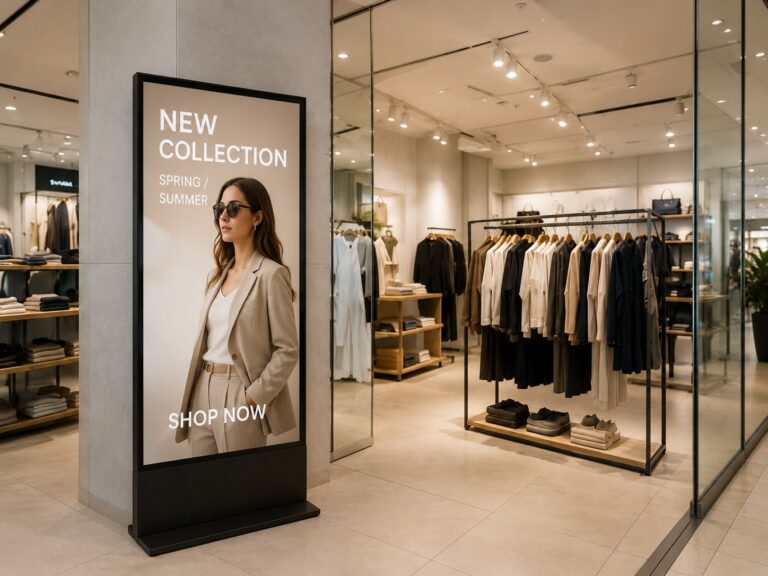
Muitos varejistas começam um sinalização digital no varejo Planejar a sinalização digital no varejo pode ser feito com uma pergunta simples: “Quanto custa a tela?”. Mas, em ambientes reais de lojas, isso raramente é suficiente. Uma tela de caixa tem um objetivo diferente de uma vitrine. Um diretório de shopping center tem uma lógica de conteúdo diferente de uma tela de promoção de prateleira. Para lojas de varejo, shoppings e redes varejistas, a verdadeira questão do planejamento não é apenas qual tela comprar, mas onde colocá-la, qual conteúdo ela deve exibir, como será atualizada e como seu desempenho será medido. Este guia explica como planejar a sinalização digital no varejo a partir de uma perspectiva B2B prática, incluindo a localização das telas, os objetivos de conteúdo, a configuração do sistema e a análise de ROI, para que os compradores possam tomar decisões com base no valor do projeto, e não apenas no preço da tela.
O que é sinalização digital no varejo e por que o planejamento é importante?
Sinalização digital para o varejo Muitas vezes é mal interpretado como simplesmente “uma tela que exibe anúncios”. Na realidade, é um solução de sinalização digital comercial Projetado para ambientes de varejo, combinando a tela de exibição, reprodutor de mídia ou Sistema Android, método de gerenciamento de conteúdo, local de instalação e plano de operação a longo prazo. Para lojas, shoppings, supermercados, restaurantes e redes varejistas, o valor de sinalização digital Depende não só da tela em si, mas também de quão bem ela se adequa ao objetivo comercial de cada local.
Uma janela de frente para display de sinalização digitalPor exemplo, uma tela de caixa geralmente é usada para atrair transeuntes com promoções, novidades ou elementos visuais da marca. Já a tela do caixa tem uma finalidade diferente: pode promover programas de fidelidade, produtos adicionais, ofertas com código QR ou mensagens durante o tempo de espera na fila. Se ambas as telas usarem o mesmo conteúdo, o projeto pode parecer ativo, mas não apresentar o desempenho real esperado no varejo.
Por isso, o planejamento é fundamental antes da compra de telas. Os varejistas devem primeiro definir onde a tela será instalada, qual conteúdo será exibido, com que frequência precisa ser atualizada e se... CMS de sinalização digital É necessário definir quem fará a manutenção do sistema. Uma pequena loja pode precisar apenas de reprodução de conteúdo simples, enquanto uma rede varejista pode exigir agendamento remoto, controle de conteúdo em várias localidades e monitoramento de reprodução. Um bom planejamento ajuda os compradores a evitar a escolha de displays com base apenas no preço e, em vez disso, a construir um sistema que suporte marketing, operações e resultados mensuráveis. ROI.
Principais casos de uso de sinalização digital no varejo: Alinhar a localização da tela com os objetivos do conteúdo
Diferente sinalização digital no varejo screens should not carry the same message. A screen at the storefront, a shelf display, a checkout screen, and a mall directory all meet customers at different moments. The best way to plan them is to connect each screen location with a clear customer pain point, content type, and business goal. For retailers planning larger deployments, working with a retail digital signage factory can help ensure suitable display configurations, consistent product supply, and better support for different store environments.
| Cenário de Varejo | Ponto problemático do cliente | Conteúdo recomendado | Objetivo de negócio |
|---|---|---|---|
| Vitrine/Expositor de vitrine | Quem passa pode não notar a loja ou a promoção atual. | Novidades, descontos, vídeos da marca, ofertas por tempo limitado | Atrair fluxo de pedestres e incentivar a entrada na loja. |
| Área de entrada | Os clientes entram na loja, mas podem não saber em que focar primeiro. | Recomendações de novos produtos, destaques da campanha, navegação na loja, mensagem da marca | Crie uma forte primeira impressão e oriente a navegação. |
| Prateleira / Zona de Produtos | As informações sobre o produto são limitadas e a equipe de vendas pode nem sempre estar disponível. | Características do produto, conteúdo comparativo, vídeos de utilização, lembretes de promoções | Apoiar as decisões de compra e reduzir a pressão de vendas. |
| Caixa de pagamento | O tempo de espera não é utilizado de forma eficaz para promoções de última hora. | Programas de fidelidade, produtos adicionais, ofertas com código QR, mensagens sobre o tempo de espera na fila. | Aumente as vendas de produtos adicionais, as inscrições e o potencial de recompra. |
| Varejo de Alimentos e Bebidas | Cardápios, preços, combos e disponibilidade podem sofrer alterações frequentes. | Painel de menu digital Conteúdo, combos, preços, imagens de comida, cardápios por período do dia, avisos de produto esgotado | Melhorar a eficiência dos pedidos e a flexibilidade do menu |
| Diretório de Shopping Centers | Os visitantes podem ter dificuldades para encontrar lojas, instalações ou eventos em andamento. | Guias de andares, diretório de marcas, promoções de eventos, conteúdo publicitário | Melhorar a experiência do visitante e apoiar as operações de publicidade. |
| Telas de rede de varejo | Lojas com várias filiais podem apresentar campanhas inconsistentes e atualizações de conteúdo lentas. | Campanhas da sede, promoções regionais, conteúdo sazonal, ativos de marca unificados. | Melhorar a eficiência operacional e a consistência das campanhas. |
UM display de sinalização digital de vitrine Deve ser simples e visualmente impactante, pois as pessoas podem olhar para ele apenas por alguns segundos. Funciona melhor para uma oferta clara, um novo produto ou uma mensagem da marca. Dentro da loja, as telas de entrada podem direcionar a atenção para campanhas atuais, novidades ou seções importantes da loja.
Para áreas de prateleiras e zonas de produtos, o conteúdo pode ser mais informativo. expositor de prateleira Pode exibir os benefícios do produto, pontos de comparação, vídeos curtos de demonstração ou lembretes de promoções. Isso é útil quando os clientes precisam de mais informações antes de tomar uma decisão de compra.
No caixa, o conteúdo deve ser curto e orientado para a ação. display de finalização de compra Pode promover cupons com código QR, benefícios de membros, produtos adicionais ou ofertas para a próxima visita. Como os clientes já estão próximos da compra, este local é mais adequado para mensagens de conversão rápida do que para longas narrativas da marca.
No varejo de alimentos e bebidas, um cardápio digital É útil porque menus, preços, combinações de refeições e disponibilidade de produtos mudam com frequência. Em shoppings, telas de diretório e quiosques interativos São mais adequadas para orientação, promoção de eventos e gestão de publicidade. Para redes de varejo, a principal vantagem é a consistência: telas em diferentes lojas podem exibir campanhas unificadas, permitindo ajustes regionais.
Uma maneira simples de priorizar esses casos de uso é acompanhar a jornada do cliente. Utilize telas na vitrine para atrair a atenção antes da entrada, telas na entrada para guiar as primeiras impressões, displays nas prateleiras para auxiliar na busca e comparação de produtos, displays no caixa para incentivar ações rápidas e telas de diretório para auxiliar na navegação em espaços de varejo maiores. Isso ajuda os varejistas a evitar a instalação de telas apenas onde há espaço disponível e, em vez disso, posicionar cada display onde ele possa auxiliar em uma decisão específica do cliente.
O que planejar antes da implantação: telas, CMS, rede e manutenção.
Antes de implantar um sistema de sinalização digital para varejoOs compradores devem olhar além do tamanho da tela e do preço unitário. Um monitor pode parecer adequado em um orçamento, mas o funcionamento real na loja depende do método de instalação, das atualizações de conteúdo, do acesso à rede, da fonte de alimentação e da responsabilidade pela manutenção. Esses detalhes afetam o bom funcionamento da tela após a instalação.
Para uma única loja de varejo, a configuração pode ser simples. O comprador pode precisar apenas de um sinalização digital montada na parede tela, um monitor de chão ou um Sinalização digital Android Dispositivo com reprodução básica de conteúdo. As principais questões são: onde a tela será instalada, com que frequência o conteúdo será alterado e quem fará as atualizações?
Para redes de varejo, shoppings ou projetos com várias unidades, o planejamento deve ser mais sistemático. CMS de sinalização digital Pode ser necessário para atualizações remotas, agendamento de conteúdo, agrupamento de lojas e monitoramento de reprodução. Sem isso, cada loja pode precisar atualizar o conteúdo manualmente, o que pode atrasar o lançamento da campanha e gerar mensagens inconsistentes.
| Item de planejamento | O que verificar antes da implantação |
|---|---|
| Tipo de tela | Escolha entre opções de montagem na parede, no chão, em vitrines, em balcões ou quiosques, dependendo da localização. |
| Instalação | Confirme se a instalação será feita na parede, no chão, embutida, suspensa ou sobre a bancada. |
| Brilho | Ajuste o nível de brilho de acordo com ambientes internos, voltados para janelas ou semiabertos. |
| CMS | Decida se a publicação remota, o agrupamento de lojas, o agendamento e o controle de permissões são necessários. |
| Rede | Verifique se o site oferece suporte a Wi-Fi, LAN ou reprodução offline. |
| Poder | Confirme o acesso à energia, o roteamento dos cabos, a segurança elétrica e a posição de instalação. |
| Manutenção | Planejar o acesso para reparos, monitoramento de dispositivos, atualizações de conteúdo e atribuição de responsabilidades. |
| Escala | Defina se o projeto é para uma única loja, uma implementação piloto ou uma implantação em várias lojas. |
O planejamento de rede e energia é especialmente fácil de ser negligenciado. Uma tela posicionada em um local visualmente perfeito ainda pode causar problemas se não houver uma conexão estável, um roteamento de cabos seguro ou um acesso conveniente para manutenção. Para vitrines ou áreas semiabertas, os compradores também devem considerar o brilho, o calor e os longos períodos de operação.
O objetivo desta fase de planejamento não é complicar o projeto, mas sim torná-lo mais simples. solução de sinalização digital comercial Mais fácil de implantar, atualizar e manter. Para redes de lojas ou projetos personalizados, é melhor confirmar o tipo de tela, os requisitos do CMS, as condições da rede e o método de instalação com o fornecedor antes da produção ou compra em grande quantidade.
Análise do ROI de Sinalização Digital no Varejo: Custos, Retornos e KPIs Mensuráveis
Um prático ROI de sinalização digital no varejo A análise deve começar com uma fórmula simples:
ROI = (Benefícios totais mensuráveis – Custos totais do projeto) ÷ Custos totais do projeto × 100%
No entanto, a parte difícil não é a fórmula. O verdadeiro desafio é decidir o que deve ser contabilizado como custo, o que pode ser contabilizado como retorno e qual... Indicadores-chave de desempenho (KPIs) para sinalização digital Pode-se comprovar que a tela realmente contribui para o desempenho da loja. Para projetos de varejo, o ROI não deve ser avaliado apenas pelo preço da tela ou pelas vendas diretas. Deve-se também considerar a eficiência na atualização de conteúdo, a redução do trabalho de impressão, a implementação mais rápida de campanhas e uma melhor comunicação com o cliente.
Quais custos devem ser incluídos?
Antes de estimar os retornos, os varejistas devem primeiro calcular o valor total. custo da sinalização digitalIsso inclui mais do que apenas a tela. Um projeto também pode exigir materiais de instalação, um reprodutor de mídia ou sistema Android, software CMS, design de conteúdo, configuração de rede, manutenção e tempo da equipe.
| Tipo de custo | O que incluir |
|---|---|
| Hardware | Monitores, reprodutores de mídia, suportes, cabos, braçadeiras |
| Instalação | Montagem na parede, acesso à energia elétrica, configuração de rede, mão de obra |
| Software | CMSgerenciamento remoto, ferramentas de agendamento, módulos de análise |
| Contente | Design gráfico, produção de vídeo, animação, materiais promocionais |
| Operação | Eletricidade, manutenção, tempo da equipe, atualizações de conteúdo |
Para uma loja pequena, a estrutura de custos pode ser simples: uma ou duas telas, reprodução básica e atualizações ocasionais de conteúdo. Para uma rede varejista, o modelo de custos geralmente é mais complexo, pois o conteúdo precisa ser gerenciado em várias lojas. Nesse caso, o CMS (Sistema de Gerenciamento de Conteúdo), o controle remoto, as permissões de usuário e o monitoramento da reprodução podem se tornar mais importantes do que o preço da tela em si.
Que retornos podem ser mensurados?
O lado de retorno de Análise de ROI de sinalização digital Deve incluir tanto o valor direto quanto o indireto. Os retornos diretos são mais fáceis de mensurar, como o aumento nas vendas de produtos promovidos, o resgate de cupons ou a leitura de códigos QR. Os retornos indiretos podem incluir custos de impressão mais baixos, menos mão de obra, atualizações de campanhas mais rápidas e melhor comunicação na loja.
Por exemplo, se um varejista costumava trocar cartazes impressos toda semana, a sinalização digital pode reduzir a impressão, o envio e o trabalho manual de substituição. Se uma rede de lojas precisa lançar uma promoção sazonal em várias filiais, as atualizações remotas de conteúdo podem ajudar a campanha a entrar no ar mais rapidamente e de forma mais consistente. Essas melhorias operacionais podem não se traduzir em vendas imediatas, mas ainda assim impactam o valor do projeto.
Os retornos mensuráveis comuns incluem:
- Vendas de produtos promovidos ou itens de campanha
- Redução de gastos com pôsteres impressos, banners, cardápios ou etiquetas de prateleira.
- Menos tempo da equipe gasto na substituição de sinalização física.
- Atualização mais rápida para campanhas sazonais ou alterações de preço.
- Melhor comunicação de ofertas de adesão, promoções com código QR ou eventos na loja.
- Melhoria da experiência do cliente através de informações e navegação mais claras.
É importante não presumir que cada tela aumentará automaticamente as vendas. Uma tela em um local inadequado, com conteúdo confuso ou manutenção precária, pode gerar pouco valor. Por isso, o ROI (retorno sobre o investimento) deve estar alinhado ao objetivo do projeto desde o início.
Quais KPIs ajudam a comprovar o ROI?
Para tornar o ROI mais confiável, os varejistas devem definir KPIs mensuráveis antes da implementação. Diferentes telas exigem diferentes indicadores de desempenho. Uma tela na vitrine pode focar na visibilidade e na entrada na loja. Uma tela de checkout pode focar em leituras de QR Code, cadastros de membros ou vendas adicionais. Um diretório do shopping pode focar no uso do sistema de localização e no engajamento dos visitantes.
| Tipo de KPI | Métricas de exemplo | Uso adequado |
|---|---|---|
| Exposição | Fluxo de pedestres, visualizações de tela, contagem de reproduções de conteúdo | Vitrine, área de entrada |
| Noivado | Tempo de permanência, leitura de QR Code, interações por toque | Tela promocional, quiosque interativo |
| Conversão | Resgate de cupons, comparação de vendas no ponto de venda, inscrições de membros | Caixa, área de produtos |
| Operação | Tempo de atividade da tela, status de reprodução, sucesso da atualização | Lojas de rede, projetos com várias localizações |
| Experiência | Redução no feedback dos clientes, na utilização do sistema de orientação e nas solicitações de serviço. | Shopping, área de serviço, tela de diretório |
Para projetos básicos, os varejistas podem começar com métodos simples de rastreamento, como comparar as vendas de produtos antes e depois de uma promoção, usar códigos QR no conteúdo da tela ou verificar a frequência com que os cupons são resgatados. Para projetos mais avançados, análises de sinalização digital, comparação de PDV (Ponto de Venda), relatórios de reprodução de conteúdo e testes A/B podem fornecer informações mais detalhadas.
Uma abordagem útil é dividir o ROI em três níveis. Primeiro, medir se a tela está funcionando corretamente. Segundo, medir se os clientes estão visualizando ou interagindo com o conteúdo. Terceiro, medir se o conteúdo contribui para um resultado comercial, como vendas, cadastros, resgates ou redução do trabalho manual.
Isso faz ROI de sinalização digital no varejo mais fácil de avaliar ao longo do tempo. Em vez de perguntar apenas "O investimento na tela se pagou?", os varejistas podem fazer perguntas mais práticas: O conteúdo está sendo atualizado de forma eficiente? Os clientes estão respondendo à mensagem? As campanhas são mais fáceis de gerenciar? Os produtos ou ofertas promovidos têm melhor desempenho quando acompanhados de conteúdo na tela?
Antes de solicitar um orçamento, os compradores devem preparar suas estimativas de custos, frequência de atualização de conteúdo, objetivos da campanha e KPIs preferenciais. Isso ajuda os fornecedores a recomendarem uma solução mais adequada e permite que o varejista avalie o ROI com base nas necessidades reais do projeto, e não em suposições.
Exemplo de marca real: Planejamento de sinalização digital no varejo, desde o uso da tela até o retorno sobre o investimento (ROI).
Um projeto de varejo real às vezes pode explicar planejamento de sinalização digital no varejo mais claramente do que vários cenários separados. Um exemplo útil é a implementação global de cardápios digitais pela Pequeno CésarSegundo informações públicas, a marca trabalhou com a NowSignage para migrar de processos manuais de menu para um sistema de gerenciamento de conteúdo (CMS) centralizado e baseado em nuvem para cardápios digitais em milhares de restaurantes em 16 países. O sistema foi projetado para manter o conteúdo do menu preciso, refletir preços e disponibilidade, e atender às necessidades locais, como idiomas e moedas.
Este caso não é um exemplo típico de loja de varejo, mas demonstra uma lógica de planejamento importante da qual muitos varejistas podem aprender: a tela é apenas uma parte do projeto. O maior valor reside em como o conteúdo é atualizado, como as lojas mantêm a consistência e com que rapidez as alterações locais podem ser refletidas.
Qual era o problema central?
Para uma rede de supermercados, as informações do cardápio mudam com frequência. Preços, disponibilidade de produtos, combos, ofertas locais e necessidades operacionais podem variar de acordo com a localização ou o mercado. Se cada loja atualizar os cardápios manualmente, o processo pode se tornar lento, inconsistente e difícil de gerenciar em grande escala.
Este também é um desafio comum para muitas redes varejistas. Mesmo fora do setor de alimentação, as lojas frequentemente precisam atualizar campanhas sazonais, promoções regionais, ofertas para membros e disponibilidade de produtos. Uma tela digital sem um processo claro de gerenciamento de conteúdo ainda pode gerar pressão operacional.
Como a sinalização digital apoiou o projeto?
Nesse tipo de implementação, o cardápio digital Não serve apenas para exibir imagens e preços de alimentos. Torna-se uma camada de comunicação entre a sede, as lojas locais e os clientes. Um CMS centralizado permite que as equipes atualizem o conteúdo do cardápio com mais eficiência, sem deixar de atender às necessidades locais.
Para outros negócios de varejo, a mesma lógica pode ser aplicada a displays de entrada, telas de caixa, promoções em prateleiras ou telas de publicidade em shoppings. A questão principal não é apenas "O que a tela deve exibir?", mas também "Quem controla o conteúdo, com que frequência ele muda e com que rapidez as atualizações chegam a cada local?".
Que ROI e KPIs os varejistas podem aprender com isso?
Este caso também demonstra porquê ROI de sinalização digital no varejo O sucesso não deve ser medido apenas pelas vendas diretas. Para um projeto com várias unidades, o valor significativo pode advir da eficiência operacional, da precisão do conteúdo, da velocidade das campanhas e da consistência entre as lojas.
Algumas orientações úteis sobre KPIs podem incluir:
| Área de Planejamento | Direção do KPI |
|---|---|
| Precisão do conteúdo | Verifique se os menus, preços, promoções ou disponibilidade estão atualizados corretamente. |
| Atualização da Eficiência | Com que rapidez o novo conteúdo pode ser publicado em todas as lojas? |
| Consistência da Loja | Se diferentes locais seguem a mesma campanha ou padrão de marca |
| Flexibilidade local | Se as equipes regionais podem ajustar o idioma, a moeda ou as ofertas locais. |
| Confiabilidade operacional | Se as telas permanecerem online e o conteúdo for exibido conforme programado. |
Para varejistas menores, a lição ainda é prática. Mesmo que uma empresa comece com apenas uma ou duas telas, ainda deve pensar na frequência de atualização, na responsabilidade pelo conteúdo e em metas mensuráveis. Para redes maiores, um sistema de sinalização digital para varejo Deve ser planejado como uma ferramenta operacional, não apenas como uma compra para exibição.
O exemplo da Little Caesars mostra que os projetos de sinalização digital mais eficazes geralmente não se baseiam apenas em telas. Eles são construídos em torno do controle de conteúdo, da execução na loja e da melhoria operacional mensurável. Essa é a verdadeira lógica de planejamento que os varejistas devem considerar antes de expandir um projeto.
Como se preparar antes de contatar um fornecedor de sinalização digital para o varejo
Antes de solicitar um orçamento, os compradores devem preparar mais do que apenas o tamanho e a quantidade da tela. fornecedor de sinalização digital para varejo É necessário compreender o ambiente da loja, o método de instalação, o plano de conteúdo, os requisitos de gestão e a escala do projeto antes de recomendar uma solução adequada. Informações claras sobre o projeto ajudam a reduzir a comunicação repetida e evitam orçamentos que parecem baratos, mas não correspondem à implementação real.
Utilize a lista de verificação abaixo antes de entrar em contato com um fabricante de sinalização digital ou provedor de soluções:
| Informações a preparar | O que confirmar |
|---|---|
| Tipo de loja | Loja de varejo, supermercado, shopping center, restaurante, loja de conveniência ou rede de lojas |
| Localização da tela | Janela, entrada, área de prateleiras, balcão de caixa, corredor, área de diretório ou área de serviço |
| Método de instalação | Montado na paredeInstalação de chão, de bancada, embutida, suspensa ou em estilo quiosque |
| Tamanho e quantidade da tela | Tamanhos de tela necessários, quantidade estimada e se é para uma loja ou várias lojas. |
| Ambiente | Ambiente interno, voltado para janela, semiaberto, com alta luminosidade ou para operação por longos períodos. |
| Tipo de conteúdo | Imagens, vídeos, conteúdo de menu digital, promoções, sinalização, ofertas com código QR ou mensagens da marca. |
| Requisito do CMS | Reprodução simplificada, atualizações em uma única loja ou gerenciamento remoto de conteúdo em várias lojas. |
| Condições da rede | Ambientes de rede Wi-Fi, LAN, reprodução offline ou mista |
| Escala do projeto | Pedido de amostra, projeto piloto, reforma de loja ou implantação em grande escala |
| Necessidades de personalização | Requisitos de marca, logotipo de inicialização, design da carcaça, interface, sistema Android ou OEM/ODM |
| Objetivo de negócio | Promoção, sinalização, comunicação em filas, exibição da marca ou gestão de campanhas da rede. |
Para uma loja pequena, a discussão pode se concentrar no tipo de tela, instalação, reprodução de conteúdo e operação básica. Para um projeto de rede de lojas ou shopping center, o fornecedor pode precisar de mais detalhes sobre controle do CMS, atualizações remotas, agrupamento de lojas, permissões de usuário e acesso para manutenção.
Esta também é a fase adequada para esclarecer se o projeto precisa de um padrão. solução de sinalização digital comercial ou um sinalização digital personalizada configuração. Por exemplo, a exibição de uma vitrine pode precisar de maior brilho, enquanto a implementação em várias lojas pode exigir suporte centralizado de CMS.
Como um fabricante de displays comerciais e sinalização digitalA Ikinor pode ajudar os compradores de projetos a analisar o tamanho da tela, o método de instalação, as opções do sistema Android, os requisitos do CMS e as necessidades de personalização OEM/ODM com base em diferentes cenários de varejo. Quanto mais claramente os compradores definirem seu caso de uso antes da consulta, mais fácil será receber uma solução prática em vez de uma cotação genérica de produto.
Conclusão: Planeje telas, conteúdo e ROI antes de expandir a sinalização digital no varejo.
Um sucesso sinalização digital no varejo Um projeto não se resume apenas à escolha de telas. Ele depende de se a localização da tela, o objetivo do conteúdo, o ambiente de instalação, os requisitos do CMS e as métricas de ROI se adequam ao cenário real do varejo. Uma vitrine, uma tela de caixa, um cardápio digital e um diretório do shopping podem usar telas comerciais, mas cada um deles atende a uma ação diferente do cliente e a um objetivo comercial diferente.
Antes de expandir um projeto, os compradores devem revisar os pontos essenciais: onde cada tela será instalada, qual conteúdo será exibido, com que frequência as atualizações serão necessárias, se o gerenciamento remoto será necessário e quais KPIs serão usados para medir o desempenho. Para pequenas lojas, uma configuração simples pode ser suficiente. Para shoppings, restaurantes ou redes varejistas, uma solução mais completa pode ser necessária. solução de sinalização digital comercial Pode ser necessário para dar suporte à operação estável e ao gerenciamento de conteúdo a longo prazo.
Se você está planejando um projeto de sinalização digital para o varejo, prepare informações sobre o tipo de loja, a localização das telas, o plano de conteúdo, as necessidades de CMS e a escala de implementação antes de entrar em contato com um fornecedor. fornecedor de sinalização digital para varejoIsso facilita o recebimento de uma solução prática em vez de uma cotação genérica para tela.
Perguntas frequentes
Sinalização digital para varejo refere-se a sistemas de exibição digital usados em ambientes comerciais para mostrar promoções, informações sobre produtos, cardápios, indicações de localização, mensagens da marca ou conteúdo de atendimento ao cliente. Pode incluir telas de parede, displays de chão, vitrines, telas de caixa, cardápios digitais e quiosques interativos. Para compradores do varejo, o ponto principal é que a sinalização digital deve apoiar um objetivo claro da loja, e não simplesmente exibir conteúdo publicitário aleatório.
A sinalização digital deve ser posicionada onde possa auxiliar na decisão do cliente. Telas na vitrine podem atrair a atenção antes mesmo de os clientes entrarem. Telas na entrada podem moldar a primeira impressão. Expositores nas prateleiras podem explicar produtos ou promoções. Telas no caixa podem promover itens adicionais, programas de fidelidade ou ofertas com código QR. Em espaços comerciais maiores, telas com diretórios ou totens de orientação podem ajudar os clientes a encontrar lojas, serviços ou áreas de eventos com mais facilidade.
O melhor conteúdo depende da localização na tela e da intenção do cliente. Uma vitrine deve usar imagens impactantes, ofertas simples e mensagens curtas. Uma prateleira pode exibir os benefícios do produto, comparações ou vídeos curtos de demonstração. Um painel de caixa deve focar em ações rápidas, como cupons, cadastros de fidelidade ou ofertas para a próxima visita. Para o varejo de alimentos, um cardápio digital deve mostrar preços claros, imagens dos produtos, combos e atualizações de disponibilidade.
A sinalização digital no varejo pode valer o investimento quando resolve um problema comercial claro, como atualizações de promoções lentas, altos custos de impressão, comunicação deficiente na loja ou campanhas inconsistentes entre as lojas. No entanto, o valor depende do planejamento. Uma tela colocada no local errado com conteúdo pouco claro pode trazer resultados limitados. Os compradores devem definir os objetivos da tela, a frequência de atualização do conteúdo e os KPIs mensuráveis antes de avaliar se o projeto vale a pena.
O retorno sobre o investimento (ROI) da sinalização digital no varejo pode ser calculado com uma fórmula básica: benefícios mensuráveis totais menos custos totais do projeto, dividido pelos custos totais do projeto. Os benefícios podem incluir vendas de produtos promovidos, redução de custos de impressão, economia de mão de obra, atualizações de campanhas mais rápidas e melhor comunicação com o cliente. O resultado exato depende dos dados de cada projeto, portanto, os compradores devem evitar presumir um ROI fixo antes da implementação.
Uma única loja com conteúdo simples pode não precisar de um CMS complexo para sinalização digital. A reprodução básica pode ser suficiente se as atualizações forem pouco frequentes. No entanto, lojas que atualizam promoções com frequência, gerenciam várias telas ou operam em diversas localidades geralmente se beneficiam do suporte de um CMS. Um CMS pode auxiliar na publicação remota, agendamento de conteúdo, agrupamento de lojas, permissões de usuário e monitoramento de reprodução.



 Portuguese
  English
  Spanish
  Arabic
  French
  Indonesian
  German
  Russian
  Vietnamese
  Thai
Thai  Italian