
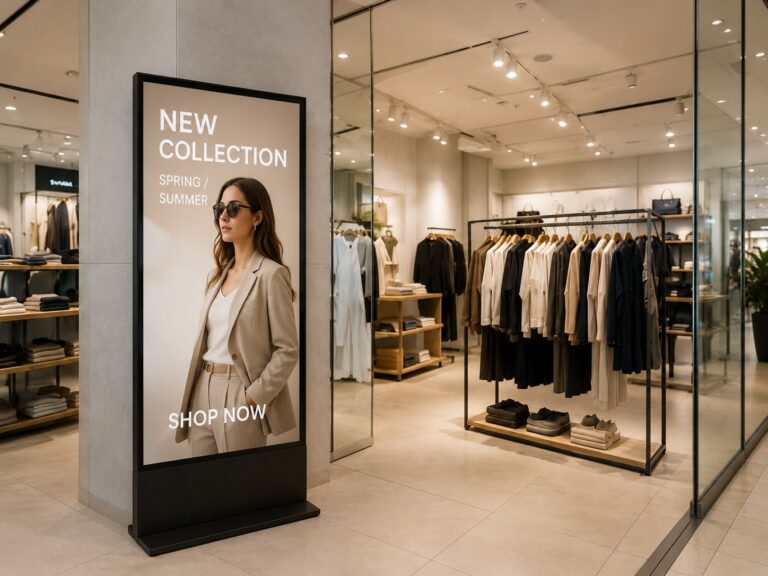
ผู้ค้าปลีกหลายรายเริ่มต้น ป้ายดิจิทัลสำหรับร้านค้าปลีก การวางแผนโครงการมักเริ่มต้นด้วยคำถามง่ายๆ เพียงข้อเดียวว่า “หน้าจอราคาเท่าไหร่?” แต่ในสภาพแวดล้อมจริงของร้านค้า คำถามนั้นมักไม่เพียงพอ หน้าจอชำระเงินมีเป้าหมายที่แตกต่างจากหน้าจอแสดงสินค้าหน้าร้าน คู่มือในห้างสรรพสินค้ามีตรรกะเนื้อหาที่แตกต่างจากหน้าจอโปรโมชั่นสินค้าบนชั้นวาง สำหรับร้านค้าปลีก ห้างสรรพสินค้า และเครือข่ายค้าปลีก คำถามในการวางแผนที่แท้จริงไม่ใช่แค่ว่าจะซื้อหน้าจอแบบไหน แต่ยังรวมถึงว่าจะวางไว้ที่ไหน ควรแสดงเนื้อหาอะไร จะอัปเดตอย่างไร และจะวัดประสิทธิภาพได้อย่างไร คู่มือนี้จะอธิบายวิธีการวางแผนป้ายดิจิทัลสำหรับร้านค้าปลีกจากมุมมอง B2B ที่ใช้งานได้จริง รวมถึงตำแหน่งการติดตั้งหน้าจอ เป้าหมายของเนื้อหา การกำหนดค่าระบบ และการวิเคราะห์ ROI เพื่อให้ผู้ซื้อสามารถตัดสินใจได้จากมูลค่าของโครงการแทนที่จะพิจารณาจากราคาของหน้าจอเพียงอย่างเดียว
ป้ายดิจิทัลสำหรับธุรกิจค้าปลีกคืออะไร และเหตุใดการวางแผนจึงมีความสำคัญ
ป้ายดิจิทัลสำหรับร้านค้าปลีก มักเข้าใจผิดว่าเป็นเพียง "หน้าจอที่แสดงโฆษณา" แต่ในความเป็นจริงแล้ว มันคือ... โซลูชันป้ายดิจิทัลเชิงพาณิชย์ ออกแบบมาสำหรับสภาพแวดล้อมการค้าปลีก โดยผสมผสานหน้าจอแสดงผล เครื่องเล่นสื่อ หรือ ระบบแอนดรอยด์วิธีการจัดการเนื้อหา สถานที่ติดตั้ง และแผนการดำเนินงานระยะยาว สำหรับร้านค้า ห้างสรรพสินค้า ซูเปอร์มาร์เก็ต ร้านอาหาร และห้างค้าปลีก มูลค่าของ ป้ายดิจิทัล ขึ้นอยู่กับไม่เพียงแต่คุณภาพของหน้าจอเท่านั้น แต่ยังขึ้นอยู่กับว่ามันสอดคล้องกับเป้าหมายทางธุรกิจของแต่ละสถานที่ได้ดีแค่ไหนด้วย
หันหน้าไปทางหน้าต่าง จอแสดงผลป้ายดิจิทัลตัวอย่างเช่น หน้าจอทั่วไปมักใช้เพื่อดึงดูดผู้คนที่เดินผ่านไปมาด้วยโปรโมชั่น สินค้าใหม่ หรือภาพลักษณ์ของแบรนด์ ในขณะที่หน้าจอเคาน์เตอร์ชำระเงินมีจุดประสงค์ที่แตกต่างออกไป อาจใช้เพื่อโปรโมตโปรแกรมสมาชิก สินค้าเพิ่มเติม ข้อเสนอผ่านคิวอาร์โค้ด หรือข้อความแจ้งเวลารอคิว หากทั้งสองหน้าจอใช้เนื้อหาเดียวกัน โครงการอาจดูน่าสนใจ แต่ล้มเหลวในการสนับสนุนประสิทธิภาพการค้าปลีกที่แท้จริง
ด้วยเหตุนี้ การวางแผนก่อนซื้อจอแสดงผลจึงมีความสำคัญ ผู้ค้าปลีกควรพิจารณาก่อนว่าจอแสดงผลจะติดตั้งที่ใด จะแสดงเนื้อหาอะไร ต้องอัปเดตบ่อยแค่ไหน และ... ระบบจัดการเนื้อหาป้ายดิจิทัล จำเป็นต้องมีระบบอะไร และใครจะเป็นผู้ดูแลรักษาระบบ ร้านค้าขนาดเล็กอาจต้องการเพียงแค่การเล่นเนื้อหาแบบง่ายๆ ในขณะที่เครือข่ายค้าปลีกอาจต้องการการกำหนดตารางเวลาจากระยะไกล การควบคุมเนื้อหาหลายสถานที่ และการตรวจสอบการเล่น การวางแผนที่ดีช่วยให้ผู้ซื้อหลีกเลี่ยงการเลือกจอแสดงผลโดยพิจารณาจากราคาเพียงอย่างเดียว และสร้างระบบที่สนับสนุนการตลาด การดำเนินงาน และการวัดผลได้แทน ผลตอบแทนจากการลงทุน.
กรณีการใช้งานป้ายดิจิทัลในธุรกิจค้าปลีกที่สำคัญ: จับคู่ตำแหน่งหน้าจอให้สอดคล้องกับเป้าหมายด้านเนื้อหา
แตกต่าง ป้ายดิจิทัลสำหรับร้านค้าปลีก screens should not carry the same message. A screen at the storefront, a shelf display, a checkout screen, and a mall directory all meet customers at different moments. The best way to plan them is to connect each screen location with a clear customer pain point, content type, and business goal. For retailers planning larger deployments, working with a retail digital signage factory can help ensure suitable display configurations, consistent product supply, and better support for different store environments.
| สถานการณ์ค้าปลีก | ปัญหาที่ลูกค้าประสบ | เนื้อหาแนะนำ | เป้าหมายทางธุรกิจ |
|---|---|---|---|
| หน้าร้าน / การจัดแสดงสินค้าในหน้าต่างร้าน | ผู้คนที่เดินผ่านไปมาอาจไม่ทันสังเกตเห็นร้านค้าหรือโปรโมชั่นปัจจุบัน | สินค้าใหม่, ส่วนลด, วิดีโอแนะนำแบรนด์, โปรโมชั่นจำกัดเวลา | ดึงดูดลูกค้าให้เข้ามาในร้านและกระตุ้นให้ลูกค้าเข้ามาในร้านมากขึ้น |
| บริเวณทางเข้า | ลูกค้าเข้ามาในร้านแต่อาจไม่รู้ว่าจะเริ่มต้นสนใจอะไรก่อน | คำแนะนำผลิตภัณฑ์ใหม่, ข้อมูลเด่นของแคมเปญ, การนำทางภายในร้าน, ข้อความของแบรนด์ | สร้างความประทับใจแรกที่ดีและนำทางในการเรียกดูเว็บไซต์ |
| ชั้นวางสินค้า / โซนสินค้า | ข้อมูลผลิตภัณฑ์มีจำกัด และพนักงานขายอาจไม่พร้อมให้บริการตลอดเวลา | คุณสมบัติของผลิตภัณฑ์, เนื้อหาเปรียบเทียบ, วิดีโอการใช้งาน, การแจ้งเตือนโปรโมชั่น | สนับสนุนการตัดสินใจซื้อและลดแรงกดดันในการขาย |
| เคาน์เตอร์ชำระเงิน | เวลาที่รอคอยไม่ได้ถูกใช้ประโยชน์อย่างมีประสิทธิภาพสำหรับการโปรโมชั่นในนาทีสุดท้าย | โปรแกรมสมาชิก, ผลิตภัณฑ์เสริม, ข้อเสนอผ่านคิวอาร์โค้ด, ข้อความแจ้งเวลารอคิว | เพิ่มยอดขายสินค้าเสริม การสมัครสมาชิก และศักยภาพในการซื้อซ้ำ |
| ธุรกิจค้าปลีกอาหารและเครื่องดื่ม | เมนู ราคา ชุดอาหาร และความพร้อมในการให้บริการ อาจมีการเปลี่ยนแปลงบ่อยครั้ง | ป้ายเมนูดิจิทัล เนื้อหา, ชุดอาหาร, ราคา, รูปภาพอาหาร, เมนูตามช่วงเวลาของวัน, ประกาศสินค้าหมด | เพิ่มประสิทธิภาพในการสั่งซื้อและเพิ่มความยืดหยุ่นของเมนู |
| รายชื่อห้างสรรพสินค้า | นักท่องเที่ยวอาจประสบปัญหาในการค้นหาร้านค้า สิ่งอำนวยความสะดวก หรือกิจกรรมต่างๆ ที่กำลังจัดขึ้น | คู่มือพื้นที่จัดงาน, รายชื่อแบรนด์, โปรโมชั่นกิจกรรม, เนื้อหาโฆษณา | ปรับปรุงประสบการณ์ของผู้เยี่ยมชมและสนับสนุนการดำเนินงานด้านการโฆษณา |
| หน้าจอเครือข่ายค้าปลีก | ร้านค้าที่มีหลายสาขาอาจมีแคมเปญที่ไม่สอดคล้องกันและการอัปเดตเนื้อหาที่ล่าช้า | แคมเปญจากสำนักงานใหญ่ โปรโมชั่นระดับภูมิภาค เนื้อหาตามฤดูกาล สินทรัพย์แบรนด์ที่เป็นหนึ่งเดียว | ปรับปรุงประสิทธิภาพการดำเนินงานและความสม่ำเสมอของแคมเปญ |
เอ จอแสดงผลป้ายดิจิทัลแบบติดหน้าต่าง ควรออกแบบให้เรียบง่ายและดึงดูดสายตา เพราะผู้คนอาจมองเพียงไม่กี่วินาทีเท่านั้น เหมาะที่สุดสำหรับข้อเสนอที่ชัดเจนเพียงอย่างเดียว ผลิตภัณฑ์ใหม่เพียงอย่างเดียว หรือข้อความแบรนด์เพียงอย่างเดียว ภายในร้าน จอแสดงผลบริเวณทางเข้าสามารถดึงดูดความสนใจไปยังแคมเปญปัจจุบัน สินค้าใหม่ หรือส่วนสำคัญของร้านได้
สำหรับพื้นที่วางสินค้าและโซนสินค้า เนื้อหาอาจให้ข้อมูลที่ละเอียดมากขึ้นได้ ชั้นวางสินค้า อาจแสดงข้อดีของผลิตภัณฑ์ จุดเปรียบเทียบ วิดีโอสาธิตการใช้งานสั้นๆ หรือการแจ้งเตือนโปรโมชั่น ซึ่งมีประโยชน์เมื่อลูกค้าต้องการข้อมูลเพิ่มเติมก่อนตัดสินใจซื้อ
บริเวณเคาน์เตอร์ชำระเงิน เนื้อหาควรสั้นและเน้นการกระทำ A จอแสดงผลการชำระเงิน สามารถใช้โปรโมตคูปอง QR Code สิทธิประโยชน์สำหรับสมาชิก สินค้าเสริม หรือข้อเสนอสำหรับการซื้อครั้งต่อไปได้ เนื่องจากลูกค้าอยู่ใกล้ที่จะซื้ออยู่แล้ว ตำแหน่งนี้จึงเหมาะสมกว่าสำหรับการส่งข้อความกระตุ้นการตัดสินใจซื้ออย่างรวดเร็ว มากกว่าการเล่าเรื่องราวของแบรนด์แบบยาวๆ
ในธุรกิจค้าปลีกอาหารและเครื่องดื่ม ป้ายเมนูดิจิทัล มีประโยชน์เพราะเมนู ราคา ชุดอาหาร และสินค้าที่มีจำหน่ายมักเปลี่ยนแปลงอยู่เสมอ ในห้างสรรพสินค้า หน้าจอแสดงข้อมูลร้านอาหารและ ตู้คีออสก์แบบอินเทอร์แอ็กทีฟ เหมาะสำหรับการนำทาง การประชาสัมพันธ์กิจกรรม และการจัดการโฆษณามากกว่า สำหรับร้านค้าปลีกขนาดใหญ่ คุณค่าหลักคือความสม่ำเสมอ: หน้าจอในร้านค้าต่างๆ สามารถแสดงแคมเปญที่เป็นหนึ่งเดียวได้ ในขณะเดียวกันก็ยังคงสามารถปรับเปลี่ยนให้เหมาะสมกับแต่ละภูมิภาคได้
วิธีง่ายๆ ในการจัดลำดับความสำคัญของกรณีการใช้งานเหล่านี้คือ การติดตามเส้นทางการใช้งานของลูกค้า ใช้จอแสดงผลหน้าร้านเพื่อดึงดูดความสนใจก่อนเข้าร้าน จอแสดงผลบริเวณทางเข้าเพื่อสร้างความประทับใจแรกเห็น จอแสดงผลบนชั้นวางสินค้าเพื่อสนับสนุนการเลือกดูและเปรียบเทียบสินค้า จอแสดงผลบริเวณจุดชำระเงินเพื่อกระตุ้นให้ลูกค้าตัดสินใจอย่างรวดเร็ว และจอแสดงผลแบบไดเร็กทอรีเพื่อช่วยในการนำทางในพื้นที่ค้าปลีกขนาดใหญ่ วิธีนี้ช่วยให้ผู้ค้าปลีกหลีกเลี่ยงการติดตั้งจอแสดงผลเฉพาะในที่ที่มีพื้นที่ว่าง และวางจอแสดงผลแต่ละจอในตำแหน่งที่สามารถสนับสนุนการตัดสินใจเฉพาะของลูกค้าได้
สิ่งที่ต้องวางแผนก่อนการใช้งานจริง: หน้าจอ, ระบบจัดการเนื้อหา (CMS), เครือข่าย และการบำรุงรักษา
ก่อนที่จะทำการติดตั้งใช้งาน ระบบป้ายดิจิทัลสำหรับร้านค้าปลีกผู้ซื้อควรพิจารณามากกว่าแค่ขนาดหน้าจอและราคาต่อหน่วย จอแสดงผลอาจดูเหมาะสมในใบเสนอราคา แต่การใช้งานจริงในร้านค้าขึ้นอยู่กับวิธีการติดตั้ง การอัปเดตเนื้อหา การเข้าถึงเครือข่าย แหล่งจ่ายไฟ และความรับผิดชอบในการบำรุงรักษา รายละเอียดเหล่านี้ส่งผลต่อว่าหน้าจอจะทำงานได้อย่างราบรื่นหลังการติดตั้งหรือไม่
สำหรับร้านค้าปลีกขนาดเล็ก การจัดตั้งอาจไม่ซับซ้อน ผู้ซื้ออาจต้องการเพียงแค่ ป้ายดิจิทัลติดผนัง หน้าจอ, จอแสดงผลแบบตั้งพื้น หรือ ป้ายดิจิทัลแอนดรอยด์ อุปกรณ์ที่มีความสามารถในการเล่นเนื้อหาพื้นฐาน คำถามหลักคือ: จะติดตั้งหน้าจอไว้ที่ไหน เนื้อหาจะเปลี่ยนบ่อยแค่ไหน และใครจะเป็นผู้ดูแลระบบ?
สำหรับร้านค้าปลีกขนาดใหญ่ ห้างสรรพสินค้า หรือโครงการที่มีหลายสาขา การวางแผนควรเป็นระบบมากขึ้น ระบบจัดการเนื้อหาป้ายดิจิทัล อาจจำเป็นสำหรับการอัปเดตจากระยะไกล การกำหนดเวลาเนื้อหา การจัดกลุ่มร้านค้า และการตรวจสอบการเล่นซ้ำ หากไม่มีสิ่งนี้ แต่ละร้านค้าอาจต้องอัปเดตเนื้อหาด้วยตนเอง ซึ่งอาจทำให้การเปิดตัวแคมเปญช้าลงและสร้างข้อความที่ไม่สอดคล้องกัน
| รายการวางแผน | สิ่งที่ต้องตรวจสอบก่อนการใช้งานจริง |
|---|---|
| ประเภทหน้าจอ | เลือกรูปแบบการติดตั้งให้เหมาะสมกับสถานที่ ไม่ว่าจะเป็นแบบติดผนัง ตั้งพื้น โชว์ในหน้าต่าง เคาน์เตอร์ หรือตู้คีออสก์ |
| การติดตั้ง | ตรวจสอบให้แน่ใจว่าได้ติดตั้งบนผนัง ตั้งพื้น ฝังในผนัง โครงสร้างแบบแขวน หรือวางบนเคาน์เตอร์ |
| ความสว่าง | ปรับความสว่างให้เหมาะสมกับสภาพแวดล้อมภายในอาคาร ที่หันเข้าหาหน้าต่าง หรือกึ่งกลางแจ้ง |
| ซีเอ็มเอส | พิจารณาว่าจำเป็นต้องใช้การเผยแพร่ระยะไกล การจัดกลุ่มร้านค้า การกำหนดเวลา และการควบคุมสิทธิ์หรือไม่ |
| เครือข่าย | ตรวจสอบว่าเว็บไซต์รองรับการเล่นผ่าน Wi-Fi, LAN หรือแบบออฟไลน์หรือไม่ |
| พลัง | ตรวจสอบการเข้าถึงแหล่งจ่ายไฟ การจัดวางสายเคเบิล ความปลอดภัยทางไฟฟ้า และตำแหน่งการติดตั้ง |
| การซ่อมบำรุง | วางแผนการเข้าถึงสำหรับการซ่อมแซม การตรวจสอบอุปกรณ์ การอัปเดตเนื้อหา และการมอบหมายความรับผิดชอบ |
| มาตราส่วน | ระบุว่าโครงการนี้เป็นสำหรับร้านค้าเดียว โครงการนำร่อง หรือการขยายไปยังหลายร้านค้า |
การวางแผนด้านเครือข่ายและพลังงานเป็นสิ่งที่มักถูกมองข้ามไปได้ง่าย จอภาพที่ติดตั้งในตำแหน่งที่ดูดีที่สุดอาจยังก่อให้เกิดปัญหาได้หากไม่มีการเชื่อมต่อที่เสถียร ไม่มีเส้นทางเดินสายเคเบิลที่ปลอดภัย หรือไม่มีทางเข้าถึงเพื่อการบำรุงรักษาที่สะดวก สำหรับจอแสดงผลในหน้าต่างหรือพื้นที่กึ่งกลางแจ้ง ผู้ซื้อควรพิจารณาถึงความสว่าง ความร้อน และระยะเวลาการใช้งานที่ยาวนานด้วย
เป้าหมายของขั้นตอนการวางแผนนี้ไม่ใช่การทำให้โครงการซับซ้อนขึ้น แต่เป็นการทำให้โครงการง่ายขึ้น โซลูชันป้ายดิจิทัลเชิงพาณิชย์ ติดตั้ง อัปเดต และบำรุงรักษาได้ง่ายกว่า สำหรับร้านค้าเครือข่ายหรือโครงการที่ปรับแต่งเอง ควรตรวจสอบประเภทหน้าจอ ข้อกำหนด CMS สภาพเครือข่าย และวิธีการติดตั้งกับผู้จำหน่ายก่อนการผลิตหรือการสั่งซื้อจำนวนมาก
การวิเคราะห์ผลตอบแทนจากการลงทุน (ROI) ของป้ายดิจิทัลสำหรับธุรกิจค้าปลีก: ต้นทุน ผลตอบแทน และตัวชี้วัดประสิทธิภาพที่วัดได้
ในทางปฏิบัติ ผลตอบแทนจากการลงทุน (ROI) ของป้ายดิจิทัลสำหรับธุรกิจค้าปลีก การวิเคราะห์ควรเริ่มต้นด้วยสูตรอย่างง่าย:
ROI = (ผลประโยชน์ที่วัดได้ทั้งหมด – ต้นทุนโครงการทั้งหมด) ÷ ต้นทุนโครงการทั้งหมด × 100%
อย่างไรก็ตาม ส่วนที่ยากไม่ใช่สูตรคำนวณ ความท้าทายที่แท้จริงคือการตัดสินใจว่าอะไรควรนับเป็นต้นทุน อะไรควรนับเป็นผลตอบแทน และอะไรควรนับเป็นผลตอบแทน ตัวชี้วัดประสิทธิภาพป้ายดิจิทัล (KPIs) สามารถพิสูจน์ได้ว่าหน้าจอช่วยสนับสนุนประสิทธิภาพของร้านค้าได้จริง สำหรับโครงการค้าปลีก ผลตอบแทนจากการลงทุน (ROI) ไม่ควรตัดสินจากราคาหน้าจอหรือยอดขายโดยตรงเพียงอย่างเดียว แต่ควรพิจารณาถึงประสิทธิภาพในการอัปเดตเนื้อหา การลดงานพิมพ์ การเปิดตัวแคมเปญที่รวดเร็วขึ้น และการสื่อสารกับลูกค้าที่ดีขึ้นด้วย
ควรรวมค่าใช้จ่ายอะไรบ้าง?
ก่อนที่จะประเมินผลตอบแทน ผู้ค้าปลีกควรคำนวณผลตอบแทนทั้งหมดก่อน ต้นทุนป้ายดิจิทัลซึ่งรวมถึงมากกว่าแค่หน้าจอแสดงผล โครงการอาจต้องใช้สิ่งอื่นๆ เพิ่มเติม เช่น วัสดุในการติดตั้ง เครื่องเล่นสื่อหรือระบบแอนดรอยด์ ซอฟต์แวร์ CMS การออกแบบเนื้อหา การตั้งค่าเครือข่าย การบำรุงรักษา และเวลาของบุคลากร
| ประเภทต้นทุน | สิ่งที่ต้องระบุ |
|---|---|
| ฮาร์ดแวร์ | จอแสดงผล, เครื่องเล่นมีเดีย, ขาตั้ง, สายเคเบิล, ตัวยึด |
| การติดตั้ง | การติดตั้งบนผนัง, การต่อสายไฟ, การติดตั้งระบบเครือข่าย, ค่าแรง |
| ซอฟต์แวร์ | ซีเอ็มเอสการจัดการระยะไกล, เครื่องมือการจัดตารางเวลา, โมดูลวิเคราะห์ข้อมูล |
| เนื้อหา | ออกแบบกราฟิก, ผลิตวิดีโอ, แอนิเมชั่น, สื่อประชาสัมพันธ์ |
| การดำเนินการ | ค่าไฟฟ้า ค่าบำรุงรักษา เวลาทำงานของพนักงาน การอัปเดตเนื้อหา |
สำหรับร้านค้าขนาดเล็ก โครงสร้างต้นทุนอาจเรียบง่าย: จอแสดงผลหนึ่งหรือสองจอ การเล่นเนื้อหาพื้นฐาน และการอัปเดตเนื้อหาเป็นครั้งคราว แต่สำหรับเครือข่ายค้าปลีก รูปแบบต้นทุนมักจะซับซ้อนกว่า เนื่องจากต้องจัดการเนื้อหาในหลายสาขา ในกรณีเช่นนั้น ระบบจัดการเนื้อหา (CMS) การควบคุมระยะไกล สิทธิ์การใช้งานของผู้ใช้ และการตรวจสอบการเล่นเนื้อหา อาจมีความสำคัญมากกว่าราคาจอแสดงผลเพียงอย่างเดียว
ผลตอบแทนใดบ้างที่สามารถวัดได้?
ด้านกลับของ การวิเคราะห์ผลตอบแทนจากการลงทุน (ROI) ของป้ายดิจิทัล ควรระบุทั้งมูลค่าทางตรงและทางอ้อม ผลตอบแทนทางตรงวัดได้ง่ายกว่า เช่น ยอดขายสินค้าที่โปรโมทเพิ่มขึ้น การใช้คูปอง หรือการสแกนคิวอาร์โค้ด ส่วนผลตอบแทนทางอ้อมอาจรวมถึงต้นทุนการพิมพ์ที่ลดลง แรงงานคนน้อยลง การอัปเดตแคมเปญที่รวดเร็วขึ้น และการสื่อสารในร้านค้าที่ดีขึ้น
ตัวอย่างเช่น หากร้านค้าปลีกเคยเปลี่ยนโปสเตอร์ที่พิมพ์ทุกสัปดาห์ ป้ายดิจิทัลอาจช่วยลดการพิมพ์ การจัดส่ง และงานเปลี่ยนโปสเตอร์ด้วยตนเองได้ หรือหากร้านค้าในเครือต้องการเปิดตัวโปรโมชั่นตามฤดูกาลในหลายสาขา การอัปเดตเนื้อหาจากระยะไกลจะช่วยให้แคมเปญดำเนินไปได้เร็วขึ้นและสม่ำเสมอยิ่งขึ้น การปรับปรุงการดำเนินงานเหล่านี้อาจไม่ส่งผลต่อยอดขายในทันที แต่ก็มีผลต่อมูลค่าของโครงการเช่นกัน
ผลตอบแทนที่วัดได้โดยทั่วไป ได้แก่:
- ยอดขายจากสินค้าโปรโมชั่นหรือสินค้าในแคมเปญ
- ลดค่าใช้จ่ายในการพิมพ์โปสเตอร์ แบนเนอร์ เมนู หรือป้ายติดชั้นวางสินค้า
- ใช้เวลาน้อยลงในการเปลี่ยนป้ายบอกทาง ลดเวลาที่เจ้าหน้าที่ใช้ไปในการเปลี่ยนป้ายต่างๆ
- อัปเดตข้อมูลแคมเปญตามฤดูกาลหรือการเปลี่ยนแปลงราคาได้เร็วขึ้น
- การสื่อสารข้อเสนอสำหรับสมาชิก โปรโมชั่นผ่านคิวอาร์โค้ด หรือกิจกรรมต่างๆ ของร้านค้าให้ดียิ่งขึ้น
- ยกระดับประสบการณ์ของลูกค้าด้วยข้อมูลและการนำทางที่ชัดเจนยิ่งขึ้น
สิ่งสำคัญคืออย่าคิดว่าทุกจอแสดงผลจะช่วยเพิ่มยอดขายได้โดยอัตโนมัติ จอแสดงผลที่ติดตั้งผิดที่ มีเนื้อหาไม่ชัดเจน หรือได้รับการดูแลรักษาไม่ดี อาจให้ผลลัพธ์ที่จำกัด นั่นเป็นเหตุผลว่าทำไมผลตอบแทนจากการลงทุน (ROI) จึงควรเชื่อมโยงกับเป้าหมายของโครงการตั้งแต่เริ่มต้น
ตัวชี้วัดผลการดำเนินงาน (KPI) ใดบ้างที่ช่วยพิสูจน์ผลตอบแทนจากการลงทุน (ROI)?
เพื่อให้ผลตอบแทนจากการลงทุน (ROI) น่าเชื่อถือมากขึ้น ผู้ค้าปลีกควรระบุตัวชี้วัดประสิทธิภาพ (KPI) ที่วัดผลได้ก่อนการใช้งานจริง หน้าจอแต่ละประเภทต้องการตัวชี้วัดประสิทธิภาพที่แตกต่างกัน หน้าจอหน้าร้านอาจเน้นที่การมองเห็นและการเข้าใช้ร้าน หน้าจอชำระเงินอาจเน้นที่การสแกนคิวอาร์โค้ด การสมัครสมาชิก หรือการขายสินค้าเพิ่มเติม ส่วนแผนที่ในห้างสรรพสินค้าอาจเน้นที่การใช้งานระบบนำทางและการมีส่วนร่วมของผู้เยี่ยมชม
| ประเภท KPI | ตัวอย่างตัวชี้วัด | การใช้งานที่เหมาะสม |
|---|---|---|
| การรับสัมผัสเชื้อ | จำนวนคนเดินผ่านไปมา จำนวนการดูหน้าจอ จำนวนการเล่นคอนเทนต์ | บริเวณหน้าร้านและทางเข้า |
| การว่าจ้าง | ระยะเวลาการรับชม, การสแกน QR Code, การโต้ตอบด้วยระบบสัมผัส | หน้าจอโปรโมชั่น ตู้คีออสก์แบบอินเทอร์แอ็กทีฟ |
| การแปลง | การแลกคูปอง, การเปรียบเทียบยอดขาย ณ จุดขาย, การสมัครสมาชิก | ชำระเงิน, โซนสินค้า |
| การดำเนินการ | เวลาใช้งานหน้าจอ, สถานะการเล่น, การอัปเดตสำเร็จ | ร้านค้าเครือข่าย โครงการที่มีหลายสาขา |
| ประสบการณ์ | ข้อเสนอแนะจากลูกค้า การใช้งานระบบนำทาง และการสอบถามบริการลดลง | ห้างสรรพสินค้า พื้นที่บริการ จอแสดงรายชื่อ |
สำหรับโครงการพื้นฐาน ผู้ค้าปลีกสามารถเริ่มต้นด้วยวิธีการติดตามแบบง่ายๆ เช่น การเปรียบเทียบยอดขายสินค้าก่อนและหลังการจัดโปรโมชั่น การใช้คิวอาร์โค้ดบนเนื้อหาบนหน้าจอ หรือการตรวจสอบความถี่ในการใช้คูปอง สำหรับโครงการที่ซับซ้อนขึ้น การวิเคราะห์ป้ายดิจิทัล การเปรียบเทียบจุดขาย รายงานการเล่นเนื้อหา และการทดสอบ A/B สามารถให้ข้อมูลเชิงลึกที่ละเอียดมากขึ้นได้
แนวทางที่มีประโยชน์คือการแบ่ง ROI ออกเป็นสามระดับ ระดับแรก วัดว่าหน้าจอทำงานได้อย่างถูกต้องหรือไม่ ระดับที่สอง วัดว่าลูกค้าเห็นหรือโต้ตอบกับเนื้อหาหรือไม่ ระดับที่สาม วัดว่าเนื้อหาช่วยสนับสนุนผลลัพธ์ทางธุรกิจหรือไม่ เช่น ยอดขาย การสมัครสมาชิก การแลกรับ หรือการลดงานด้วยตนเอง
สิ่งนี้ทำให้ ผลตอบแทนจากการลงทุน (ROI) ของป้ายดิจิทัลสำหรับธุรกิจค้าปลีก ประเมินผลได้ง่ายกว่าในระยะยาว แทนที่จะถามแค่ว่า “จอแสดงผลคุ้มค่ากับการลงทุนหรือไม่?” ผู้ค้าปลีกสามารถถามคำถามที่ใช้งานได้จริงมากกว่า เช่น เนื้อหาได้รับการอัปเดตอย่างมีประสิทธิภาพหรือไม่? ลูกค้าตอบสนองต่อข้อความหรือไม่? การจัดการแคมเปญง่ายขึ้นหรือไม่? ผลิตภัณฑ์หรือข้อเสนอที่โปรโมตมีประสิทธิภาพดีขึ้นเมื่อมีเนื้อหาบนหน้าจอสนับสนุนหรือไม่?
ก่อนขอใบเสนอราคา ผู้ซื้อควรเตรียมข้อมูลเกี่ยวกับต้นทุนที่คาดการณ์ไว้ ความถี่ในการอัปเดตเนื้อหา เป้าหมายของแคมเปญ และตัวชี้วัดประสิทธิภาพ (KPI) ที่ต้องการ การทำเช่นนี้จะช่วยให้ซัพพลายเออร์แนะนำโซลูชันที่เหมาะสมยิ่งขึ้น และช่วยให้ผู้ค้าปลีกประเมินผลตอบแทนจากการลงทุน (ROI) โดยอิงจากความต้องการของโครงการจริง ไม่ใช่จากข้อสันนิษฐาน
ตัวอย่างจากแบรนด์จริง: การวางแผนป้ายดิจิทัลสำหรับร้านค้าปลีก ตั้งแต่การใช้งานหน้าจอไปจนถึงผลตอบแทนจากการลงทุน (ROI)
โครงการค้าปลีกจริงบางครั้งอาจอธิบายได้ การวางแผนป้ายดิจิทัลสำหรับธุรกิจค้าปลีก ชัดเจนกว่าการใช้สถานการณ์แยกย่อยหลายๆ สถานการณ์ ตัวอย่างที่เป็นประโยชน์อย่างหนึ่งคือ การเปิดตัวป้ายเมนูดิจิทัลทั่วโลกโดย ลิตเติ้ลซีซาร์จากรายงานข่าวสาธารณะ แบรนด์ดังกล่าวได้ร่วมงานกับ NowSignage เพื่อเปลี่ยนจากกระบวนการจัดทำเมนูแบบใช้คนทำ มาเป็นระบบจัดการเนื้อหาเมนูแบบรวมศูนย์บนระบบคลาวด์ สำหรับป้ายเมนูดิจิทัลในร้านอาหารหลายพันแห่งใน 16 ประเทศ ระบบนี้ได้รับการออกแบบมาเพื่อให้เนื้อหาเมนูมีความถูกต้อง แสดงราคาและความพร้อมใช้งาน และรองรับความต้องการในท้องถิ่น เช่น ภาษาและสกุลเงิน
กรณีนี้ไม่ใช่ตัวอย่างร้านค้าปลีกทั่วไป แต่แสดงให้เห็นถึงตรรกะการวางแผนที่สำคัญซึ่งผู้ค้าปลีกหลายรายสามารถเรียนรู้ได้ นั่นคือ หน้าจอเป็นเพียงส่วนหนึ่งของโครงการเท่านั้น คุณค่าที่ยิ่งใหญ่กว่านั้นมาจากการอัปเดตเนื้อหา การรักษาความสม่ำเสมอของร้านค้า และความรวดเร็วในการสะท้อนการเปลี่ยนแปลงในระดับท้องถิ่น
ปัญหาหลักคืออะไร?
สำหรับร้านค้าปลีกอาหาร ข้อมูลเมนูมีการเปลี่ยนแปลงอยู่บ่อยครั้ง ราคา ความพร้อมของสินค้า ชุดอาหาร โปรโมชั่นเฉพาะพื้นที่ และความต้องการในการดำเนินงานอาจแตกต่างกันไปตามแต่ละสาขาหรือตลาด หากแต่ละสาขาอัปเดตเมนูด้วยตนเอง กระบวนการอาจช้า ไม่สม่ำเสมอ และจัดการได้ยากในระดับใหญ่
นี่เป็นความท้าทายทั่วไปสำหรับห้างค้าปลีกหลายแห่ง แม้แต่ในธุรกิจที่ไม่ใช่ร้านอาหาร ร้านค้ามักต้องอัปเดตแคมเปญตามฤดูกาล โปรโมชั่นประจำภูมิภาค ข้อเสนอสำหรับสมาชิก และความพร้อมของสินค้าอยู่เสมอ หน้าจอดิจิทัลที่ไม่มีกระบวนการจัดการเนื้อหาที่ชัดเจนอาจยังคงสร้างแรงกดดันในการดำเนินงานได้
ป้ายดิจิทัลมีส่วนช่วยในโครงการนี้อย่างไร?
ในการเปิดตัวรูปแบบนี้ ป้ายเมนูดิจิทัล ระบบจัดการเนื้อหา (CMS) ไม่ได้ใช้เพียงแค่แสดงภาพอาหารและราคาเท่านั้น แต่ยังทำหน้าที่เป็นช่องทางการสื่อสารระหว่างสำนักงานใหญ่ ร้านค้าในท้องถิ่น และลูกค้า ระบบ CMS แบบรวมศูนย์ช่วยให้ทีมงานสามารถอัปเดตเนื้อหาเมนูได้อย่างมีประสิทธิภาพมากขึ้น ในขณะเดียวกันก็ยังรองรับข้อกำหนดของแต่ละท้องถิ่นได้ด้วย
สำหรับธุรกิจค้าปลีกอื่นๆ หลักการเดียวกันนี้สามารถนำไปใช้กับจอแสดงผลทางเข้า หน้าจอชำระเงิน โปรโมชั่นบนชั้นวางสินค้า หรือจอโฆษณาในห้างสรรพสินค้าได้ คำถามหลักไม่ใช่แค่ “หน้าจอควรแสดงอะไร?” แต่ยังรวมถึง “ใครเป็นผู้ควบคุมเนื้อหา เนื้อหาควรเปลี่ยนแปลงบ่อยแค่ไหน และการอัปเดตจะไปถึงแต่ละจุดได้เร็วแค่ไหน?”
ผู้ค้าปลีกสามารถเรียนรู้ ROI และ KPI อะไรจากเรื่องนี้ได้บ้าง?
กรณีนี้ยังแสดงให้เห็นถึงเหตุผลอีกด้วย ผลตอบแทนจากการลงทุน (ROI) ของป้ายดิจิทัลสำหรับธุรกิจค้าปลีก ไม่ควรวัดผลจากยอดขายโดยตรงเพียงอย่างเดียว สำหรับโครงการที่มีหลายสาขา คุณค่าที่สำคัญอาจมาจากประสิทธิภาพในการดำเนินงาน ความถูกต้องของเนื้อหา ความเร็วของแคมเปญ และความสม่ำเสมอของร้านค้า
แนวทางการวัดผลการดำเนินงาน (KPI) ที่มีประโยชน์อาจรวมถึง:
| พื้นที่วางแผน | ทิศทาง KPI |
|---|---|
| ความถูกต้องของเนื้อหา | ไม่ว่าเมนู ราคา โปรโมชั่น หรือข้อมูลความพร้อมให้บริการจะได้รับการอัปเดตอย่างถูกต้องหรือไม่ก็ตาม |
| ประสิทธิภาพการอัปเดต | ความเร็วในการเผยแพร่เนื้อหาใหม่ไปยังร้านค้าต่างๆ |
| ความสม่ำเสมอของร้านค้า | ไม่ว่าสถานที่ต่างๆ จะใช้แคมเปญหรือมาตรฐานแบรนด์เดียวกันหรือไม่ก็ตาม |
| ความยืดหยุ่นในระดับท้องถิ่น | ทีมงานระดับภูมิภาคสามารถปรับเปลี่ยนภาษา สกุลเงิน หรือข้อเสนอในท้องถิ่นได้หรือไม่ |
| ความน่าเชื่อถือในการปฏิบัติงาน | ไม่ว่าหน้าจอจะยังคงเชื่อมต่อออนไลน์และเนื้อหาจะเล่นตามกำหนดเวลาหรือไม่ |
สำหรับร้านค้าปลีกขนาดเล็ก บทเรียนนี้ยังคงใช้ได้จริง แม้ว่าธุรกิจจะเริ่มต้นด้วยหน้าจอเพียงหนึ่งหรือสองจอ ก็ควรคำนึงถึงความถี่ในการอัปเดต ความรับผิดชอบต่อเนื้อหา และเป้าหมายที่วัดผลได้ สำหรับเครือข่ายขนาดใหญ่... ระบบป้ายดิจิทัลสำหรับร้านค้าปลีก ควรวางแผนการใช้งานให้เป็นเครื่องมือที่ใช้งานได้จริง ไม่ใช่แค่ซื้อมาเพื่อโชว์เท่านั้น
ตัวอย่างของ Little Caesars แสดงให้เห็นว่าโครงการป้ายดิจิทัลที่ประสบความสำเร็จมากที่สุดมักไม่ได้สร้างขึ้นจากหน้าจอเพียงอย่างเดียว แต่สร้างขึ้นจากความสามารถในการควบคุมเนื้อหา การดำเนินการในร้าน และการปรับปรุงการดำเนินงานที่วัดผลได้ นั่นคือตรรกะการวางแผนที่แท้จริงที่ผู้ค้าปลีกควรพิจารณาก่อนที่จะขยายโครงการ
วิธีเตรียมตัวก่อนติดต่อผู้จำหน่ายป้ายดิจิทัลสำหรับร้านค้าปลีก
ก่อนขอใบเสนอราคา ผู้ซื้อควรเตรียมข้อมูลมากกว่าแค่ขนาดหน้าจอและจำนวนที่ต้องการ ผู้จำหน่ายป้ายดิจิทัลสำหรับร้านค้าปลีก จำเป็นต้องเข้าใจสภาพแวดล้อมของร้านค้า วิธีการติดตั้ง แผนเนื้อหา ข้อกำหนดด้านการจัดการ และขนาดของโครงการก่อนที่จะแนะนำโซลูชันที่เหมาะสม ข้อมูลโครงการที่ชัดเจนจะช่วยลดการสื่อสารซ้ำซ้อนและหลีกเลี่ยงการเสนอราคาที่ดูถูกแต่ไม่เหมาะสมกับการใช้งานจริง
โปรดใช้รายการตรวจสอบด้านล่างก่อนติดต่อ ผู้ผลิตป้ายดิจิทัล หรือผู้ให้บริการโซลูชัน:
| ข้อมูลที่ต้องเตรียม | สิ่งที่ต้องยืนยัน |
|---|---|
| ประเภทร้านค้า | ร้านค้าปลีก ซูเปอร์มาร์เก็ต ห้างสรรพสินค้า ร้านอาหาร ร้านสะดวกซื้อ หรือร้านค้าเครือข่าย |
| ตำแหน่งหน้าจอ | หน้าต่าง ทางเข้า พื้นที่วางสินค้า เคาน์เตอร์ชำระเงิน ทางเดิน พื้นที่แสดงรายชื่อ หรือโซนบริการ |
| วิธีการติดตั้ง | ติดตั้งบนผนังติดตั้งได้ทั้งแบบตั้งพื้น แบบวางบนเคาน์เตอร์ แบบฝังพื้น แบบแขวน หรือแบบคีออสก์ |
| ขนาดหน้าจอและจำนวน | ขนาดหน้าจอที่ต้องการ จำนวนที่คาดการณ์ และระบุว่าเป็นการสั่งซื้อสำหรับร้านค้าเดียวหรือหลายสาขา |
| สิ่งแวดล้อม | สภาพแวดล้อมภายในอาคาร, บริเวณที่หันออกทางหน้าต่าง, บริเวณกึ่งกลางแจ้ง, บริเวณที่มีความสว่างสูง หรือสภาพแวดล้อมการทำงานต่อเนื่องเป็นเวลานาน |
| ประเภทเนื้อหา | รูปภาพ วิดีโอ เนื้อหาเมนูดิจิทัล โปรโมชั่น ระบบนำทาง ข้อเสนอผ่านคิวอาร์โค้ด หรือข้อความของแบรนด์ |
| ข้อกำหนด CMS | การเล่นซ้ำแบบง่าย การอัปเดตข้อมูลร้านค้าเดียว หรือการจัดการเนื้อหาจากระยะไกลหลายร้านค้า |
| สภาวะเครือข่าย | Wi-Fi, LAN, การเล่นแบบออฟไลน์ หรือสภาพแวดล้อมเครือข่ายแบบผสม |
| ขนาดโครงการ | การสั่งซื้อตัวอย่าง โครงการนำร่อง การปรับปรุงร้านค้า หรือการใช้งานจำนวนมาก |
| ความต้องการในการปรับแต่ง | ข้อกำหนดด้านการสร้างแบรนด์ โลโก้บูต การออกแบบตัวเครื่อง อินเทอร์เฟซ ระบบแอนดรอยด์ หรือข้อกำหนด OEM/ODM |
| เป้าหมายทางธุรกิจ | การจัดการแคมเปญส่งเสริมการขาย การนำทาง การสื่อสารในแถว การแสดงแบรนด์ หรือแคมเปญแบบเครือข่าย |
สำหรับร้านค้าขนาดเล็ก การพูดคุยอาจเน้นไปที่ประเภทหน้าจอ การติดตั้ง การเล่นเนื้อหา และการใช้งานพื้นฐาน แต่สำหรับร้านค้าเครือข่ายหรือโครงการในห้างสรรพสินค้า ผู้จำหน่ายอาจต้องการรายละเอียดเพิ่มเติมเกี่ยวกับการควบคุม CMS การอัปเดตจากระยะไกล การจัดกลุ่มร้านค้า สิทธิ์การใช้งานของผู้ใช้ และการเข้าถึงเพื่อการบำรุงรักษา
นี่เป็นช่วงเวลาที่เหมาะสมที่จะชี้แจงว่าโครงการนี้จำเป็นต้องมีมาตรฐานหรือไม่ โซลูชันป้ายดิจิทัลเชิงพาณิชย์ หรือ ป้ายดิจิทัลแบบกำหนดเอง การกำหนดค่า ตัวอย่างเช่น การแสดงผลบนหน้าจออาจต้องการความสว่างที่สูงกว่า ในขณะที่การเปิดตัวในหลายสาขาอาจต้องการการสนับสนุนจากระบบจัดการเนื้อหา (CMS) แบบรวมศูนย์
ในฐานะ ผู้ผลิตจอแสดงผลเชิงพาณิชย์และป้ายดิจิทัลIkinor สามารถช่วยผู้ซื้อโครงการตรวจสอบขนาดหน้าจอ วิธีการติดตั้ง ตัวเลือกของระบบ Android ข้อกำหนดของ CMS และความต้องการในการปรับแต่ง OEM/ODM ตามสถานการณ์การค้าปลีกที่แตกต่างกัน ยิ่งผู้ซื้อกำหนดกรณีการใช้งานของตนให้ชัดเจนก่อนการปรึกษาหารือมากเท่าใด ก็ยิ่งง่ายต่อการได้รับโซลูชันที่ใช้งานได้จริงแทนที่จะเป็นใบเสนอราคาสินค้าทั่วไป
สรุป: วางแผนจำนวนหน้าจอ เนื้อหา และผลตอบแทนจากการลงทุน (ROI) ก่อนขยายการใช้งานป้ายดิจิทัลในธุรกิจค้าปลีก
ประสบความสำเร็จ ป้ายดิจิทัลสำหรับร้านค้าปลีก โครงการไม่ได้เป็นเพียงแค่การเลือกหน้าจอเท่านั้น แต่ยังขึ้นอยู่กับว่าตำแหน่งของหน้าจอ เป้าหมายของเนื้อหา สภาพแวดล้อมในการติดตั้ง ข้อกำหนดของระบบจัดการเนื้อหา (CMS) และตัวชี้วัดผลตอบแทนจากการลงทุน (ROI) ตรงกับสถานการณ์การค้าปลีกจริงหรือไม่ จอแสดงผลหน้าร้าน หน้าจอชำระเงิน ป้ายเมนูดิจิทัล และสมุดรายชื่อในห้างสรรพสินค้า อาจใช้จอแสดงผลเชิงพาณิชย์เหมือนกัน แต่แต่ละอย่างรองรับการกระทำของลูกค้าและเป้าหมายทางธุรกิจที่แตกต่างกัน
ก่อนที่จะขยายขนาดโครงการ ผู้ซื้อควรตรวจสอบสิ่งสำคัญต่างๆ ก่อน เช่น ตำแหน่งที่จะติดตั้งหน้าจอแต่ละจอ เนื้อหาที่จะแสดง ความถี่ในการอัปเดต ความจำเป็นในการจัดการจากระยะไกล และตัวชี้วัดประสิทธิภาพ (KPI) ที่จะใช้ในการวัดผล สำหรับร้านค้าขนาดเล็ก การติดตั้งแบบง่ายๆ อาจเพียงพอ แต่สำหรับห้างสรรพสินค้า ร้านอาหาร หรือร้านค้าปลีกขนาดใหญ่ อาจจำเป็นต้องมีระบบที่ครบวงจรมากขึ้น โซลูชันป้ายดิจิทัลเชิงพาณิชย์ อาจจำเป็นต้องใช้เพื่อสนับสนุนการดำเนินงานที่มีเสถียรภาพและการจัดการเนื้อหาในระยะยาว
หากคุณกำลังวางแผนโครงการป้ายดิจิทัลสำหรับร้านค้าปลีก โปรดเตรียมข้อมูลประเภทร้านค้า ตำแหน่งหน้าจอ แผนเนื้อหา ความต้องการระบบจัดการเนื้อหา (CMS) และขนาดการใช้งานให้พร้อมก่อนติดต่อผู้เชี่ยวชาญ ผู้จำหน่ายป้ายดิจิทัลสำหรับร้านค้าปลีกวิธีนี้ทำให้ได้รับโซลูชันที่ใช้งานได้จริงง่ายกว่าการได้รับใบเสนอราคาหน้าจอแบบทั่วไป
คำถามที่พบบ่อย
ป้ายดิจิทัลสำหรับร้านค้าปลีก หมายถึงระบบแสดงผลดิจิทัลที่ใช้ในสภาพแวดล้อมการค้าปลีกเพื่อแสดงโปรโมชั่น ข้อมูลผลิตภัณฑ์ เมนู ระบบนำทาง ข้อความของแบรนด์ หรือเนื้อหาบริการลูกค้า ซึ่งอาจรวมถึงจอติดผนัง จอตั้งพื้น จอแสดงสินค้าหน้าร้าน จอชำระเงิน กระดานเมนูดิจิทัล และตู้คีออสก์แบบโต้ตอบ สำหรับผู้ซื้อร้านค้าปลีก จุดสำคัญคือ ป้ายดิจิทัลควรสนับสนุนเป้าหมายของร้านค้าอย่างชัดเจน ไม่ใช่เพียงแค่แสดงเนื้อหาโฆษณาแบบสุ่ม
ป้ายดิจิทัลควรติดตั้งในตำแหน่งที่ช่วยสนับสนุนการตัดสินใจของลูกค้า จอแสดงผลหน้าร้านสามารถดึงดูดความสนใจก่อนที่ลูกค้าจะเข้ามา จอแสดงผลบริเวณทางเข้าสามารถสร้างความประทับใจแรกพบได้ จอแสดงผลบนชั้นวางสินค้าสามารถอธิบายผลิตภัณฑ์หรือโปรโมชั่นต่างๆ จอแสดงผลบริเวณจุดชำระเงินสามารถโปรโมตสินค้าเพิ่มเติม โปรแกรมสมาชิก หรือข้อเสนอผ่านรหัส QR ในพื้นที่ค้าปลีกขนาดใหญ่ จอแสดงผลรายชื่อร้านค้าหรือตู้ข้อมูลนำทางสามารถช่วยให้ลูกค้าค้นหาร้านค้า บริการ หรือพื้นที่จัดกิจกรรมได้ง่ายขึ้น
เนื้อหาที่ดีที่สุดขึ้นอยู่กับตำแหน่งของหน้าจอและความตั้งใจของลูกค้า การจัดแสดงสินค้าในหน้าต่างร้านควรใช้ภาพที่โดดเด่น ข้อเสนอที่เข้าใจง่าย และข้อความสั้นๆ การจัดแสดงสินค้าบนชั้นวางสามารถแสดงประโยชน์ของผลิตภัณฑ์ การเปรียบเทียบ หรือวิดีโอการใช้งานสั้นๆ การจัดแสดงสินค้าบริเวณจุดชำระเงินควรเน้นการกระทำที่รวดเร็ว เช่น คูปอง การสมัครสมาชิก หรือข้อเสนอสำหรับการซื้อครั้งต่อไป สำหรับธุรกิจค้าปลีกอาหาร ป้ายเมนูดิจิทัลควรแสดงราคาที่ชัดเจน รูปภาพผลิตภัณฑ์ ชุดสินค้า และการอัปเดตสถานะสินค้า
ป้ายดิจิทัลสำหรับร้านค้าปลีกอาจคุ้มค่ากับการลงทุนเมื่อสามารถแก้ปัญหาทางธุรกิจได้อย่างชัดเจน เช่น การอัปเดตโปรโมชั่นช้า ต้นทุนการพิมพ์สูง การสื่อสารภายในร้านอ่อนแอ หรือแคมเปญที่ไม่สอดคล้องกันในแต่ละสาขา อย่างไรก็ตาม มูลค่าขึ้นอยู่กับการวางแผน หน้าจอที่ติดตั้งในตำแหน่งที่ไม่เหมาะสมและมีเนื้อหาไม่ชัดเจนอาจให้ผลลัพธ์ที่จำกัด ผู้ซื้อควรระบุเป้าหมายของหน้าจอ ความถี่ในการอัปเดตเนื้อหา และตัวชี้วัดประสิทธิภาพที่วัดผลได้ ก่อนที่จะตัดสินว่าโครงการนั้นคุ้มค่าหรือไม่
ผลตอบแทนจากการลงทุน (ROI) ของป้ายดิจิทัลสำหรับธุรกิจค้าปลีกสามารถคำนวณได้ด้วยสูตรพื้นฐาน: ผลประโยชน์ที่วัดได้ทั้งหมดลบด้วยต้นทุนโครงการทั้งหมด หารด้วยต้นทุนโครงการทั้งหมด ผลประโยชน์อาจรวมถึงยอดขายสินค้าที่เพิ่มขึ้น ต้นทุนการพิมพ์ที่ลดลง การประหยัดแรงงาน การอัปเดตแคมเปญที่รวดเร็วขึ้น และการสื่อสารกับลูกค้าที่ดีขึ้น ผลลัพธ์ที่แน่นอนขึ้นอยู่กับข้อมูลของแต่ละโครงการ ดังนั้นผู้ซื้อควรหลีกเลี่ยงการคาดเดา ROI ที่ตายตัวก่อนการใช้งานจริง
ร้านค้าที่มีเนื้อหาเรียบง่ายอาจไม่จำเป็นต้องใช้ระบบจัดการเนื้อหาป้ายดิจิทัล (CMS) ที่ซับซ้อน การเล่นเนื้อหาพื้นฐานอาจเพียงพอหากไม่มีการอัปเดตบ่อยนัก อย่างไรก็ตาม ร้านค้าที่อัปเดตโปรโมชั่นบ่อย จัดการหลายหน้าจอ หรือดำเนินงานในหลายสถานที่ มักจะได้รับประโยชน์จากการสนับสนุนจาก CMS CMS สามารถช่วยในการเผยแพร่จากระยะไกล การกำหนดเวลาเนื้อหา การจัดกลุ่มร้านค้า สิทธิ์การใช้งานของผู้ใช้ และการตรวจสอบการเล่นเนื้อหาได้



 Thai
Thai  English
  Spanish
  Arabic
  French
  Indonesian
  German
  Portuguese
  Russian
  Vietnamese
  Italian