
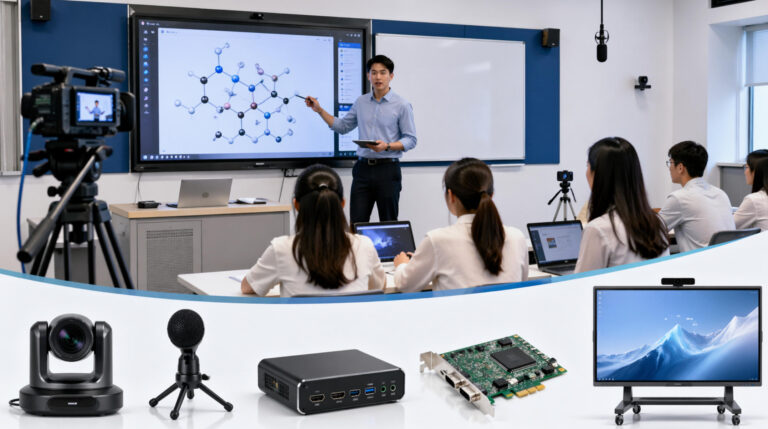
Lecture capture hardware is a critical part of any lecture capture system, yet many users are unsure how to choose the right setup. With so many devices available—cameras, microphones, capture cards, and all-in-one solutions—it can be confusing to know what actually matters. In this article, I’ll walk you through the key types of lecture capture hardware, what functions they provide, and practical tips to help you select the most suitable solution based on your needs and budget.
What Devices Are Used in Lecture Capture Systems?
Modern lecture capture systems are typically built from several types of hardware working together to record and manage content. However, with the advancement of technology, interactive displays are now capable of handling the entire workflow independently, making them a true all-in-one solution.
| Device Type | Typical Equipment | Function | Key Notes |
|---|---|---|---|
| Camera | PTZ Auto-Tracking Camera / USB Camera | Capture teacher or presenter video | Multi-camera setups are used in advanced systems for better coverage |
| Microphone | Ceiling Microphone / Wireless Mic / Array Mic | Capture clear audio during lessons or meetings | Audio quality is critical for playback and user experience |
| Capture Device | HDMI Capture Card / PCIe Capture Card | Capture screen content such as PPT, software, or HDMI input | Converts video signals into recordable data streams |
| Interactive Display (Core) | Interactive Flat Panel / Smart Board | Display, touch interaction, annotation, and recording | All-in-one solution that replaces multiple devices |
First, there are camera devices, such as PTZ auto-tracking cameras or standard USB cameras, which are used to capture the presenter or teacher. High-end setups often include multiple cameras to provide different viewing angles and a more dynamic recording experience.
Next are audio devices, including ceiling microphones, wireless microphones, or array microphones. These ensure that speech is captured clearly, which is critical for both live sessions and recorded playback.
Another essential component is the capture device, often overlooked but extremely important. Tools like capture cards are used to record screen content, such as presentations or HDMI input from external devices. Their role is to convert video signals into recordable data streams.
More advanced setups include lecture capture appliances, such as dedicated recording units from brands like Epiphan or Panopto, which combine encoding and recording into a single device.
However, the industry is clearly shifting toward interactive display–based systems, which integrate recording, presentation, annotation, and collaboration into one platform—simplifying setup, reducing costs, and improving overall efficiency.
6 Advanced Lecture Capture Hardwares – Which One To Choose?
| Hardware | Introduction | Core Features | Best For | Evaluation |
|---|---|---|---|---|
| YuJa Hardware Hub | Cost-effective lecture capture appliance that integrates with existing classroom devices | Multi-device integration, automatic recording, cloud connectivity | Schools with existing AV setup | ⭐⭐⭐⭐☆ Flexible but relies on external devices |
| Enghouse Mediasite Recorder | Enterprise-level automated lecture capture system widely used in universities | Auto recording, live streaming, centralized management | Large-scale campus deployment | ⭐⭐⭐⭐⭐ High stability, but higher cost |
| Panopto Certified Hardware | Purpose-built capture hardware integrated with Panopto ecosystem | High-quality recording, LMS integration, auto upload | LMS-based education systems | ⭐⭐⭐⭐⭐ Strong software ecosystem |
| Epiphan Pearl Mini | Professional video recording and streaming device | Multi-source input, real-time encoding, streaming + recording | Professional AV / high-end classrooms | ⭐⭐⭐⭐⭐ Powerful but complex |
| IQBoard IQVideo LCS710 | All-in-one lecture capture device designed for classrooms | AI tracking, 4K recording, multi-source capture | Smart classroom solutions | ⭐⭐⭐⭐☆ Education-focused, integrated |
| Ikinor Interactive Display | All-in-one interactive display solution with built-in recording, AI features, and cloud integration | Built-in camera, microphone array, screen recording, AI functions, cloud management | Smart classrooms, corporate training, scalable deployments | ⭐⭐⭐⭐⭐ Highly integrated, cost-effective, customizable |
Key Functions A Lecture Capture Hardware Should Have
A truly effective Lecture Capture Hardwares must include a complete set of core capabilities to support both education and business use cases. First is multi-source recording, which allows the system to capture the presenter’s video (via camera), clear audio (via microphone), screen content such as PPT or software demonstrations, and even whiteboard annotations. This ensures that every aspect of a lesson or meeting is fully recorded.
Equally important is automatic synchronization, where audio, video, and screen content are perfectly aligned in real time. This prevents delays or mismatches that could negatively impact the viewing experience. Another essential feature is one-touch recording, enabling teachers or presenters to start and stop recordings without technical complexity.
In terms of content management, the system should support automatic uploading to cloud platforms or LMS systems, making it easy to store, organize, and access recordings anytime. In addition, AI-powered features are becoming increasingly important, such as automatic scene switching, speech-to-text subtitles, and intelligent editing, all of which enhance both efficiency and content quality.
For example, Ikinor’s interactive display solution integrates recording, wireless screen sharing, multi-system collaboration, and cloud management into a single platform. Its AI-driven capabilities further support speech recognition, content analysis, and smart interaction, making it ideal for modern classrooms and training environments.
At its core, today’s lecture capture system is no longer just a recording tool—it has evolved into a comprehensive content production and knowledge management platform.
How to Choose Lecture Capture Devices?
When selecting a Lecture Capture Devices, you don’t need to get lost in complex specifications. Instead, focus on four key dimensions that truly determine performance and usability.
First is integration level (the most important factor). The current industry trend is clear: the more integrated, the better. Traditional setups rely on multiple devices—cameras, PCs, capture cards—which often lead to compatibility issues, complicated wiring, and higher maintenance costs. In contrast, all-in-one systems based on interactive displays combine recording, presentation, annotation, and management into a single device, significantly improving reliability and user experience.
Second is stability. A reliable system must support long-term operation without crashes or recording failures. This is especially critical in daily teaching or corporate training environments. Features like automatic recording also help reduce human error and ensure that no important content is missed.
Third is scalability. Consider whether the system supports deployment across multiple classrooms or meeting rooms, and whether it integrates with cloud platforms for centralized management and remote access. This is essential for large-scale implementations.
Finally, there is ease of use. The system should be intuitive enough that teachers or presenters can operate it without technical expertise. Ideally, it should follow a “plug-and-play” approach—simple, efficient, and easy for anyone to use.



 English
  Spanish
  Arabic
  French
  Indonesian
  German
  Portuguese
  Russian
  Vietnamese
  Thai
Thai  Italian